

FCM AndroidConfigV2를 사용하면 적시에 알림을 전송하고 간소화된 API를 통해 인텐트 기반 메시지를 Android 기기로 전송할 수 있습니다.
이 가이드에서는 백엔드 전송 요청을 AndroidConfig에서 AndroidConfigV2로 이전하는 방법과 Android 애플리케이션 클라이언트를 기존 onMessageReceived 처리에서 새로운 v2 클라이언트 콜백 onNotificationReceived 및 onBackgroundSyncReceived로 업데이트하는 방법을 설명합니다.
AndroidConfigV2의 새로운 기능
FCM AndroidConfigV2 API는 두 가지 메시지 유형을 도입하여 개발자 환경을 간소화합니다.
RemoteNotification: 긴급하고 시간에 민감한 사용자에게 표시되는 알림을 표시하는 모든 FCM 메시지에 권장됩니다. 이러한 메시지는 배터리 절약 조치를 우회하며 지연 없이 전송됩니다. 기기에서 FCM SDK와 Google Play 서비스는 Android의NotificationManager에 알림을 게시하는 소유권을 갖습니다.BackgroundSync: 백그라운드 동기화 및 앱 상태 업데이트를 위한 긴급하지 않은 데이터 메시지입니다. 배터리 수명을 최적화하기 위해 전송을 일괄 처리하거나 지연시킬 수 있습니다.
| 기능 | 기존 (AndroidConfig v1) |
신규 (AndroidConfigV2개) |
|---|---|---|
| 구성 필드 | message.android |
message.android_v2 |
| 우선순위 정의 | 명시적 priority: "high" 또는 priority: "normal" |
합집합 유형에 의해 암시됨 (긴급 알림의 경우 remote_notification, 긴급하지 않은 동기화의 경우 background_sync) |
| 알림 게시 | 앱이 NotificationManager.notify()를 수동으로 호출함 |
FCM SDK 및 GMS Core는 직접 또는 NotificationResponse를 사용하여 게시합니다. |
| 클라이언트 콜백 | • onMessageReceived(RemoteMessage)• onDeletedMessages() |
• onNotificationReceived(RemoteMessage)• onBackgroundSyncReceived(RemoteMessage)• onDeletedMessages() |
| 접기 가능 여부 | 다양함, 명시적 설정 필요 | 두 메시지 유형 모두 축소형 또는 비축소형 (기본적으로 축소형이 아님)일 수 있습니다. |
AndroidConfigV2 전송 요청 승인
Google 애플리케이션 기본 사용자 인증 정보 또는 Admin SDK를 사용하여 Firebase 서비스 계정에서 파생된 OAuth 2.0 액세스 토큰을 계속 사용하고 HTTP v1 messages:send 엔드포인트에 POST 요청을 보낼 수 있습니다.
Firebase 서비스 계정을 사용하지 않는 경우 전용 계정을 Firebase 클라우드 메시징 API 관리자 역할 (roles/firebase.messagingAdmin)에 할당하고 액세스 토큰을 생성할 때 https://www.googleapis.com/auth/firebase.messaging OAuth 2.0 범위를 요청해야 합니다.
POST https://fcm.googleapis.com/v1/projects/YOUR_PROJECT_ID/messages:send HTTP/1.1
Authorization: Bearer YOUR_OAUTH_ACCESS_TOKEN
Content-Type: application/json
서버 전송 요청 업데이트 (REST)
REST API를 사용하여 AndroidConfigV2 요청을 보내려면 요청 본문의 android 객체를 android_v2로 바꿉니다. android_v2 내에서 공통 매개변수 (예: ttl, collapse_key, data, restricted_package_name)를 지정하고 통합 필드 remote_notification 또는 background_sync 중 하나를 제공합니다.
RemoteNotification 메시지 전송
긴급한 사용자 대상 알림을 보내려면 remote_notification 객체와 권장되는 notification 페이로드를 포함합니다. 기본적으로 mutable_content는 false로 설정됩니다. GMS 코어는 백그라운드 앱 코드를 실행하지 않고 알림을 즉시 렌더링하고 작업 표시줄에 게시합니다.
전체 HTTP 요청 JSON 샘플 (자동 렌더링 알림)
POST https://fcm.googleapis.com/v1/projects/myproject-b5ae1/messages:send HTTP/1.1
Content-Type: application/json
Authorization: Bearer ya29.ElqKBGN2Ri_Uz...HnS_uNreA

{
  "message": {
    "token": "bk3RNwTe3H0:CI2k_HHwgIpoDKCIZvvDMExUdFQ3P1...",
    "notification": {
      "title": "FCM Message",
      "body": "This is an FCM notification message!"
    },
    "android_v2": {
      "ttl": "3600s",
      "remote_notification": {
        "mutable_content": false,
        "notification": {
          "title": "Order update",
          "body": "Your order has been shipped!",
          "icon": "ic_notification_custom",
          "sound": "default",
          "tag": "alert_tag_1",
          "id": 100
        }
      }
    }
  }
}
변경 가능한 콘텐츠가 포함된 RemoteNotification 전송
애플리케이션이 기기에서 알림을 표시하기 전에 수정해야 하는 경우 remote_notification 내에 mutable_content: true를 설정합니다. 이렇게 하면 GMS Core가 클라이언트 애플리케이션에 바인딩되고 onNotificationReceived()를 호출합니다. 이는 엔드 투 엔드 암호화된 페이로드를 복호화하거나, 사용자 아바타를 연결하거나, 문자열을 현지화하려는 경우에 유용합니다.
mutable_content가 true인 경우에도 remote_notification 내에 notification 객체를 포함해야 합니다. GMS Core는 클라이언트 콜백이 타임아웃되거나 제한 한도를 초과하는 경우 이 notification 객체를 대체 알림으로 사용합니다.
기존 v1 데이터 메시지에서 이전하고 FCM에서 페이로드를 이전 v1 클라이언트 설치에 순수 데이터 메시지로 전송하려면 remote_notification 내에 use_as_v1_data_message: true를 설정합니다.
전체 HTTP 요청 JSON 샘플
POST https://fcm.googleapis.com/v1/projects/myproject-b5ae1/messages:send HTTP/1.1
Content-Type: application/json
Authorization: Bearer ya29.ElqKBGN2Ri_Uz...HnS_uNreA

{
  "message": {
    "token": "bk3RNwTe3H0:CI2k_HHwgIpoDKCIZvvDMExUdFQ3P1...",
    "data": {
      "encrypted_content": "U2FsdGVkX19vN2m+",
      "sender_id": "user_98124"
    },
    "android_v2": {
      "ttl": "3600s",
      "remote_notification": {
        "mutable_content": true,
        "use_as_v1_data_message": true,
        "notification": {
          "title": "New message",
          "body": "You have a new message",
          "tag": "chat_alert",
          "id": 1001
        }
      }
    }
  }
}
BackgroundSync 메시지 보내기
백그라운드 데이터 동기화, 자동 상태 업데이트 또는 앱 배지나 위젯 업데이트를 위해 긴급하지 않은 메시지를 보내려면 background_sync 객체를 사용합니다.
이러한 메시지는 기기 배터리 수명을 최적화하기 위해 일괄 처리되거나 지연될 수 있으므로 사용자에게 표시되는 알림을 게시하는 데 사용하지 마세요.
전체 HTTP 요청 JSON 샘플
POST https://fcm.googleapis.com/v1/projects/myproject-b5ae1/messages:send HTTP/1.1
Content-Type: application/json
Authorization: Bearer ya29.ElqKBGN2Ri_Uz...HnS_uNreA

{
  "message": {
    "token": "bk3RNwTe3H0:CI2k_HHwgIpoDKCIZvvDMExUdFQ3P1...",
    "data": {
      "score": "FETCH_UPDATES",
      "sync_action": "FETCH_UPDATES"
    },
    "android_v2": {
      "ttl": "86400s",
      "collapse_key": "app_state_sync",
      "background_sync": {}
    }
  }
}
Android 클라이언트 콜백 업데이트
Android에서 AndroidConfigV2 메시지를 수신하려면 최신 firebase-messaging SDK를 사용하도록 앱을 업그레이드하세요. onNotificationReceived() 및 onBackgroundSyncReceived()를 구현하여 FirebaseMessagingService를 확장하는 서비스를 업데이트합니다.
EAP SDK 설치
EAP 기간에는 firebase-messaging v2 SDK가 Google의 공개 Maven 저장소가 아닌 로컬 Maven 저장소 보관 파일로 배포됩니다.
다음 옵션 중 하나를 사용하여
firebase-messaging:26.1.0-eap01가 포함된m2repository디렉터리를 Android 프로젝트의 루트 디렉터리 (<project-root>/m2repository)에 추가합니다.- 옵션 A: 사전 빌드된 보관 파일 다운로드: FirebaseMessaging_26.1.0-eap01.zip을 다운로드하고
m2repository디렉터리를 Android 프로젝트의 루트 디렉터리 (<project-root>/m2repository)에 추출합니다. 옵션 B: Gradle을 사용하여 GitHub에서 빌드:
firebase/firebase-android-sdk의feature/fcm-android-config-v2-eap브랜치를 클론하고 로컬 Maven 저장소를 빌드한 후 생성된build/m2repository디렉터리를 Android 프로젝트 루트에 복사합니다.git clone --branch feature/fcm-android-config-v2-eap --single-branch \ https://github.com/firebase/firebase-android-sdk.git cd firebase-android-sdk ./gradlew -PprojectsToPublish="firebase-messaging" firebasePublish cp -R build/m2repository /path/to/your/android-project/m2repository
- 옵션 A: 사전 빌드된 보관 파일 다운로드: FirebaseMessaging_26.1.0-eap01.zip을 다운로드하고
프로젝트 수준
settings.gradle.kts(또는settings.gradle)에서 로컬m2repository디렉터리를repositories블록 상단(google()위)에 추가합니다.Kotlin
dependencyResolutionManagement {
    repositoriesMode.set(RepositoriesMode.FAIL_ON_PROJECT_REPOS)
    repositories {
        maven { url = uri("${rootDir}/m2repository") }
        google()
        mavenCentral()
    }
}
Groovy
dependencyResolutionManagement {
    repositoriesMode.set(RepositoriesMode.FAIL_ON_PROJECT_REPOS)
    repositories {
        maven { url "${rootDir}/m2repository" }
        google()
        mavenCentral()
    }
}
모듈 수준
app/build.gradle.kts(또는app/build.gradle)에서firebase-messaging종속 항목을26.1.0-eap01로 업데이트합니다.Kotlin
dependencies {
    implementation("com.google.firebase:firebase-messaging:26.1.0-eap01")
}
Groovy
dependencies { implementation 'com.google.firebase:firebase-messaging:26.1.0-eap01' }프로젝트를 Gradle 파일과 동기화합니다.
onNotificationReceived로 RemoteNotifications 처리
AndroidConfigV2를 사용하면 mutable_content가 true로 설정되거나 onNotificationReceived()에서 명시적으로 무음 처리되지 않는 한 RemoteNotification 메시지가 표시됩니다.
mutable_content: true와 함께 RemoteNotification가 도착하면 GMS Core가 애플리케이션에 바인딩되고 onNotificationReceived()를 호출합니다. 메서드는 20초 이내에 NotificationResponse를 반환해야 합니다.
수정된 알림 반환
NotificationResponse.create에 전달하는 Notification 객체는 전송 요청에 정의된 서버의 remote_notification.notification 대체 페이로드 속성을 대체합니다. 전송 요청의 값을 유지하려면 기기 내 수정을 적용하는 동안 message.notification (Java의 경우 message.getNotification())에서 값을 읽습니다.
Kotlin
import androidx.core.app.NotificationCompat
import com.google.firebase.messaging.FirebaseMessagingService
import com.google.firebase.messaging.NotificationResponse
import com.google.firebase.messaging.RemoteMessage

class MyFirebaseMessagingService : FirebaseMessagingService() {

    override fun onNotificationReceived(message: RemoteMessage): NotificationResponse {
        val serverNotif = message.notification
        val channelId = serverNotif?.channelId ?: "default_channel"
        // Keep the server-defined title unchanged, or fall back to default
        val title = serverNotif?.title ?: "New message"
        // Modify the notification body on-device (for example, decrypting data)
        val decryptedBody = decryptPayload(message.data["encrypted_content"])

        val builder = NotificationCompat.Builder(this, channelId)
            .setSmallIcon(R.drawable.ic_stat_notification)
            .setContentTitle(title)
            .setContentText(decryptedBody)
            .setPriority(NotificationCompat.PRIORITY_HIGH)
            .setAutoCancel(true)

        // Return the response for the open-source FCM SDK to post to the Android platform
        return NotificationResponse.create("optional_tag", 100, builder.build())
    }
}
Java
import com.google.firebase.messaging.FirebaseMessagingService;
import com.google.firebase.messaging.RemoteMessage;
import com.google.firebase.messaging.NotificationResponse;
import androidx.core.app.NotificationCompat;

public class MyFirebaseMessagingService extends FirebaseMessagingService {

    @Override
    public NotificationResponse onNotificationReceived(RemoteMessage message) {
        RemoteMessage.Notification serverNotif = message.getNotification();
        String channelId = (serverNotif != null && serverNotif.getChannelId() != null)
                ? serverNotif.getChannelId()
                : "default_channel";
        // Keep the server-defined title unchanged, or fall back to default
        String title = (serverNotif != null && serverNotif.getTitle() != null)
                ? serverNotif.getTitle()
                : "New message";
        // Modify the notification body on-device (for example, decrypting data)
        String decryptedBody = decryptPayload(message.getData().get("encrypted_content"));

        NotificationCompat.Builder builder = new NotificationCompat.Builder(this, channelId)
                .setSmallIcon(R.drawable.ic_stat_notification)
                .setContentTitle(title)
                .setContentText(decryptedBody)
                .setPriority(NotificationCompat.PRIORITY_HIGH)
                .setAutoCancel(true);

        // Return the response for the open-source FCM SDK to post to the Android platform
        return NotificationResponse.create("optional_tag", 100, builder.build());
    }
}
알림 표시 안함
사용자가 현재 관련 화면 또는 채팅을 활성화한 경우 NotificationResponse.suppress()를 반환하여 알림을 표시하지 않을 수 있습니다.
Kotlin
import androidx.lifecycle.Lifecycle
import androidx.lifecycle.ProcessLifecycleOwner

override fun onNotificationReceived(message: RemoteMessage): NotificationResponse {
    val chatId = message.data["chat_id"]
    val isAppForeground = ProcessLifecycleOwner.get()
        .lifecycle
        .currentState
        .isAtLeast(Lifecycle.State.STARTED)

    if (isAppForeground && chatRepository.isConversationActive(chatId)) {
        // Suppress notification display because the user is actively viewing this chat
        return NotificationResponse.suppress()
    }

    val builder = buildNotificationForChat(message)
    return NotificationResponse.create("chat_tag", 101, builder.build())
}
Java
import androidx.lifecycle.Lifecycle;
import androidx.lifecycle.ProcessLifecycleOwner;

@Override
public NotificationResponse onNotificationReceived(RemoteMessage message) {
    String chatId = message.getData().get("chat_id");
    boolean isAppForeground = ProcessLifecycleOwner.get()
            .getLifecycle()
            .getCurrentState()
            .isAtLeast(Lifecycle.State.STARTED);

    if (isAppForeground && chatRepository.isConversationActive(chatId)) {
        // Suppress notification display because the user is actively viewing this chat
        return NotificationResponse.suppress();
    }

    NotificationCompat.Builder builder = buildNotificationForChat(message);
    return NotificationResponse.create("chat_tag", 101, builder.build());
}
알림 스트리밍 또는 이전 알림 취소 (FcmNotificationManager)
수신 푸시 하나에 여러 알림을 게시하거나 새 알림을 표시하기 전에 오래된 알림을 취소해야 하는 경우 FcmNotificationManager를 사용합니다.
Kotlin
override fun onNotificationReceived(message: RemoteMessage): NotificationResponse {
    // Retrieve the scoped manager for this message execution
    val manager = getFcmNotificationManager(message)

    // 1. Cancel an outdated notification right away
    manager.cancelNow("message_tag", 50)

    // 2. Post the item notification immediately
    val itemNotif = NotificationCompat.Builder(this, "chat_channel")
        .setSmallIcon(R.drawable.ic_message)
        .setContentTitle("Alex")
        .setContentText(message.data["text"])
    manager.postNow("item_tag", 51, itemNotif.build())

    // 3. Post a group summary notification
    val summaryNotif = NotificationCompat.Builder(this, "chat_channel")
        .setSmallIcon(R.drawable.ic_message)
        .setContentTitle("New Conversations")
        .setGroupSummary(true)
    manager.postNow("summary_tag", 52, summaryNotif.build())

    // 4. Return finished() to complete the streaming workflow
    return manager.finished()
}
Java
@Override
public NotificationResponse onNotificationReceived(RemoteMessage message) {
    // Retrieve the scoped manager for this message execution
    FcmNotificationManager manager = getFcmNotificationManager(message);

    // 1. Cancel an outdated notification right away
    manager.cancelNow("message_tag", 50);

    // 2. Post the item notification immediately
    NotificationCompat.Builder itemNotif = new NotificationCompat.Builder(this, "chat_channel")
            .setSmallIcon(R.drawable.ic_message)
            .setContentTitle("Alex")
            .setContentText(message.getData().get("text"));
    manager.postNow("item_tag", 51, itemNotif.build());

    // 3. Post a group summary notification
    NotificationCompat.Builder summaryNotif = new NotificationCompat.Builder(this, "chat_channel")
            .setSmallIcon(R.drawable.ic_message)
            .setContentTitle("New Conversations")
            .setGroupSummary(true);
    manager.postNow("summary_tag", 52, summaryNotif.build());

    // 4. Return finished() to complete the streaming workflow
    return manager.finished();
}
onBackgroundSyncReceived를 사용하여 BackgroundSync 메시지 처리
Android에서 BackgroundSync 메시지를 처리하려면 onBackgroundSyncReceived()를 사용합니다.
Kotlin
override fun onBackgroundSyncReceived(message: RemoteMessage) {
    val syncCommand = message.data["sync_action"]

    try {
        // Perform local database synchronization or cache refresh
        AppDataRepository.getInstance(applicationContext).syncWithServer(syncCommand)
    } catch (e: Exception) {
        Log.e("FCM", "Background sync operation failed", e)
    }
    // Execution completes -> GMS Core marks the message as handled and unbinds.
}
Java
@Override
public void onBackgroundSyncReceived(RemoteMessage message) {
    String syncCommand = message.getData().get("sync_action");

    try {
        // Perform local database synchronization or cache refresh
        AppDataRepository.getInstance(getApplicationContext()).syncWithServer(syncCommand);
    } catch (Exception e) {
        Log.e("FCM", "Background sync operation failed", e);
    }
    // Execution completes -> GMS Core marks the message as handled and unbinds.
}
onDeletedMessages를 사용하여 대기 중인 메시지 삭제 처리
기기가 장기간 FCM에 연결되지 않았거나 서버 큐가 가득 찬 경우와 같은 일부 상황에서는 FCM가 전송 전에 대기 중인 메시지를 삭제할 수 있습니다. 이러한 경우 onDeletedMessages()를 재정의합니다.
Kotlin
override fun onDeletedMessages() {
    // Perform a full state synchronization with your app server
    AppDataRepository.getInstance(applicationContext).scheduleFullSync()
}
Java
@Override
public void onDeletedMessages() {
    // Perform a full state synchronization with your app server
    AppDataRepository.getInstance(getApplicationContext()).scheduleFullSync();
}
특정 앱 이전
엔드 투 엔드 암호화 (E2EE) 알림 전송
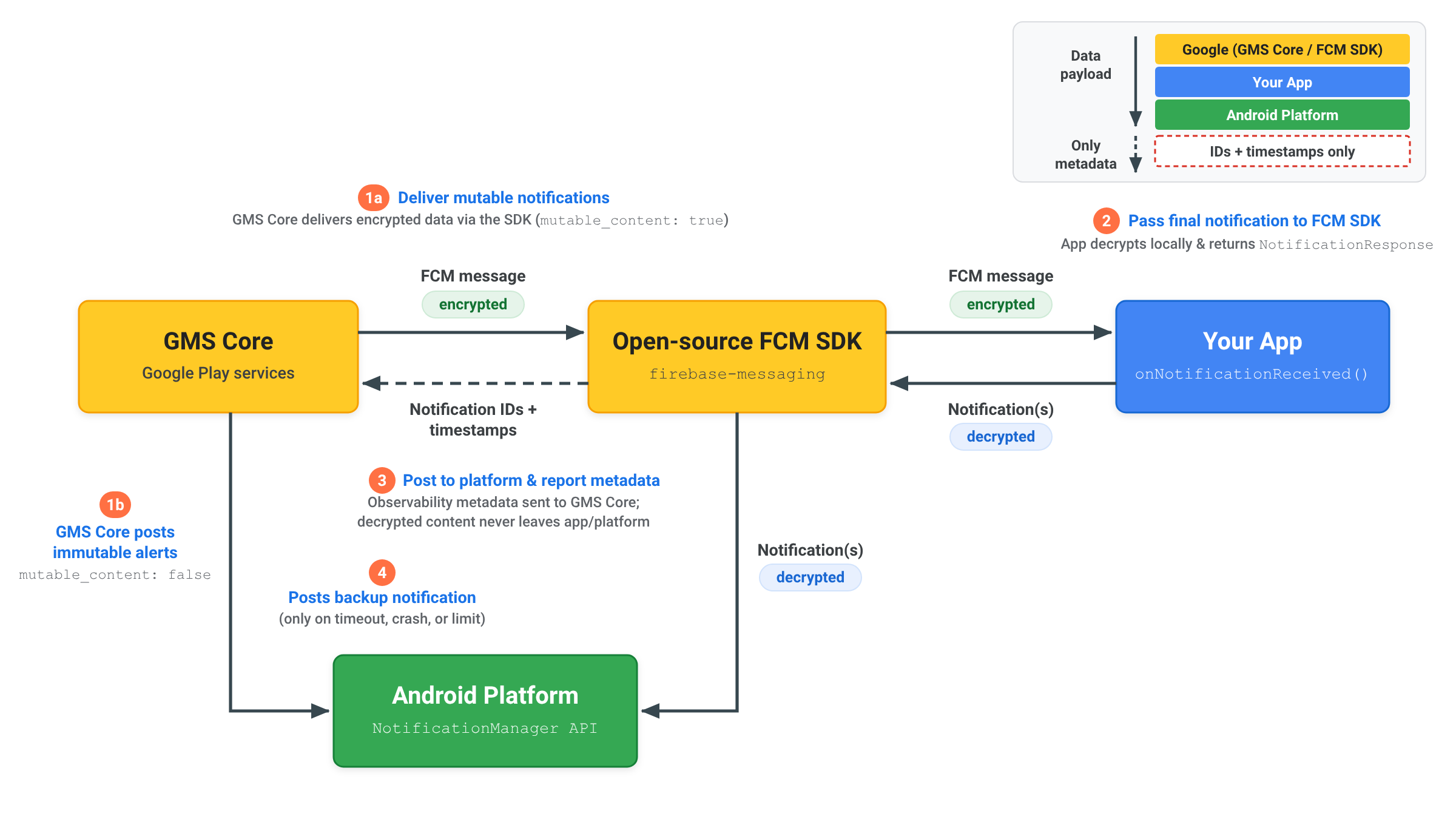
RemoteNotification를 사용하여 엔드 투 엔드 암호화 알림을 전송하면 복호화된 알림 콘텐츠가 앱과 Android 플랫폼 내에 유지됩니다.
- 변경 가능한 알림 전송: 서버가
RemoteNotification를mutable_content: true,data의 암호화된 페이로드, 일반적인 암호화되지 않은 백업notification와 함께 전송합니다. GMS 코어는 암호화된 메시지를 앱 내의 오픈소스 FCM SDK에 전달합니다. - 복호화 및 알림 반환: FCM SDK가
onNotificationReceived()를 호출합니다. 앱은 로컬에서 페이로드를 복호화하고, 최종 복호화된 AndroidNotification를 빌드하고,NotificationResponse또는FcmNotificationManager를 사용하여 오픈소스 FCM SDK에 다시 전달합니다. - 플랫폼에 게시 및 메타데이터 보고: 오픈소스 FCM SDK는 복호화된 알림을 Android 플랫폼
NotificationManagerAPI에 직접 게시하고 전송 모니터링 가능성을 위해 알림 ID 및 타임스탬프와 같은 알림 메타데이터만 GMS Core로 다시 전송합니다. 복호화된 콘텐츠는 GMS 코어로 전송되지 않습니다. - 필요한 경우 백업 알림 게시: 앱이 20초 제한 시간 내에 응답하지 않거나 백그라운드 제한을 초과하는 경우에만 GMS Core가 일반 백업
notification를 Android 플랫폼에 직접 게시합니다.
알림 표시 중지 및 시간 제한 이해하기
Android 생태계 전반에서 안정적인 전송을 유지하기 위해 GMS Core는 RemoteNotification 메시지를 처리할 때 처리 제한 시간 및 알림 표시 중지 한도를 적용합니다.
처리 시간 초과
mutable_content가 true로 설정된 경우 onNotificationReceived() 메서드는 20초 이내에 NotificationResponse를 반환해야 합니다. 실행이 이 기준점을 초과하면 콜백이 취소되고 GMS Core는 remote_notification.notification 페이로드에서 렌더링된 대체 알림을 자동으로 게시합니다.
알림 표시 중지율
RemoteNotification 메시지는 잠자기 제한을 우회하여 사용자에게 즉시 알리고 지연 없이 전송되므로 애플리케이션은 수신된 RemoteNotification 메시지에 대한 알림을 표시해야 합니다.
모든 애플리케이션은 백그라운드에서 실행되는 동안 RemoteNotification 트래픽의 최대 25% 를 억제할 수 있습니다. 애플리케이션의 억제율이 25%를 초과하면 GMS Core는 remote_notification.notification 페이로드에서 렌더링된 대체 알림을 자동으로 렌더링하고 게시합니다.
애플리케이션이 포그라운드에서 활성 상태일 때 실행되는 억제는 이 기준점에 포함되지 않습니다. 무제한 백그라운드 사용 권한이 부여된 애플리케이션도 백그라운드 억제 제한에서 제외됩니다.