

Khi sử dụng FCM AndroidConfigV2, bạn có thể gửi thông báo dựa trên ý định đến các thiết bị Android bằng cách gửi thông báo kịp thời và API đơn giản hoá.
Hướng dẫn này trình bày cách di chuyển các yêu cầu gửi của phần phụ trợ từ AndroidConfig
sang AndroidConfigV2 và cách cập nhật ứng dụng Android
từ cách xử lý onMessageReceived cũ sang lệnh gọi lại ứng dụng v2 mới
onNotificationReceived và onBackgroundSyncReceived.
Tính năng mới trong AndroidConfigV2
API FCM AndroidConfigV2 đơn giản hoá trải nghiệm của nhà phát triển bằng cách giới thiệu hai loại thông báo:
RemoteNotification: Bạn nên dùng cho tất cả thông báo FCM hiển thị thông báo khẩn cấp, có giới hạn thời gian mà người dùng có thể nhìn thấy. Những thông báo này bỏ qua mọi biện pháp tiết kiệm pin và được gửi ngay lập tức. Trên thiết bị, SDK FCM và Dịch vụ Google Play sẽ chịu trách nhiệm đăng thông báo lênNotificationManagercủa Android.BackgroundSync: Thông báo dữ liệu không khẩn cấp dùng để đồng bộ hoá trong nền và cập nhật trạng thái ứng dụng. Quá trình phân phối có thể được thực hiện theo lô hoặc bị trì hoãn để tối ưu hoá thời lượng pin.
| Tính năng | Cũ (AndroidConfig phiên bản 1) |
Mới (AndroidConfigV2) |
|---|---|---|
| Trường cấu hình | message.android |
message.android_v2 |
| Định nghĩa về mức độ ưu tiên | priority: "high" hoặc priority: "normal" tường minh |
Được ngụ ý theo loại hợp nhất (remote_notification cho cảnh báo khẩn cấp so với background_sync cho đồng bộ hoá không khẩn cấp) |
| Đăng thông báo | Ứng dụng gọi NotificationManager.notify() theo cách thủ công |
SDK FCM và GMS Core đăng trực tiếp hoặc sử dụng NotificationResponse |
| Lệnh gọi lại của ứng dụng | • onMessageReceived(RemoteMessage)• onDeletedMessages() |
• onNotificationReceived(RemoteMessage)• onBackgroundSyncReceived(RemoteMessage)• onDeletedMessages() |
| Khả năng thu gọn | Thay đổi; cần có chế độ cài đặt rõ ràng | Cả hai loại thông báo đều có thể thu gọn hoặc không thu gọn (không thu gọn theo mặc định) |
Uỷ quyền cho AndroidConfigV2 gửi yêu cầu
Bạn có thể tiếp tục sử dụng mã truy cập OAuth 2.0 bắt nguồn từ tài khoản dịch vụ Firebase của mình bằng cách sử dụng Thông tin xác thực mặc định của ứng dụng Google hoặc SDK dành cho quản trị viên, đồng thời gửi yêu cầu POST đến điểm cuối HTTP phiên bản 1 messages:send.
Nếu bạn không sử dụng tài khoản dịch vụ Firebase, hãy nhớ chỉ định tài khoản chuyên dụng của bạn cho vai trò Quản trị viên API Giải pháp gửi thông báo qua đám mây của Firebase (roles/firebase.messagingAdmin)
và yêu cầu phạm vi OAuth 2.0 https://www.googleapis.com/auth/firebase.messaging khi tạo mã truy cập:
POST https://fcm.googleapis.com/v1/projects/YOUR_PROJECT_ID/messages:send HTTP/1.1
Authorization: Bearer YOUR_OAUTH_ACCESS_TOKEN
Content-Type: application/json
Yêu cầu gửi thông tin cập nhật đến máy chủ (REST)
Để gửi yêu cầu AndroidConfigV2 bằng API REST, hãy thay thế đối tượng android trong nội dung yêu cầu bằng android_v2. Trong android_v2, hãy chỉ định các tham số phổ biến (chẳng hạn như ttl, collapse_key, data và restricted_package_name) rồi cung cấp một trong các trường hợp nhất sau: remote_notification hoặc background_sync.
Gửi thông báo RemoteNotification
Để gửi thông báo khẩn cấp dành cho người dùng, hãy thêm đối tượng remote_notification và tải trọng notification được đề xuất. Theo mặc định, mutable_content được đặt thành false. GMS Core ngay lập tức kết xuất và đăng thông báo lên khay hệ thống mà không cần thực thi mã ứng dụng nền.
Mẫu JSON hoàn chỉnh của yêu cầu HTTP (Thông báo được hiển thị tự động)
POST https://fcm.googleapis.com/v1/projects/myproject-b5ae1/messages:send HTTP/1.1
Content-Type: application/json
Authorization: Bearer ya29.ElqKBGN2Ri_Uz...HnS_uNreA

{
  "message": {
    "token": "bk3RNwTe3H0:CI2k_HHwgIpoDKCIZvvDMExUdFQ3P1...",
    "notification": {
      "title": "FCM Message",
      "body": "This is an FCM notification message!"
    },
    "android_v2": {
      "ttl": "3600s",
      "remote_notification": {
        "mutable_content": false,
        "notification": {
          "title": "Order update",
          "body": "Your order has been shipped!",
          "icon": "ic_notification_custom",
          "sound": "default",
          "tag": "alert_tag_1",
          "id": 100
        }
      }
    }
  }
}
Gửi RemoteNotification có nội dung có thể thay đổi
Nếu ứng dụng của bạn cần sửa đổi thông báo trên thiết bị trước khi thông báo đó xuất hiện, hãy đặt mutable_content: true bên trong remote_notification. Thao tác này hướng dẫn GMS Core liên kết với ứng dụng khách của bạn và gọi onNotificationReceived(). Điều này rất hữu ích khi bạn muốn giải mã tải trọng được mã hoá hai đầu, đính kèm hình đại diện của người dùng hoặc bản địa hoá chuỗi.
Hãy nhớ thêm đối tượng notification vào bên trong remote_notification ngay cả khi mutable_content là true. GMS Core sử dụng đối tượng notification này làm thông báo dự phòng nếu lệnh gọi lại của ứng dụng khách hết thời gian chờ hoặc vượt quá giới hạn chặn.
Nếu bạn đang di chuyển từ thông báo dữ liệu phiên bản 1 cũ và muốn FCM phân phối tải trọng đến các bản cài đặt ứng dụng khách phiên bản 1 cũ hơn dưới dạng thông báo dữ liệu thuần tuý, hãy đặt use_as_v1_data_message: true bên trong remote_notification.
Mẫu JSON hoàn chỉnh của yêu cầu HTTP
POST https://fcm.googleapis.com/v1/projects/myproject-b5ae1/messages:send HTTP/1.1
Content-Type: application/json
Authorization: Bearer ya29.ElqKBGN2Ri_Uz...HnS_uNreA

{
  "message": {
    "token": "bk3RNwTe3H0:CI2k_HHwgIpoDKCIZvvDMExUdFQ3P1...",
    "data": {
      "encrypted_content": "U2FsdGVkX19vN2m+",
      "sender_id": "user_98124"
    },
    "android_v2": {
      "ttl": "3600s",
      "remote_notification": {
        "mutable_content": true,
        "use_as_v1_data_message": true,
        "notification": {
          "title": "New message",
          "body": "You have a new message",
          "tag": "chat_alert",
          "id": 1001
        }
      }
    }
  }
}
Gửi thông báo BackgroundSync
Để gửi thông báo không khẩn cấp cho việc đồng bộ hoá dữ liệu trong nền, cập nhật trạng thái im lặng hoặc cập nhật huy hiệu hay tiện ích của ứng dụng, hãy sử dụng đối tượng background_sync.
Đừng sử dụng các thông báo này để đăng
thông báo mà người dùng có thể nhìn thấy, vì các thông báo này có thể được gộp theo lô hoặc bị trì hoãn để tối ưu hoá
thời lượng pin của thiết bị.
Mẫu JSON hoàn chỉnh của yêu cầu HTTP
POST https://fcm.googleapis.com/v1/projects/myproject-b5ae1/messages:send HTTP/1.1
Content-Type: application/json
Authorization: Bearer ya29.ElqKBGN2Ri_Uz...HnS_uNreA

{
  "message": {
    "token": "bk3RNwTe3H0:CI2k_HHwgIpoDKCIZvvDMExUdFQ3P1...",
    "data": {
      "score": "FETCH_UPDATES",
      "sync_action": "FETCH_UPDATES"
    },
    "android_v2": {
      "ttl": "86400s",
      "collapse_key": "app_state_sync",
      "background_sync": {}
    }
  }
}
Cập nhật lệnh gọi lại ứng dụng Android
Để nhận thông báo AndroidConfigV2 trên Android, hãy nâng cấp ứng dụng của bạn để sử dụng SDK firebase-messaging mới nhất. Cập nhật dịch vụ mở rộng FirebaseMessagingService bằng cách triển khai onNotificationReceived() và onBackgroundSyncReceived().
Cài đặt SDK EAP
Trong Chương trình tiếp cận sớm (EAP), SDK firebase-messaging phiên bản 2 được phân phối dưới dạng một bản lưu trữ kho lưu trữ Maven cục bộ thay vì thông qua kho lưu trữ Maven công khai của Google.
Thêm thư mục
m2repositorychứafirebase-messaging:26.1.0-eap01vào thư mục gốc của dự án Android (<project-root>/m2repository) bằng một trong các lựa chọn sau:- Cách A: Tải bản lưu trữ tạo sẵn xuống: Tải FirebaseMessaging_26.1.0-eap01.zip xuống rồi giải nén thư mục
m2repositoryvào thư mục gốc của dự án Android (<project-root>/m2repository). Lựa chọn B: Tạo từ GitHub bằng Gradle: Sao chép nhánh
feature/fcm-android-config-v2-eapcủafirebase/firebase-android-sdk, tạo kho lưu trữ Maven cục bộ và sao chép thư mụcbuild/m2repositoryđã tạo vào thư mục gốc của dự án Android:git clone --branch feature/fcm-android-config-v2-eap --single-branch \ https://github.com/firebase/firebase-android-sdk.git cd firebase-android-sdk ./gradlew -PprojectsToPublish="firebase-messaging" firebasePublish cp -R build/m2repository /path/to/your/android-project/m2repository
- Cách A: Tải bản lưu trữ tạo sẵn xuống: Tải FirebaseMessaging_26.1.0-eap01.zip xuống rồi giải nén thư mục
Trong tệp
settings.gradle.kts(hoặcsettings.gradle) cấp dự án, hãy thêm thư mụcm2repositorycục bộ vào đầu khốirepositories, phía trêngoogle():Kotlin
dependencyResolutionManagement {
    repositoriesMode.set(RepositoriesMode.FAIL_ON_PROJECT_REPOS)
    repositories {
        maven { url = uri("${rootDir}/m2repository") }
        google()
        mavenCentral()
    }
}
Groovy
dependencyResolutionManagement {
    repositoriesMode.set(RepositoriesMode.FAIL_ON_PROJECT_REPOS)
    repositories {
        maven { url "${rootDir}/m2repository" }
        google()
        mavenCentral()
    }
}
Trong tệp
app/build.gradle.kts(hoặcapp/build.gradle) ở cấp mô-đun, hãy cập nhật phần phụ thuộcfirebase-messagingthành26.1.0-eap01:Kotlin
dependencies {
    implementation("com.google.firebase:firebase-messaging:26.1.0-eap01")
}
Groovy
dependencies { implementation 'com.google.firebase:firebase-messaging:26.1.0-eap01' }Đồng bộ hoá dự án với các tệp Gradle.
Xử lý RemoteNotifications bằng onNotificationReceived
Với AndroidConfigV2, thông báo RemoteNotification sẽ hiển thị trừ phi mutable_content được đặt thành true hoặc bị tắt tiếng rõ ràng trong onNotificationReceived().
Khi RemoteNotification đến cùng với mutable_content: true, GMS Core sẽ liên kết với ứng dụng của bạn và gọi onNotificationReceived(). Phương thức của bạn phải trả về một NotificationResponse trong vòng 20 giây.
Trả về thông báo đã sửa đổi
Đối tượng Notification mà bạn truyền đến NotificationResponse.create sẽ thay thế các thuộc tính tải trọng dự phòng remote_notification.notification của máy chủ được xác định trong yêu cầu gửi. Để giữ các giá trị từ yêu cầu gửi, hãy đọc các giá trị đó từ message.notification (message.getNotification() trong Java) trong khi áp dụng các nội dung sửa đổi trên thiết bị:
Kotlin
import androidx.core.app.NotificationCompat
import com.google.firebase.messaging.FirebaseMessagingService
import com.google.firebase.messaging.NotificationResponse
import com.google.firebase.messaging.RemoteMessage

class MyFirebaseMessagingService : FirebaseMessagingService() {

    override fun onNotificationReceived(message: RemoteMessage): NotificationResponse {
        val serverNotif = message.notification
        val channelId = serverNotif?.channelId ?: "default_channel"
        // Keep the server-defined title unchanged, or fall back to default
        val title = serverNotif?.title ?: "New message"
        // Modify the notification body on-device (for example, decrypting data)
        val decryptedBody = decryptPayload(message.data["encrypted_content"])

        val builder = NotificationCompat.Builder(this, channelId)
            .setSmallIcon(R.drawable.ic_stat_notification)
            .setContentTitle(title)
            .setContentText(decryptedBody)
            .setPriority(NotificationCompat.PRIORITY_HIGH)
            .setAutoCancel(true)

        // Return the response for the open-source FCM SDK to post to the Android platform
        return NotificationResponse.create("optional_tag", 100, builder.build())
    }
}
Java
import com.google.firebase.messaging.FirebaseMessagingService;
import com.google.firebase.messaging.RemoteMessage;
import com.google.firebase.messaging.NotificationResponse;
import androidx.core.app.NotificationCompat;

public class MyFirebaseMessagingService extends FirebaseMessagingService {

    @Override
    public NotificationResponse onNotificationReceived(RemoteMessage message) {
        RemoteMessage.Notification serverNotif = message.getNotification();
        String channelId = (serverNotif != null && serverNotif.getChannelId() != null)
                ? serverNotif.getChannelId()
                : "default_channel";
        // Keep the server-defined title unchanged, or fall back to default
        String title = (serverNotif != null && serverNotif.getTitle() != null)
                ? serverNotif.getTitle()
                : "New message";
        // Modify the notification body on-device (for example, decrypting data)
        String decryptedBody = decryptPayload(message.getData().get("encrypted_content"));

        NotificationCompat.Builder builder = new NotificationCompat.Builder(this, channelId)
                .setSmallIcon(R.drawable.ic_stat_notification)
                .setContentTitle(title)
                .setContentText(decryptedBody)
                .setPriority(NotificationCompat.PRIORITY_HIGH)
                .setAutoCancel(true);

        // Return the response for the open-source FCM SDK to post to the Android platform
        return NotificationResponse.create("optional_tag", 100, builder.build());
    }
}
Ẩn thông báo
Nếu người dùng hiện đang mở màn hình hoặc cuộc trò chuyện có liên quan, bạn có thể chặn thông báo bằng cách trả về NotificationResponse.suppress():
Kotlin
import androidx.lifecycle.Lifecycle
import androidx.lifecycle.ProcessLifecycleOwner

override fun onNotificationReceived(message: RemoteMessage): NotificationResponse {
    val chatId = message.data["chat_id"]
    val isAppForeground = ProcessLifecycleOwner.get()
        .lifecycle
        .currentState
        .isAtLeast(Lifecycle.State.STARTED)

    if (isAppForeground && chatRepository.isConversationActive(chatId)) {
        // Suppress notification display because the user is actively viewing this chat
        return NotificationResponse.suppress()
    }

    val builder = buildNotificationForChat(message)
    return NotificationResponse.create("chat_tag", 101, builder.build())
}
Java
import androidx.lifecycle.Lifecycle;
import androidx.lifecycle.ProcessLifecycleOwner;

@Override
public NotificationResponse onNotificationReceived(RemoteMessage message) {
    String chatId = message.getData().get("chat_id");
    boolean isAppForeground = ProcessLifecycleOwner.get()
            .getLifecycle()
            .getCurrentState()
            .isAtLeast(Lifecycle.State.STARTED);

    if (isAppForeground && chatRepository.isConversationActive(chatId)) {
        // Suppress notification display because the user is actively viewing this chat
        return NotificationResponse.suppress();
    }

    NotificationCompat.Builder builder = buildNotificationForChat(message);
    return NotificationResponse.create("chat_tag", 101, builder.build());
}
Thông báo về sự kiện phát trực tiếp hoặc huỷ cảnh báo cũ (FcmNotificationManager)
Nếu bạn cần đăng nhiều thông báo cho một thông báo đẩy đến hoặc huỷ
thông báo cũ trước khi hiển thị thông báo mới, hãy sử dụng FcmNotificationManager:
Kotlin
override fun onNotificationReceived(message: RemoteMessage): NotificationResponse {
    // Retrieve the scoped manager for this message execution
    val manager = getFcmNotificationManager(message)

    // 1. Cancel an outdated notification right away
    manager.cancelNow("message_tag", 50)

    // 2. Post the item notification immediately
    val itemNotif = NotificationCompat.Builder(this, "chat_channel")
        .setSmallIcon(R.drawable.ic_message)
        .setContentTitle("Alex")
        .setContentText(message.data["text"])
    manager.postNow("item_tag", 51, itemNotif.build())

    // 3. Post a group summary notification
    val summaryNotif = NotificationCompat.Builder(this, "chat_channel")
        .setSmallIcon(R.drawable.ic_message)
        .setContentTitle("New Conversations")
        .setGroupSummary(true)
    manager.postNow("summary_tag", 52, summaryNotif.build())

    // 4. Return finished() to complete the streaming workflow
    return manager.finished()
}
Java
@Override
public NotificationResponse onNotificationReceived(RemoteMessage message) {
    // Retrieve the scoped manager for this message execution
    FcmNotificationManager manager = getFcmNotificationManager(message);

    // 1. Cancel an outdated notification right away
    manager.cancelNow("message_tag", 50);

    // 2. Post the item notification immediately
    NotificationCompat.Builder itemNotif = new NotificationCompat.Builder(this, "chat_channel")
            .setSmallIcon(R.drawable.ic_message)
            .setContentTitle("Alex")
            .setContentText(message.getData().get("text"));
    manager.postNow("item_tag", 51, itemNotif.build());

    // 3. Post a group summary notification
    NotificationCompat.Builder summaryNotif = new NotificationCompat.Builder(this, "chat_channel")
            .setSmallIcon(R.drawable.ic_message)
            .setContentTitle("New Conversations")
            .setGroupSummary(true);
    manager.postNow("summary_tag", 52, summaryNotif.build());

    // 4. Return finished() to complete the streaming workflow
    return manager.finished();
}
Xử lý thông báo BackgroundSync bằng onBackgroundSyncReceived
Để xử lý tin nhắn BackgroundSync trên Android, hãy sử dụng
onBackgroundSyncReceived():
Kotlin
override fun onBackgroundSyncReceived(message: RemoteMessage) {
    val syncCommand = message.data["sync_action"]

    try {
        // Perform local database synchronization or cache refresh
        AppDataRepository.getInstance(applicationContext).syncWithServer(syncCommand)
    } catch (e: Exception) {
        Log.e("FCM", "Background sync operation failed", e)
    }
    // Execution completes -> GMS Core marks the message as handled and unbinds.
}
Java
@Override
public void onBackgroundSyncReceived(RemoteMessage message) {
    String syncCommand = message.getData().get("sync_action");

    try {
        // Perform local database synchronization or cache refresh
        AppDataRepository.getInstance(getApplicationContext()).syncWithServer(syncCommand);
    } catch (Exception e) {
        Log.e("FCM", "Background sync operation failed", e);
    }
    // Execution completes -> GMS Core marks the message as handled and unbinds.
}
Xử lý các yêu cầu xoá tin nhắn đang chờ xử lý bằng onDeletedMessages
Trong một số trường hợp, chẳng hạn như khi thiết bị không kết nối với FCM trong một khoảng thời gian dài hoặc khi hàng đợi của máy chủ đã đầy, FCM có thể xoá các tin nhắn đang chờ xử lý trước khi gửi. Trong những trường hợp này, hãy ghi đè
onDeletedMessages():
Kotlin
override fun onDeletedMessages() {
    // Perform a full state synchronization with your app server
    AppDataRepository.getInstance(applicationContext).scheduleFullSync()
}
Java
@Override
public void onDeletedMessages() {
    // Perform a full state synchronization with your app server
    AppDataRepository.getInstance(getApplicationContext()).scheduleFullSync();
}
Di chuyển các ứng dụng cụ thể
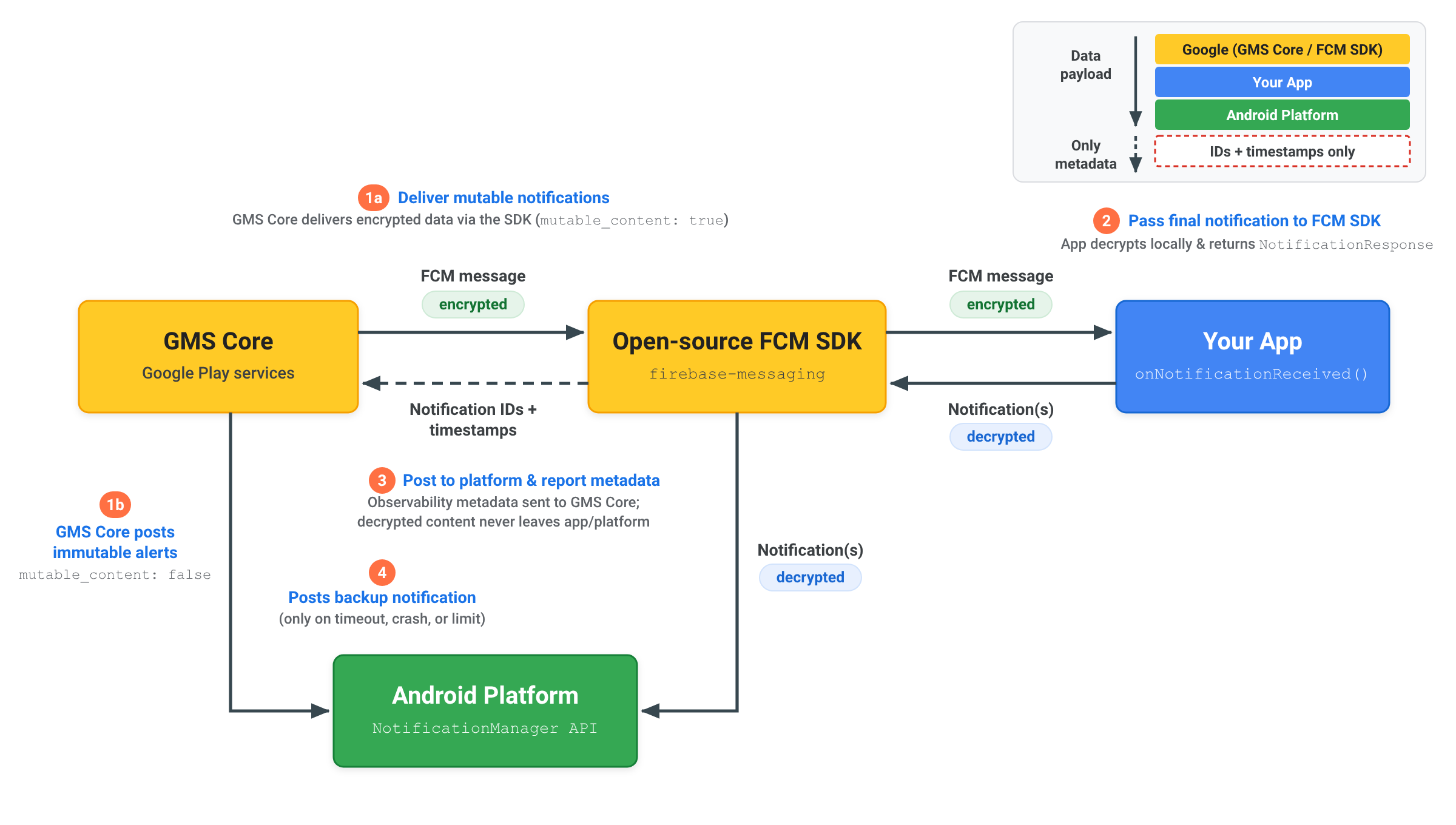
Gửi thông báo được mã hoá hai đầu (E2EE)
Khi gửi thông báo được mã hoá hai đầu bằng
RemoteNotification, nội dung thông báo đã giải mã
sẽ nằm trong ứng dụng của bạn và nền tảng Android:
- Gửi thông báo có thể thay đổi:
Máy chủ của bạn gửi một
RemoteNotificationcómutable_content: true, tải trọng được mã hoá trongdatavà một bản sao lưu chung không được mã hoánotification. GMS Core sẽ gửi thông báo đã mã hoá đến SDK FCM nguồn mở bên trong ứng dụng của bạn. - Giải mã và trả về thông báo: SDK FCM gọi
onNotificationReceived(). Ứng dụng của bạn giải mã tải trọng trên thiết bị, tạoNotificationAndroid đã giải mã cuối cùng và chuyển lại cho SDK FCM nguồn mở bằngNotificationResponsehoặcFcmNotificationManager. - Đăng lên nền tảng và báo cáo siêu dữ liệu: SDK nguồn mở FCM đăng thông báo đã giải mã trực tiếp lên API
NotificationManagercủa nền tảng Android và chỉ gửi siêu dữ liệu thông báo (chẳng hạn như mã thông báo và dấu thời gian) trở lại GMS Core để ghi nhận việc phân phối. Nội dung đã giải mã sẽ không bao giờ được gửi đến GMS Core. - Đăng thông báo dự phòng nếu cần: Chỉ khi ứng dụng của bạn không phản hồi trong thời gian chờ 20 giây hoặc vượt quá giới hạn chặn trong nền, thì GMS Core mới đăng trực tiếp
notificationdự phòng chung lên nền tảng Android.
Tìm hiểu về việc chặn thông báo và thời gian chờ
Để duy trì khả năng phân phối đáng tin cậy trên hệ sinh thái Android, GMS Core áp dụng thời gian chờ xử lý và giới hạn chặn thông báo khi xử lý thông báo RemoteNotification:
Hết thời gian xử lý
Khi mutable_content được đặt thành true, phương thức onNotificationReceived() của bạn phải trả về NotificationResponse trong vòng 20 giây. Nếu
quá trình thực thi vượt quá ngưỡng này, lệnh gọi lại sẽ bị huỷ và GMS Core
sẽ tự động đăng thông báo dự phòng được hiển thị từ
tải trọng remote_notification.notification.
Tỷ lệ chặn thông báo
Vì thông báo RemoteNotification bỏ qua các quy định hạn chế của chế độ Nghỉ để thông báo cho người dùng ngay lập tức và được gửi mà không bị trễ, nên các ứng dụng sẽ hiển thị thông báo cho các thông báo RemoteNotification đã nhận.
Mỗi ứng dụng được phép chặn tối đa 25% lưu lượng truy cập RemoteNotification khi chạy ở chế độ nền. Nếu tỷ lệ chặn của một ứng dụng vượt quá 25%, thì GMS Core sẽ tự động hiển thị và đăng một thông báo dự phòng được hiển thị từ tải trọng remote_notification.notification.
Các hoạt động chặn được thực hiện khi ứng dụng đang hoạt động ở nền trước sẽ không được tính vào ngưỡng này. Các ứng dụng được cấp quyền sử dụng không hạn chế ở chế độ nền cũng được miễn các giới hạn về việc chặn hoạt động trong nền.