
배경
파이프라인 작업은 Cloud Firestore의 새로운 쿼리 인터페이스입니다.
이 인터페이스는 복잡한 표현식을 비롯한 고급 쿼리 기능을 제공합니다. 또한 min, max, substring, regex_match, array_contains_all과 같은 많은 새로운 함수를 지원합니다.
파이프라인 작업을 사용하면 색인 생성도 전적으로 선택사항이므로 새 쿼리 개발 프로세스가 간소화됩니다. 파이프라인 작업은 쿼리 형태에 대한 많은 제한사항도 제거하므로 큰 in 또는 or 쿼리를 지정할 수 있습니다.
시작하기
클라이언트 SDK를 설치하고 초기화하려면 다음 가이드의 안내를 참고하세요.
구문
다음 섹션에서는 파이프라인 작업의 구문을 간략하게 설명합니다.
개념
파이프라인 작업과의 한 가지 중요한 차이점은 명시적인 '단계' 순서가 도입되었다는 것입니다. 이를 통해 더 복잡한 쿼리를 표현할 수 있습니다. 하지만 단계의 순서가 암시되었던 핵심 작업을 사용하는 기존 쿼리 인터페이스와는 크게 다릅니다. 다음 파이프라인 작업 예를 살펴보세요.
Web
const pipeline = db.pipeline() // Step 1: Start a query with collection scope .collection("cities") // Step 2: Filter the collection .where(field("population").greaterThan(100000)) // Step 3: Sort the remaining documents .sort(field("name").ascending()) // Step 4: Return the top 10. Note applying the limit earlier in the // pipeline would have unintentional results. .limit(10);
Swift
let pipeline = db.pipeline() // Step 1: Start a query with collection scope .collection("cities") // Step 2: Filter the collection .where(Field("population").greaterThan(100000)) // Step 3: Sort the remaining documents .sort([Field("name").ascending()]) // Step 4: Return the top 10. Note applying the limit earlier in the pipeline would have // unintentional results. .limit(10)
Kotlin
val pipeline = db.pipeline() // Step 1: Start a query with collection scope .collection("cities") // Step 2: Filter the collection .where(field("population").greaterThan(100000)) // Step 3: Sort the remaining documents .sort(field("name").ascending()) // Step 4: Return the top 10. Note applying the limit earlier in the pipeline would have // unintentional results. .limit(10)
Java
Pipeline pipeline = db.pipeline() // Step 1: Start a query with collection scope .collection("cities") // Step 2: Filter the collection .where(field("population").greaterThan(100000)) // Step 3: Sort the remaining documents .sort(field("name").ascending()) // Step 4: Return the top 10. Note applying the limit earlier in the pipeline would have // unintentional results. .limit(10);
Python
from google.cloud.firestore_v1.pipeline_expressions import Field pipeline = ( client.pipeline() .collection("cities") .where(Field.of("population").greater_than(100_000)) .sort(Field.of("name").ascending()) .limit(10) )
초기화
파이프라인 작업은 기존 Cloud Firestore 쿼리에서 가져온 매우 친숙한 구문을 사용합니다. 시작하려면 다음을 작성하여 쿼리를 초기화합니다.
Web
const { getFirestore } = require("firebase/firestore"); const { execute } = require("firebase/firestore/pipelines"); const database = getFirestore(app, "enterprise"); const pipeline = database.pipeline();
Swift
let firestore = Firestore.firestore(database: "enterprise") let pipeline = firestore.pipeline()
Kotlin
val firestore = Firebase.firestore("enterprise") val pipeline = firestore.pipeline()
Java
FirebaseFirestore firestore = FirebaseFirestore.getInstance("enterprise"); PipelineSource pipeline = firestore.pipeline();
Python
firestore_client = firestore.client(default_app, "your-new-enterprise-database") pipeline = firestore_client.pipeline()
구조
파이프라인 작업을 만들 때 이해해야 하는 몇 가지 용어가 있습니다. 단계, 표현식, 함수입니다.
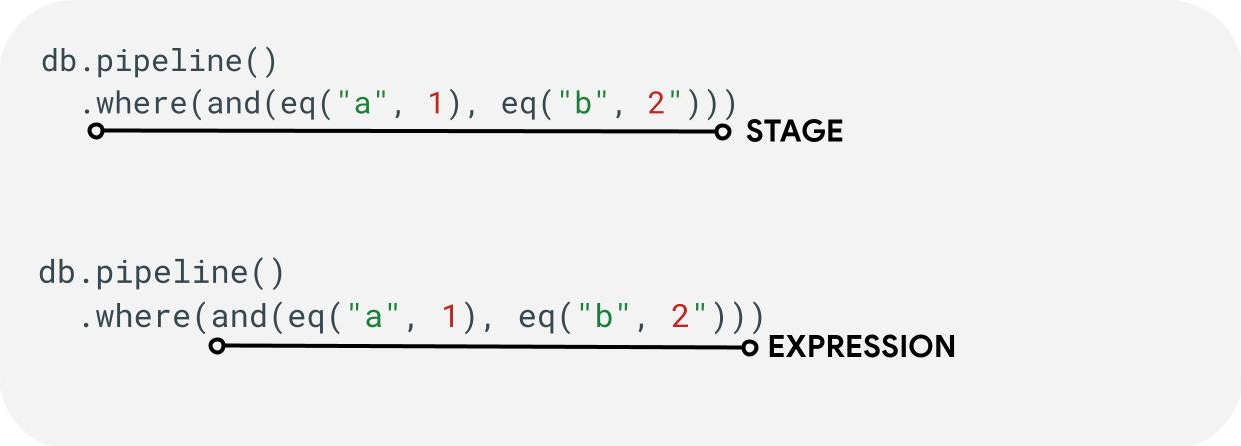
단계: 파이프라인은 하나 이상의 단계로 구성될 수 있습니다. 논리적으로 이는 쿼리를 실행하는 데 필요한 일련의 단계를 나타냅니다. 참고: 실제로 성능을 개선하기 위해 단계가 순서대로 실행되지 않을 수 있습니다. 하지만 이렇게 해도 쿼리의 의도나 정확성은 수정되지 않습니다.
표현식: 단계에서는 더 복잡한 쿼리를 표현할 수 있는 표현식을 허용하는 경우가 많습니다. 표현식은 간단할 수 있으며 eq("a", 1)와 같은 단일 함수로 구성될 수 있습니다. and(eq("a", 1), eq("b", 2)).와 같은 표현식을 중첩하여 더 복잡한 표현식을 표현할 수도 있습니다.
필드 참조와 상수 참조 비교
파이프라인 작업은 복잡한 표현식을 지원합니다. 따라서 값이 필드를 나타내는지 상수를 나타내는지 구분해야 할 수 있습니다. 다음 예를 참고하세요.
Web
const pipeline = db.pipeline() .collection("cities") .where(field("name").equal(constant("Toronto")));
Swift
let pipeline = db.pipeline() .collection("cities") .where(Field("name").equal(Constant("Toronto")))
Kotlin
val pipeline = db.pipeline() .collection("cities") .where(field("name").equal(constant("Toronto")))
Java
Pipeline pipeline = db.pipeline() .collection("cities") .where(field("name").equal(constant("Toronto")));
Python
from google.cloud.firestore_v1.pipeline_expressions import Field, Constant pipeline = ( client.pipeline() .collection("cities") .where(Field.of("name").equal(Constant.of("Toronto"))) )
단계
입력 단계
입력 단계는 쿼리의 첫 번째 단계를 나타냅니다. 쿼리할 문서의 초기 집합을 정의합니다. 파이프라인 작업의 경우 대부분의 쿼리가 collection(...) 또는 collection_group(...) 단계로 시작하는 기존 쿼리와 유사합니다. 두 개의 새로운 입력 단계는 database()와 documents(...)입니다. 여기서 database()는 데이터베이스의 모든 문서를 반환할 수 있고 documents(...)는 일괄 읽기와 동일하게 작동합니다.
Web
let results; // Return all restaurants in San Francisco results = await execute(db.pipeline().collection("cities/sf/restaurants")); // Return all restaurants results = await execute(db.pipeline().collectionGroup("restaurants")); // Return all documents across all collections in the database (the entire database) results = await execute(db.pipeline().database()); // Batch read of 3 documents results = await execute(db.pipeline().documents([ doc(db, "cities", "SF"), doc(db, "cities", "DC"), doc(db, "cities", "NY") ]));
Swift
var results: Pipeline.Snapshot // Return all restaurants in San Francisco results = try await db.pipeline().collection("cities/sf/restaurants").execute() // Return all restaurants results = try await db.pipeline().collectionGroup("restaurants").execute() // Return all documents across all collections in the database (the entire database) results = try await db.pipeline().database().execute() // Batch read of 3 documents results = try await db.pipeline().documents([ db.collection("cities").document("SF"), db.collection("cities").document("DC"), db.collection("cities").document("NY") ]).execute()
Kotlin
var results: Task<Pipeline.Snapshot> // Return all restaurants in San Francisco results = db.pipeline().collection("cities/sf/restaurants").execute() // Return all restaurants results = db.pipeline().collectionGroup("restaurants").execute() // Return all documents across all collections in the database (the entire database) results = db.pipeline().database().execute() // Batch read of 3 documents results = db.pipeline().documents( db.collection("cities").document("SF"), db.collection("cities").document("DC"), db.collection("cities").document("NY") ).execute()
Java
Task<Pipeline.Snapshot> results; // Return all restaurants in San Francisco results = db.pipeline().collection("cities/sf/restaurants").execute(); // Return all restaurants results = db.pipeline().collectionGroup("restaurants").execute(); // Return all documents across all collections in the database (the entire database) results = db.pipeline().database().execute(); // Batch read of 3 documents results = db.pipeline().documents( db.collection("cities").document("SF"), db.collection("cities").document("DC"), db.collection("cities").document("NY") ).execute();
Python
# Return all restaurants in San Francisco results = client.pipeline().collection("cities/sf/restaurants").execute() # Return all restaurants results = client.pipeline().collection_group("restaurants").execute() # Return all documents across all collections in the database (the entire database) results = client.pipeline().database().execute() # Batch read of 3 documents results = ( client.pipeline() .documents( client.collection("cities").document("SF"), client.collection("cities").document("DC"), client.collection("cities").document("NY"), ) .execute() )
다른 모든 단계와 마찬가지로 이러한 입력 단계의 결과 순서는 안정적이지 않습니다. 특정 순서가 필요한 경우 항상 sort(...) 연산자를 추가해야 합니다.
Where
where(...) 단계는 이전 단계에서 생성된 문서에 대한 기존 필터 작업으로 작동하며 기존 쿼리의 기존 'where' 구문을 대부분 반영합니다. 지정된 표현식이 true가 아닌 값으로 평가되는 문서는 반환된 문서에서 필터링됩니다.
여러 where(...) 문을 함께 연결하여 and(...) 표현식으로 사용할 수 있습니다. 예를 들어 다음 두 쿼리는 논리적으로 동일하며 서로 바꿔서 사용할 수 있습니다.
Web
let results; results = await execute(db.pipeline().collection("books") .where(field("rating").equal(5)) .where(field("published").lessThan(1900)) ); results = await execute(db.pipeline().collection("books") .where(and(field("rating").equal(5), field("published").lessThan(1900))) );
Swift
var results: Pipeline.Snapshot results = try await db.pipeline().collection("books") .where(Field("rating").equal(5)) .where(Field("published").lessThan(1900)) .execute() results = try await db.pipeline().collection("books") .where(Field("rating").equal(5) && Field("published").lessThan(1900)) .execute()
Kotlin
var results: Task<Pipeline.Snapshot> results = db.pipeline().collection("books") .where(field("rating").equal(5)) .where(field("published").lessThan(1900)) .execute() results = db.pipeline().collection("books") .where(Expression.and(field("rating").equal(5), field("published").lessThan(1900))) .execute()
Java
Task<Pipeline.Snapshot> results; results = db.pipeline().collection("books") .where(field("rating").equal(5)) .where(field("published").lessThan(1900)) .execute(); results = db.pipeline().collection("books") .where(Expression.and( field("rating").equal(5), field("published").lessThan(1900) )) .execute();
Python
from google.cloud.firestore_v1.pipeline_expressions import And, Field results = ( client.pipeline() .collection("books") .where(Field.of("rating").equal(5)) .where(Field.of("published").less_than(1900)) .execute() ) results = ( client.pipeline() .collection("books") .where(And(Field.of("rating").equal(5), Field.of("published").less_than(1900))) .execute() )
필드 선택/추가 및 삭제
select(...), add_fields(...), remove_fields(...)를 사용하면 이전 단계에서 반환된 필드를 수정할 수 있습니다. 이 세 가지를 일반적으로 프로젝션 스타일 단계라고 합니다.
select(...) 및 add_fields(...)를 사용하면 사용자 제공 필드 이름에 표현식의 결과를 지정할 수 있습니다. 오류가 발생하는 표현식은 null 값을 생성합니다. select(...)는 지정된 필드 이름이 있는 문서만 반환하는 반면 add_fields(...)는 이전 단계의 스키마를 확장합니다(필드 이름이 동일한 값을 덮어쓸 수 있음).
remove_fields(...)를 사용하면 이전 단계에서 삭제할 필드 집합을 지정할 수 있습니다. 존재하지 않는 필드 이름을 지정하면 노옵스(no-ops)입니다.
아래의 반환할 필드 제한 섹션을 참고하세요. 일반적으로 이러한 단계를 사용하여 결과를 클라이언트에 필요한 필드로만 제한하면 대부분의 쿼리에서 비용과 지연 시간을 줄이는 데 도움이 됩니다.
집계/고유
aggregate(...) 단계를 사용하면 입력 문서에 대해 일련의 집계를 수행할 수 있습니다. 기본적으로 모든 문서는 함께 집계되지만 선택적 grouping 인수를 제공하여 입력 문서를 서로 다른 버킷으로 집계할 수 있습니다.
Web
const results = await execute(db.pipeline() .collection("books") .aggregate( field("rating").average().as("avg_rating") ) .distinct(field("genre")) );
Swift
let results = try await db.pipeline() .collection("books") .aggregate([ Field("rating").average().as("avg_rating") ], groups: [ Field("genre") ]) .execute()
Kotlin
val results = db.pipeline() .collection("books") .aggregate( AggregateStage .withAccumulators(AggregateFunction.average("rating").alias("avg_rating")) .withGroups(field("genre")) ) .execute()
Java
Task<Pipeline.Snapshot> results = db.pipeline() .collection("books") .aggregate(AggregateStage .withAccumulators( AggregateFunction.average("rating").alias("avg_rating")) .withGroups(field("genre"))) .execute();
Python
from google.cloud.firestore_v1.pipeline_expressions import Field results = ( client.pipeline() .collection("books") .aggregate( Field.of("rating").average().as_("avg_rating"), groups=[Field.of("genre")] ) .execute() )
groupings가 지정되지 않은 경우 이 단계에서는 단일 문서만 생성됩니다. 그렇지 않으면 groupings 값의 고유한 조합마다 문서가 생성됩니다.
distinct(...) 단계는 누산기가 없이 고유한 groupings만 생성할 수 있는 간소화된 집계 연산자입니다. 다른 모든 면에서 aggregate(...)와 동일하게 동작합니다. 예시는 다음과 같습니다.
Web
const results = await execute(db.pipeline() .collection("books") .distinct( field("author").toUpper().as("author"), field("genre") ) );
Swift
let results = try await db.pipeline() .collection("books") .distinct([ Field("author").toUpper().as("author"), Field("genre") ]) .execute()
Kotlin
val results = db.pipeline() .collection("books") .distinct( field("author").toUpper().alias("author"), field("genre") ) .execute()
Java
Task<Pipeline.Snapshot> results = db.pipeline() .collection("books") .distinct( field("author").toUpper().alias("author"), field("genre") ) .execute();
Python
from google.cloud.firestore_v1.pipeline_expressions import Field results = ( client.pipeline() .collection("books") .distinct(Field.of("author").to_upper().as_("author"), "genre") .execute() )
함수
함수는 표현식과 복잡한 쿼리를 만드는 구성요소입니다. 예시가 포함된 전체 함수 목록은 함수 참조를 참고하세요. 참고로 일반적인 쿼리의 구조는 다음과 같습니다.

많은 단계에서 하나 이상의 함수가 포함된 표현식을 허용합니다. 가장 일반적인 함수 사용은 where(...) 및 select(...) 단계에서 확인할 수 있습니다. 알아두어야 할 두 가지 주요 함수 유형은 다음과 같습니다.
Web
let results; // Type 1: Scalar (for use in non-aggregation stages) // Example: Return the min store price for each book. results = await execute(db.pipeline().collection("books") .select(field("current").logicalMinimum(field("updated")).as("price_min")) ); // Type 2: Aggregation (for use in aggregate stages) // Example: Return the min price of all books. results = await execute(db.pipeline().collection("books") .aggregate(field("price").minimum().as("min_price")) );
Swift
var results: Pipeline.Snapshot // Type 1: Scalar (for use in non-aggregation stages) // Example: Return the min store price for each book. results = try await db.pipeline().collection("books") .select([ Field("current").logicalMinimum(["updated"]).as("price_min") ]) .execute() // Type 2: Aggregation (for use in aggregate stages) // Example: Return the min price of all books. results = try await db.pipeline().collection("books") .aggregate([Field("price").minimum().as("min_price")]) .execute()
Kotlin
var results: Task<Pipeline.Snapshot> // Type 1: Scalar (for use in non-aggregation stages) // Example: Return the min store price for each book. results = db.pipeline().collection("books") .select( field("current").logicalMinimum("updated").alias("price_min") ) .execute() // Type 2: Aggregation (for use in aggregate stages) // Example: Return the min price of all books. results = db.pipeline().collection("books") .aggregate(AggregateFunction.minimum("price").alias("min_price")) .execute()
Java
Task<Pipeline.Snapshot> results; // Type 1: Scalar (for use in non-aggregation stages) // Example: Return the min store price for each book. results = db.pipeline().collection("books") .select( field("current").logicalMinimum("updated").alias("price_min") ) .execute(); // Type 2: Aggregation (for use in aggregate stages) // Example: Return the min price of all books. results = db.pipeline().collection("books") .aggregate(AggregateFunction.minimum("price").alias("min_price")) .execute();
Python
from google.cloud.firestore_v1.pipeline_expressions import Field # Type 1: Scalar (for use in non-aggregation stages) # Example: Return the min store price for each book. results = ( client.pipeline() .collection("books") .select( Field.of("current").logical_minimum(Field.of("updated")).as_("price_min") ) .execute() ) # Type 2: Aggregation (for use in aggregate stages) # Example: Return the min price of all books. results = ( client.pipeline() .collection("books") .aggregate(Field.of("price").minimum().as_("min_price")) .execute() )
한도
대부분의 경우 Enterprise 버전은 쿼리 형태에 제한을 두지 않습니다. 즉, IN 또는 OR 쿼리의 값 수가 제한되지 않습니다. 대신 다음과 같은 두 가지 기본 제한사항을 알아두어야 합니다.
- 기한: 60초(Standard 버전과 동일)
- 메모리 사용량: 쿼리 실행 중 구체화된 데이터 양에 대한 128MiB 제한
오류
여러 가지 이유로 쿼리가 실패할 수 있습니다. 다음은 일반적인 오류와 관련 조치로 연결되는 링크입니다.
| 오류 코드 | 작업 |
DEADLINE_EXCEEDED
|
실행 중인 쿼리가 60초 기한을 초과하며 추가 최적화가 필요합니다. 팁은 성능 섹션을 참고하세요. 문제의 근본 원인을 파악할 수 없는 경우 팀에 문의하세요. |
RESOURCE_EXHAUSTED
|
실행 중인 쿼리가 메모리 한도를 초과하며 추가 최적화가 필요합니다. 팁은 성능 섹션을 참고하세요. 문제의 근본 원인을 파악할 수 없는 경우 팀에 문의하세요. |
INTERNAL
|
지원팀에 문의하세요. |
성능
기존 쿼리와 달리 파이프라인 작업에는 색인이 항상 있어야 하는 것은 아닙니다. 즉, FAILED_PRECONDITION 누락된 색인 오류로 인해 즉시 실패했을 기존 쿼리에 비해 지연 시간이 더 길어질 수 있습니다. 파이프라인 작업의 성능을 개선하려면 몇 가지 단계를 따르면 됩니다.
색인 만들기
사용된 색인
쿼리 설명을 사용하면 쿼리가 색인으로 처리되는지 아니면 테이블 스캔과 같은 덜 효율적인 작업으로 대체되는지 확인할 수 있습니다. 쿼리가 색인에서 완전히 처리되지 않는 경우 안내에 따라 색인을 만들 수 있습니다.
색인 만들기
기존 색인 관리 문서에 따라 색인을 만들 수 있습니다. 색인을 만들기 전에 Cloud Firestore의 색인에 관한 일반 권장사항을 숙지하세요. 쿼리에서 색인을 활용할 수 있도록 하려면 권장사항에 따라 다음 순서로 필드가 있는 색인을 만드세요.
- 일치 필터에 사용될 모든 필드(순서 무관)
- 정렬할 모든 필드(동일한 순서)
- 범위 또는 불일치 필터에 사용될 필드(쿼리 제약 조건 선택성의 내림차순).
예를 들면 다음 쿼리의 경우 다음과 같습니다.
Web
const results = await execute(db.pipeline() .collection("books") .where(field("published").lessThan(1900)) .where(field("genre").equal("Science Fiction")) .where(field("rating").greaterThan(4.3)) .sort(field("published").descending()) );
Swift
let results = try await db.pipeline() .collection("books") .where(Field("published").lessThan(1900)) .where(Field("genre").equal("Science Fiction")) .where(Field("rating").greaterThan(4.3)) .sort([Field("published").descending()]) .execute()
Kotlin
val results = db.pipeline() .collection("books") .where(field("published").lessThan(1900)) .where(field("genre").equal("Science Fiction")) .where(field("rating").greaterThan(4.3)) .sort(field("published").descending()) .execute()
Java
Task<Pipeline.Snapshot> results = db.pipeline() .collection("books") .where(field("published").lessThan(1900)) .where(field("genre").equal("Science Fiction")) .where(field("rating").greaterThan(4.3)) .sort(field("published").descending()) .execute();
Python
from google.cloud.firestore_v1.pipeline_expressions import Field results = ( client.pipeline() .collection("books") .where(Field.of("published").less_than(1900)) .where(Field.of("genre").equal("Science Fiction")) .where(Field.of("rating").greater_than(4.3)) .sort(Field.of("published").descending()) .execute() )
권장 색인은 (genre [...], published DESC, avg_rating DESC).의 books에 대한 컬렉션 범위 색인입니다.
색인 밀도
Cloud Firestore는 희소 색인과 비희소 색인을 지원합니다. 자세한 내용은 색인 밀도를 참조하세요.
커버드 쿼리 + 보조 색인
반환되는 모든 필드가 보조 색인에 있는 경우 Cloud Firestore는 전체 문서 가져오기를 건너뛰고 색인의 결과만 반환할 수 있습니다. 일반적으로 이렇게 하면 지연 시간과 비용이 크게 개선됩니다. 아래 샘플 쿼리를 사용합니다.
Web
const results = await execute(db.pipeline() .collection("books") .where(field("category").like("%fantasy%")) .where(field("title").exists()) .where(field("author").exists()) .select(field("title"), field("author")) );
Swift
let results = try await db.pipeline() .collection("books") .where(Field("category").like("%fantasy%")) .where(Field("title").exists()) .where(Field("author").exists()) .select([Field("title"), Field("author")]) .execute()
Kotlin
val results = db.pipeline() .collection("books") .where(field("category").like("%fantasy%")) .where(field("title").exists()) .where(field("author").exists()) .select(field("title"), field("author")) .execute()
Java
Task<Pipeline.Snapshot> results = db.pipeline() .collection("books") .where(field("category").like("%fantasy%")) .where(field("title").exists()) .where(field("author").exists()) .select(field("title"), field("author")) .execute();
Python
from google.cloud.firestore_v1.pipeline_expressions import Field results = ( client.pipeline() .collection("books") .where(Field.of("category").like("%fantasy%")) .where(Field.of("title").exists()) .where(Field.of("author").exists()) .select("title", "author") .execute() )
데이터베이스에 이미 (category [...], title [...], author [...])의 books에 컬렉션 범위 색인이 있는 경우 기본 문서 자체에서 아무것도 가져오지 않아도 됩니다. 이 경우 색인의 순서는 중요하지 않으며 [...]을 사용하여 이를 나타냅니다.
반환할 필드 제한
기본적으로 Cloud Firestore 쿼리는 기존 시스템의 SELECT *와 유사하게 문서의 모든 필드를 반환합니다. 하지만 애플리케이션에 필드의 하위 집합만 필요한 경우 select(...) 또는 restrict(...) 단계를 사용하여 이 필터링을 서버 측으로 푸시할 수 있습니다. 이렇게 하면 응답 크기가 줄어들어 네트워크 이그레스 비용이 감소하고 지연 시간도 개선됩니다.
문제해결 도구
쿼리 설명
쿼리 설명을 사용하면 실행 측정항목과 사용된 색인에 대한 세부정보를 확인할 수 있습니다.
측정항목
기존 Cloud Firestore 측정항목과 완전히 통합된 경우 파이프라인 작업
알려진 문제/제한사항
특수 색인
파이프라인 작업은 아직 기존 array-contains 및 vector 색인 유형을 지원하지 않습니다. 이러한 쿼리를 거부하는 대신 Cloud Firestore는 다른 기존 ascending 및 descending 색인을 사용하려고 시도합니다. 이로 인해 비공개 프리뷰 중에 이러한 array_contains 또는 find_nearest 표현식이 포함된 파이프라인 작업이 기존의 동등한 작업보다 느려질 것으로 예상됩니다.
페이지로 나누기
비공개 프리뷰 중에는 결과 집합을 쉽게 페이지로 나누는 기능이 지원되지 않습니다. 아래와 같이 동등한 where(...) 및 sort(...) 단계를 연결하여 이 문제를 해결할 수 있습니다.
Web
// Existing pagination via `startAt()` const q = query(collection(db, "cities"), orderBy("population"), startAt(1000000)); // Private preview workaround using pipelines const pageSize = 2; const pipeline = db.pipeline() .collection("cities") .select("name", "population", "__name__") .sort(field("population").descending(), field("__name__").ascending()); // Page 1 results let snapshot = await execute(pipeline.limit(pageSize)); // End of page marker const lastDoc = snapshot.results[snapshot.results.length - 1]; // Page 2 results snapshot = await execute( pipeline .where( or( and( field("population").equal(lastDoc.get("population")), field("__name__").greaterThan(lastDoc.ref) ), field("population").lessThan(lastDoc.get("population")) ) ) .limit(pageSize) );
Swift
// Existing pagination via `start(at:)` let query = db.collection("cities").order(by: "population").start(at: [1000000]) // Private preview workaround using pipelines let pipeline = db.pipeline() .collection("cities") .where(Field("population").greaterThanOrEqual(1000000)) .sort([Field("population").descending()])
Kotlin
// Existing pagination via `startAt()` val query = db.collection("cities").orderBy("population").startAt(1000000) // Private preview workaround using pipelines val pipeline = db.pipeline() .collection("cities") .where(field("population").greaterThanOrEqual(1000000)) .sort(field("population").descending())
Java
// Existing pagination via `startAt()` Query query = db.collection("cities").orderBy("population").startAt(1000000); // Private preview workaround using pipelines Pipeline pipeline = db.pipeline() .collection("cities") .where(field("population").greaterThanOrEqual(1000000)) .sort(field("population").descending());
Python
from google.cloud.firestore_v1.pipeline_expressions import Field # Existing pagination via `start_at()` query = ( client.collection("cities") .order_by("population") .start_at({"population": 1_000_000}) ) # Private preview workaround using pipelines pipeline = ( client.pipeline() .collection("cities") .where(Field.of("population").greater_than_or_equal(1_000_000)) .sort(Field.of("population").descending()) )
에뮬레이터 지원
에뮬레이터는 파이프라인 작업을 지원하지 않습니다.
실시간 및 오프라인 지원
파이프라인 작업에는 아직 실시간 및 오프라인 기능이 없습니다.
다음 단계
- 함수 및 단계 참고 문서를 살펴봅니다.