

Фон
Конвейерные операции предоставляют новый интерфейс запросов для Cloud Firestore , поддерживающий расширенные возможности запросов и сложные выражения. Он вводит множество новых функций, включая min(...) , max(...) , substring(...) , regex_match(...) и array_contains_all(...) , а также этапы для выполнения сложных преобразований.
Начиная
Для установки и инициализации клиентских SDK обратитесь к инструкциям в следующих руководствах:
Синтаксис
В следующих разделах представлен обзор синтаксиса операций конвейера.
Концепции
Одно из существенных отличий операций Pipeline заключается во введении явного указания порядка выполнения этапов. Это позволяет формулировать более сложные запросы. Однако это заметное отклонение от существующего интерфейса запросов, использующего операции Core, где порядок выполнения этапов подразумевался. Рассмотрим следующий пример операций Pipeline:
Web
const pipeline = db.pipeline() // Step 1: Start a query with collection scope .collection("cities") // Step 2: Filter the collection .where(field("population").greaterThan(100000)) // Step 3: Sort the remaining documents .sort(field("name").ascending()) // Step 4: Return the top 10. Note applying the limit earlier in the // pipeline would have unintentional results. .limit(10);
Быстрый
let pipeline = db.pipeline() // Step 1: Start a query with collection scope .collection("cities") // Step 2: Filter the collection .where(Field("population").greaterThan(100000)) // Step 3: Sort the remaining documents .sort([Field("name").ascending()]) // Step 4: Return the top 10. Note applying the limit earlier in the pipeline would have // unintentional results. .limit(10)
Kotlin
val pipeline = db.pipeline() // Step 1: Start a query with collection scope .collection("cities") // Step 2: Filter the collection .where(field("population").greaterThan(100000)) // Step 3: Sort the remaining documents .sort(field("name").ascending()) // Step 4: Return the top 10. Note applying the limit earlier in the pipeline would have // unintentional results. .limit(10)
Java
Pipeline pipeline = db.pipeline() // Step 1: Start a query with collection scope .collection("cities") // Step 2: Filter the collection .where(field("population").greaterThan(100000)) // Step 3: Sort the remaining documents .sort(field("name").ascending()) // Step 4: Return the top 10. Note applying the limit earlier in the pipeline would have // unintentional results. .limit(10);
Python
from google.cloud.firestore_v1.pipeline_expressions import Field pipeline = ( client.pipeline() .collection("cities") .where(Field.of("population").greater_than(100_000)) .sort(Field.of("name").ascending()) .limit(10) )
Идти
pipeline := client.Pipeline(). Collection("cities"). Where(firestore.FieldOf("population").GreaterThan(100000)). Sort(firestore.Orders(firestore.Ascending(firestore.FieldOf("name")))). Limit(10)
Инициализация
Операции конвейера имеют очень знакомый синтаксис, заимствованный из существующих запросов Cloud Firestore . Для начала необходимо инициализировать запрос, написав следующее:
Web
const { getFirestore } = require("firebase/firestore"); const { execute } = require("firebase/firestore/pipelines"); const database = getFirestore(app, "enterprise"); const pipeline = database.pipeline();
Быстрый
let firestore = Firestore.firestore(database: "enterprise") let pipeline = firestore.pipeline()
Kotlin
val firestore = Firebase.firestore("enterprise") val pipeline = firestore.pipeline()
Java
FirebaseFirestore firestore = FirebaseFirestore.getInstance("enterprise"); PipelineSource pipeline = firestore.pipeline();
Python
firestore_client = firestore.client(default_app, "your-new-enterprise-database") pipeline = firestore_client.pipeline()
Идти
client, err := firestore.NewClientWithDatabase(ctx, projectID, databaseID) if err != nil { fmt.Fprintf(w, "firestore.NewClientWithDatabase failed: %v", err) return err } defer client.Close() pipeline := client.Pipeline().Collection("books")
Структура
При создании операций конвейера важно понимать несколько терминов: этапы, выражения, а также функции и обертки подзапросов.
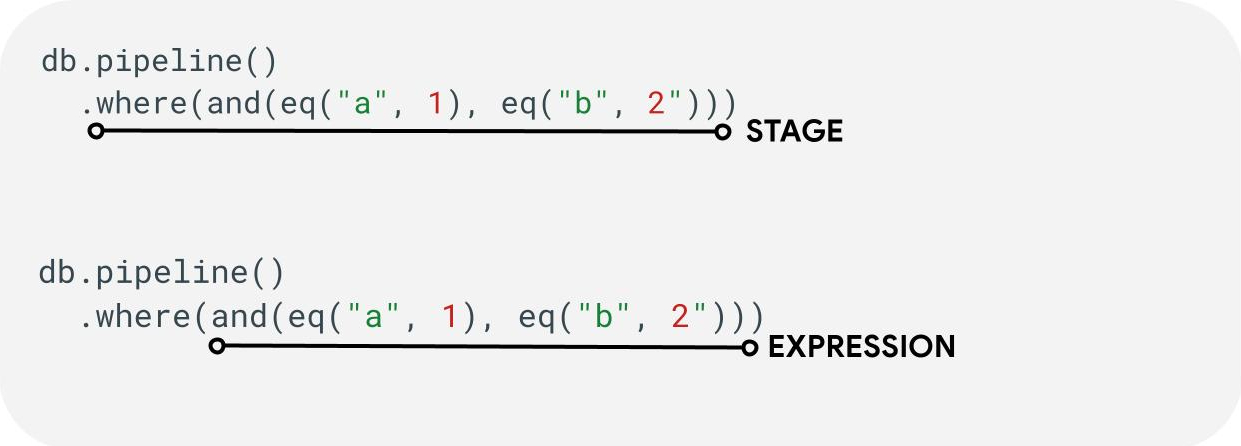
Этапы: Конвейер обработки запросов может состоять из одного или нескольких этапов. Логически они представляют собой последовательность шагов (или этапов), необходимых для выполнения запроса.
Выражения: Этапы часто принимают выражения, позволяющие выражать более сложные запросы. Выражение может быть простым и состоять из одной функции, например eq("a", 1) . Вы также можете выражать более сложные выражения, вкладывая выражения, например and(eq("a", 1), eq("b", 2)).
Обертки подзапросов: функции, такие как array() и scalar() позволяют встраивать вложенный конвейер в качестве выражения внутри этапа.
Поля / Константы / Переменные
Конвейерные операции поддерживают сложные выражения. Поэтому важно различать, представляет ли значение поле , константу или переменную .
В то время как поля ссылаются на данные внутри документов, а константы позволяют указывать любое значение в качестве аргумента выражения, переменные позволяют определять и использовать временные значения, область действия которых ограничена выполнением запроса, а не обрабатываемыми документами. Ниже представлен обзор этих концепций; дополнительную информацию о чтении и записи переменных во время выполнения запроса см. в описании этапа let(...) .
| Поля | Константы | Переменные | |
|---|---|---|---|
| Цель | получать доступ к полям или сохранять их в документах. | указать фиксированное значение | использовать временные значения во время выполнения конвейера |
| Использование SDK | field("name") | constant("val") | variable("name") |
| Объем | локальный к текущему документу | глобальный | от глобального уровня до трубопроводов и подтрубопроводов |
| Неопределенная ссылка | оценивается как absent | Н/Д | генерирует ошибку во время выполнения |
Примеры:
Web
const pipeline = db.pipeline() .collection("cities") .where(field("name").equal(constant("Toronto")));
Быстрый
let pipeline = db.pipeline() .collection("cities") .where(Field("name").equal(Constant("Toronto")))
Kotlin
val pipeline = db.pipeline() .collection("cities") .where(field("name").equal(constant("Toronto")))
Java
Pipeline pipeline = db.pipeline() .collection("cities") .where(field("name").equal(constant("Toronto")));
Python
from google.cloud.firestore_v1.pipeline_expressions import Field, Constant pipeline = ( client.pipeline() .collection("cities") .where(Field.of("name").equal(Constant.of("Toronto"))) )
Идти
pipeline := client.Pipeline().Collection("cities"). Where(firestore.FieldOf("name").Equal(firestore.ConstantOf("Toronto")))
Этапы
Этапы ввода
Этап ввода представляет собой первый этап запроса. Он определяет начальный набор документов, по которым выполняется запрос. Для операций Pipeline это во многом аналогично существующим запросам, где большинство запросов начинаются либо с этапа collection(...) , либо с этапа collection_group(...) . Два новых этапа ввода — это database() и documents(...) , где database() позволяет возвращать все документы из базы данных, а documents(...) работает идентично пакетному чтению.
Web
let results; // Return all restaurants in San Francisco results = await execute(db.pipeline().collection("cities/sf/restaurants")); // Return all restaurants results = await execute(db.pipeline().collectionGroup("restaurants")); // Return all documents across all collections in the database (the entire database) results = await execute(db.pipeline().database()); // Batch read of 3 documents results = await execute(db.pipeline().documents([ doc(db, "cities", "SF"), doc(db, "cities", "DC"), doc(db, "cities", "NY") ]));
Быстрый
var results: Pipeline.Snapshot // Return all restaurants in San Francisco results = try await db.pipeline().collection("cities/sf/restaurants").execute() // Return all restaurants results = try await db.pipeline().collectionGroup("restaurants").execute() // Return all documents across all collections in the database (the entire database) results = try await db.pipeline().database().execute() // Batch read of 3 documents results = try await db.pipeline().documents([ db.collection("cities").document("SF"), db.collection("cities").document("DC"), db.collection("cities").document("NY") ]).execute()
Kotlin
var results: Task<Pipeline.Snapshot> // Return all restaurants in San Francisco results = db.pipeline().collection("cities/sf/restaurants").execute() // Return all restaurants results = db.pipeline().collectionGroup("restaurants").execute() // Return all documents across all collections in the database (the entire database) results = db.pipeline().database().execute() // Batch read of 3 documents results = db.pipeline().documents( db.collection("cities").document("SF"), db.collection("cities").document("DC"), db.collection("cities").document("NY") ).execute()
Java
Task<Pipeline.Snapshot> results; // Return all restaurants in San Francisco results = db.pipeline().collection("cities/sf/restaurants").execute(); // Return all restaurants results = db.pipeline().collectionGroup("restaurants").execute(); // Return all documents across all collections in the database (the entire database) results = db.pipeline().database().execute(); // Batch read of 3 documents results = db.pipeline().documents( db.collection("cities").document("SF"), db.collection("cities").document("DC"), db.collection("cities").document("NY") ).execute();
Python
# Return all restaurants in San Francisco results = client.pipeline().collection("cities/sf/restaurants").execute() # Return all restaurants results = client.pipeline().collection_group("restaurants").execute() # Return all documents across all collections in the database (the entire database) results = client.pipeline().database().execute() # Batch read of 3 documents results = ( client.pipeline() .documents( client.collection("cities").document("SF"), client.collection("cities").document("DC"), client.collection("cities").document("NY"), ) .execute() )
Идти
// Return all restaurants in San Francisco results1, err := client.Pipeline().Collection("cities/sf/restaurants").Execute(ctx).Results().GetAll() if err != nil { fmt.Fprintf(w, "GetAll failed: %v", err) return err } // Return all restaurants results2, err := client.Pipeline().CollectionGroup("restaurants").Execute(ctx).Results().GetAll() if err != nil { fmt.Fprintf(w, "GetAll failed: %v", err) return err } // Return all documents across all collections in the database (the entire database) results3, err := client.Pipeline().Database().Execute(ctx).Results().GetAll() if err != nil { fmt.Fprintf(w, "GetAll failed: %v", err) return err } // Batch read of 3 documents results4, err := client.Pipeline(). Documents([]*firestore.DocumentRef{ client.Collection("cities").Doc("SF"), client.Collection("cities").Doc("DC"), client.Collection("cities").Doc("NY"), }). Execute(ctx).Results().GetAll() if err != nil { fmt.Fprintf(w, "GetAll failed: %v", err) return err }
Как и на всех остальных этапах, порядок результатов на этих этапах ввода нестабилен. Оператор sort(...) следует добавлять всегда, если требуется определенный порядок.
Где
Этап where(...) действует как стандартная операция фильтрации документов, сгенерированных на предыдущем этапе, и в основном повторяет существующий синтаксис "where" для существующих запросов. Любой документ, в котором заданное выражение принимает значение, отличное от true отфильтровывается из возвращаемых документов.
Несколько операторов where(...) можно объединить в цепочку, и они будут действовать как выражение and(...) . Например, следующие два запроса логически эквивалентны и могут использоваться взаимозаменяемо.
Web
let results; results = await execute(db.pipeline().collection("books") .where(field("rating").equal(5)) .where(field("published").lessThan(1900)) ); results = await execute(db.pipeline().collection("books") .where(and(field("rating").equal(5), field("published").lessThan(1900))) );
Быстрый
var results: Pipeline.Snapshot results = try await db.pipeline().collection("books") .where(Field("rating").equal(5)) .where(Field("published").lessThan(1900)) .execute() results = try await db.pipeline().collection("books") .where(Field("rating").equal(5) && Field("published").lessThan(1900)) .execute()
Kotlin
var results: Task<Pipeline.Snapshot> results = db.pipeline().collection("books") .where(field("rating").equal(5)) .where(field("published").lessThan(1900)) .execute() results = db.pipeline().collection("books") .where(Expression.and(field("rating").equal(5), field("published").lessThan(1900))) .execute()
Java
Task<Pipeline.Snapshot> results; results = db.pipeline().collection("books") .where(field("rating").equal(5)) .where(field("published").lessThan(1900)) .execute(); results = db.pipeline().collection("books") .where(Expression.and( field("rating").equal(5), field("published").lessThan(1900) )) .execute();
Python
from google.cloud.firestore_v1.pipeline_expressions import And, Field results = ( client.pipeline() .collection("books") .where(Field.of("rating").equal(5)) .where(Field.of("published").less_than(1900)) .execute() ) results = ( client.pipeline() .collection("books") .where(And(Field.of("rating").equal(5), Field.of("published").less_than(1900))) .execute() )
Идти
results1, err := client.Pipeline(). Collection("books"). Where(firestore.FieldOf("rating").Equal(5)). Where(firestore.FieldOf("published").LessThan(1900)). Execute(ctx).Results().GetAll() if err != nil { fmt.Fprintf(w, "GetAll failed: %v", err) return err } results2, err := client.Pipeline(). Collection("books"). Where(firestore.And( firestore.FieldOf("rating").Equal(5), firestore.FieldOf("published").LessThan(1900), )). Execute(ctx).Results().GetAll() if err != nil { fmt.Fprintf(w, "GetAll failed: %v", err) return err }
Выбрать / Добавить и удалить поля
Функции select(...) , add_fields(...) и remove_fields(...) позволяют изменять поля, возвращаемые предыдущим этапом. Эти три функции обычно называются этапами проекционного типа.
Функции select(...) и add_fields(...) позволяют указать результат выражения для имени поля, предоставленного пользователем. Функция select(...) вернет только документы с указанными именами полей, а add_fields(...) расширит схему предыдущего этапа (потенциально перезаписывая значения с идентичными именами полей).
Функция remove_fields(...) позволяет указать набор полей, которые нужно удалить на предыдущем этапе. Указание имен полей, которых не существует, ничего не делает.
См. раздел «Ограничение возвращаемых полей» ниже, но в целом использование такого этапа для ограничения результата только теми полями, которые необходимы клиенту, помогает снизить стоимость и задержку для большинства запросов.
Совокупный / Отдельный
Этап aggregate(...) позволяет выполнить ряд агрегаций над входными документами. По умолчанию все документы агрегируются вместе, но можно указать необязательный аргумент grouping , позволяющий агрегировать входные документы в разные группы.
Web
const results = await execute(db.pipeline() .collection("books") .aggregate( field("rating").average().as("avg_rating") ) .distinct(field("genre")) );
Быстрый
let results = try await db.pipeline() .collection("books") .aggregate([ Field("rating").average().as("avg_rating") ], groups: [ Field("genre") ]) .execute()
Kotlin
val results = db.pipeline() .collection("books") .aggregate( AggregateStage .withAccumulators(AggregateFunction.average("rating").alias("avg_rating")) .withGroups(field("genre")) ) .execute()
Java
Task<Pipeline.Snapshot> results = db.pipeline() .collection("books") .aggregate(AggregateStage .withAccumulators( AggregateFunction.average("rating").alias("avg_rating")) .withGroups(field("genre"))) .execute();
Python
from google.cloud.firestore_v1.pipeline_expressions import Field results = ( client.pipeline() .collection("books") .aggregate( Field.of("rating").average().as_("avg_rating"), groups=[Field.of("genre")] ) .execute() )
Идти
snapshot := client.Pipeline(). Collection("books"). Aggregate( firestore.Accumulators(firestore.Average("rating").As("avg_rating")), firestore.WithAggregateGroups("genre"), ). Execute(ctx)
Если groupings не указаны, на этом этапе будет создан только один документ; в противном случае документ будет сгенерирован для каждой уникальной комбинации значений параметров groupings .
Этап distinct(...) — это упрощенный оператор агрегирования, позволяющий генерировать только уникальные groupings без каких-либо аккумуляторов. Во всех остальных отношениях он ведет себя идентично оператору aggregate(...) . Следующий пример это демонстрирует:
Web
const results = await execute(db.pipeline() .collection("books") .distinct( field("author").toUpper().as("author"), field("genre") ) );
Быстрый
let results = try await db.pipeline() .collection("books") .distinct([ Field("author").toUpper().as("author"), Field("genre") ]) .execute()
Kotlin
val results = db.pipeline() .collection("books") .distinct( field("author").toUpper().alias("author"), field("genre") ) .execute()
Java
Task<Pipeline.Snapshot> results = db.pipeline() .collection("books") .distinct( field("author").toUpper().alias("author"), field("genre") ) .execute();
Python
from google.cloud.firestore_v1.pipeline_expressions import Field results = ( client.pipeline() .collection("books") .distinct(Field.of("author").to_upper().as_("author"), "genre") .execute() )
Идти
snapshot := client.Pipeline(). Collection("books"). Distinct(firestore.Fields( firestore.ToUpper(firestore.FieldOf("author")).As("author"), firestore.FieldOf("genre"), )). Execute(ctx)
Функции
Функции являются базовым элементом для создания выражений и сложных запросов. Полный список функций с примерами см. в справочнике по функциям . В качестве краткого напоминания рассмотрим структуру типичного запроса:

Многие этапы принимают выражения, содержащие одну или несколько функций. Наиболее часто функции используются на этапах where(...) и select(...) . Существует два основных типа функций, с которыми вам следует ознакомиться:
Web
let results; // Type 1: Scalar (for use in non-aggregation stages) // Example: Return the min store price for each book. results = await execute(db.pipeline().collection("books") .select(field("current").logicalMinimum(field("updated")).as("price_min")) ); // Type 2: Aggregation (for use in aggregate stages) // Example: Return the min price of all books. results = await execute(db.pipeline().collection("books") .aggregate(field("price").minimum().as("min_price")) );
Быстрый
var results: Pipeline.Snapshot // Type 1: Scalar (for use in non-aggregation stages) // Example: Return the min store price for each book. results = try await db.pipeline().collection("books") .select([ Field("current").logicalMinimum(["updated"]).as("price_min") ]) .execute() // Type 2: Aggregation (for use in aggregate stages) // Example: Return the min price of all books. results = try await db.pipeline().collection("books") .aggregate([Field("price").minimum().as("min_price")]) .execute()
Kotlin
var results: Task<Pipeline.Snapshot> // Type 1: Scalar (for use in non-aggregation stages) // Example: Return the min store price for each book. results = db.pipeline().collection("books") .select( field("current").logicalMinimum("updated").alias("price_min") ) .execute() // Type 2: Aggregation (for use in aggregate stages) // Example: Return the min price of all books. results = db.pipeline().collection("books") .aggregate(AggregateFunction.minimum("price").alias("min_price")) .execute()
Java
Task<Pipeline.Snapshot> results; // Type 1: Scalar (for use in non-aggregation stages) // Example: Return the min store price for each book. results = db.pipeline().collection("books") .select( field("current").logicalMinimum("updated").alias("price_min") ) .execute(); // Type 2: Aggregation (for use in aggregate stages) // Example: Return the min price of all books. results = db.pipeline().collection("books") .aggregate(AggregateFunction.minimum("price").alias("min_price")) .execute();
Python
from google.cloud.firestore_v1.pipeline_expressions import Field # Type 1: Scalar (for use in non-aggregation stages) # Example: Return the min store price for each book. results = ( client.pipeline() .collection("books") .select( Field.of("current").logical_minimum(Field.of("updated")).as_("price_min") ) .execute() ) # Type 2: Aggregation (for use in aggregate stages) # Example: Return the min price of all books. results = ( client.pipeline() .collection("books") .aggregate(Field.of("price").minimum().as_("min_price")) .execute() )
Идти
// Type 1: Scalar (for use in non-aggregation stages) // Example: Return the min store price for each book. results1, err := client.Pipeline(). Collection("books"). Select(firestore.Fields( firestore.LogicalMinimum(firestore.FieldOf("current"), firestore.FieldOf("updated")).As("price_min"), )). Execute(ctx).Results().GetAll() if err != nil { fmt.Fprintf(w, "GetAll failed: %v", err) return err } // Type 2: Aggregation (for use in aggregate stages) // Example: Return the min price of all books. results2, err := client.Pipeline(). Collection("books"). Aggregate(firestore.Accumulators( firestore.Minimum("price").As("min_price"), )). Execute(ctx).Results().GetAll() if err != nil { fmt.Fprintf(w, "GetAll failed: %v", err) return err }
Пределы
В большинстве случаев версия Enterprise не накладывает ограничений на структуру запроса. Другими словами, вы не ограничены небольшим количеством значений в запросе IN или OR . Вместо этого, следует помнить о двух основных ограничениях:
- Срок выполнения: 60 секунд (идентично стандартной версии).
- Использование памяти: ограничение в 128 МиБ на объем материализованных данных во время выполнения запроса.
Ошибки
Вы можете столкнуться с неудачными запросами по ряду причин. Вот ссылка на распространенные ошибки и соответствующие действия, которые вы можете предпринять:
| Код ошибки | Действие |
DEADLINE_EXCEEDED | Выполняемый вами запрос превышает 60-секундный лимит и требует дополнительной оптимизации. Советы по оптимизации см. в разделе «Производительность». Если вам не удается выявить причину проблемы, обратитесь к команде. |
RESOURCE_EXHAUSTED | Выполняемый вами запрос превышает лимиты памяти и требует дополнительной оптимизации. Советы по оптимизации см. в разделе «Производительность». Если вам не удается выявить причину проблемы, обратитесь к команде. |
INTERNAL | Обратитесь в службу поддержки. |
Производительность
В базах данных Enterprise Edition не требуется постоянное наличие индекса. Это означает, что запрос может демонстрировать более высокую задержку по сравнению с существующими запросами, которые бы сразу же завершились с ошибкой FAILED_PRECONDITION указывающей на отсутствие индекса. Для повышения производительности операций конвейера можно предпринять несколько шагов.
Создание индексов
Используемый указатель
Команда `Query explain` позволяет определить, обрабатывается ли ваш запрос индексом или же используется менее эффективная операция, например, сканирование таблицы. Если ваш запрос не полностью обрабатывается индексом, вы можете создать индекс, следуя инструкциям.
Создание индексов
Для создания индексов можно следовать существующей документации по управлению индексами. Прежде чем создавать индекс, ознакомьтесь с общими рекомендациями по работе с индексами в Cloud Firestore . Чтобы ваш запрос мог использовать индексы, следуйте рекомендациям по созданию индексов с полями в следующем порядке:
- Все поля, которые будут использоваться в фильтрах равенства (в любом порядке).
- Все поля, по которым будет производиться сортировка (в том же порядке).
- Поля, которые будут использоваться в фильтрах диапазона или неравенства, в порядке убывания избирательности ограничений запроса.
Например, для следующего запроса:
Web
const results = await execute(db.pipeline() .collection("books") .where(field("published").lessThan(1900)) .where(field("genre").equal("Science Fiction")) .where(field("rating").greaterThan(4.3)) .sort(field("published").descending()) );
Быстрый
let results = try await db.pipeline() .collection("books") .where(Field("published").lessThan(1900)) .where(Field("genre").equal("Science Fiction")) .where(Field("rating").greaterThan(4.3)) .sort([Field("published").descending()]) .execute()
Kotlin
val results = db.pipeline() .collection("books") .where(field("published").lessThan(1900)) .where(field("genre").equal("Science Fiction")) .where(field("rating").greaterThan(4.3)) .sort(field("published").descending()) .execute()
Java
Task<Pipeline.Snapshot> results = db.pipeline() .collection("books") .where(field("published").lessThan(1900)) .where(field("genre").equal("Science Fiction")) .where(field("rating").greaterThan(4.3)) .sort(field("published").descending()) .execute();
Python
from google.cloud.firestore_v1.pipeline_expressions import Field results = ( client.pipeline() .collection("books") .where(Field.of("published").less_than(1900)) .where(Field.of("genre").equal("Science Fiction")) .where(Field.of("rating").greater_than(4.3)) .sort(Field.of("published").descending()) .execute() )
Идти
snapshot := client.Pipeline(). Collection("books"). Where(firestore.FieldOf("published").LessThan(1900)). Where(firestore.FieldOf("genre").Equal("Science Fiction")). Where(firestore.FieldOf("rating").GreaterThan(4.3)). Sort(firestore.Orders(firestore.Descending(firestore.FieldOf("published")))). Execute(ctx)
Рекомендуемый указатель — это индекс, охватывающий всю коллекцию books по категориям (genre [...], published DESC, avg_rating DESC).
Плотность индекса
Cloud Firestore поддерживает разреженные и неразреженные индексы. Для получения дополнительной информации см. раздел «Плотность индекса» .
Покрываемые запросы + вторичные индексы
Cloud Firestore может пропускать загрузку всего документа и возвращать результаты только из индекса, если все возвращаемые поля присутствуют во вторичном индексе. Это обычно приводит к значительному снижению задержки (и стоимости). Рассмотрим пример запроса ниже:
Web
const results = await execute(db.pipeline() .collection("books") .where(field("category").like("%fantasy%")) .where(field("title").exists()) .where(field("author").exists()) .select(field("title"), field("author")) );
Быстрый
let results = try await db.pipeline() .collection("books") .where(Field("category").like("%fantasy%")) .where(Field("title").exists()) .where(Field("author").exists()) .select([Field("title"), Field("author")]) .execute()
Kotlin
val results = db.pipeline() .collection("books") .where(field("category").like("%fantasy%")) .where(field("title").exists()) .where(field("author").exists()) .select(field("title"), field("author")) .execute()
Java
Task<Pipeline.Snapshot> results = db.pipeline() .collection("books") .where(field("category").like("%fantasy%")) .where(field("title").exists()) .where(field("author").exists()) .select(field("title"), field("author")) .execute();
Python
from google.cloud.firestore_v1.pipeline_expressions import Field results = ( client.pipeline() .collection("books") .where(Field.of("category").like("%fantasy%")) .where(Field.of("title").exists()) .where(Field.of("author").exists()) .select("title", "author") .execute() )
Идти
snapshot := client.Pipeline(). Collection("books"). Where(firestore.FieldOf("category").Like("%fantasy%")). Where(firestore.FieldOf("title").FieldExists()). Where(firestore.FieldOf("author").FieldExists()). Select(firestore.Fields("title", "author")). Execute(ctx)
Если в базе данных уже есть индекс с областью видимости коллекции books по (category [...], title [...], author [...]) то она может избежать извлечения данных из самих основных документов. В этом случае порядок в индексе не имеет значения, для этого используется [...] .
Ограничить поля для возврата
По умолчанию запрос Cloud Firestore возвращает все поля документа, аналогично оператору SELECT * в реляционных системах. Однако, если вашему приложению требуется только подмножество полей, можно использовать этапы select(...) или restrict(...) для переноса этой фильтрации на сервер. Это уменьшит как размер ответа (снизит стоимость исходящего трафика), так и улучшит задержку.
Инструменты для устранения неполадок
Запрос поясняет
Функция Query Explain позволяет получить представление о метриках выполнения и подробную информацию об используемых индексах.
Метрики
Операции конвейера полностью интегрированы с существующими метриками Cloud Firestore .
Известные проблемы / Ограничения
Специализированные индексы
Операции конвейера пока не поддерживают существующие типы индексов array-contains и vector . Вместо простого отклонения таких запросов Cloud Firestore попытается использовать другие существующие индексы ascending и descending . Ожидается, что из-за этого выполнение запросов с использованием таких выражений array_contains или find_nearest будет медленнее, чем их существующие аналоги.
Поддержка в режиме реального времени и в автономном режиме.
В системах управления трубопроводами отсутствуют возможности работы в режиме реального времени и в автономном режиме.
Что дальше?
- Начните изучение справочной документации по функциям и этапам .
- Узнайте, как выполнять объединения таблиц с помощью подзапросов .