

如果對後端服務強制執行 App Check,則依賴該後端服務的應用程式功能將無法在模擬器或持續整合 (CI) 環境中運行,因為這些環境不符合有效裝置的定義。如要在開發和測試期間於這些環境中執行應用程式,您必須建立應用程式的偵錯版本,並使用App Check 偵錯提供者,而非正式環境認證提供者。
在模擬器中使用偵錯提供者
以下說明如何在模擬器中以互動方式執行應用程式時使用偵錯供應器 (例如在本機開發期間):
在模組 (應用程式層級) Gradle 檔案 (通常是
<project>/<app-module>/build.gradle.kts或<project>/<app-module>/build.gradle) 中,加入 Android 適用的 App Check 程式庫依附元件。建議使用 Firebase Android BoM 控制程式庫版本管理。dependencies { // Import the BoM for the Firebase platform implementation(platform("com.google.firebase:firebase-bom:34.18.0")) // Add the dependencies for the App Check libraries // When using the BoM, you don't specify versions in Firebase library dependencies implementation("com.google.firebase:firebase-appcheck-debug") }
只要使用 Firebase Android BoM,應用程式就會一律使用相容的 Firebase Android 程式庫版本。
(替代做法) 不使用 BoM 新增 Firebase 程式庫依附元件
如果選擇不使用 Firebase BoM,則必須在依附元件行中指定每個 Firebase 程式庫版本。
請注意,如果應用程式使用多個 Firebase 程式庫,強烈建議使用 BoM 管理程式庫版本,確保所有版本都相容。
dependencies {
    // Add the dependencies for the App Check libraries
    // When NOT using the BoM, you must specify versions in Firebase library dependencies
    implementation("com.google.firebase:firebase-appcheck-debug:19.4.1")
}
在偵錯版本中,將 App Check 設定為使用偵錯服務工廠:
Kotlin
Firebase.initialize(context = this) Firebase.appCheck.installAppCheckProviderFactory( DebugAppCheckProviderFactory.getInstance(), )
Java
FirebaseApp.initializeApp(/*context=*/ this); FirebaseAppCheck firebaseAppCheck = FirebaseAppCheck.getInstance(); firebaseAppCheck.installAppCheckProviderFactory( DebugAppCheckProviderFactory.getInstance());
取得偵錯權杖:
在模擬器或測試裝置上執行應用程式。
在記錄中尋找 App Check 偵錯權杖。例如:
D DebugAppCheckProvider: Enter this debug secret into the allow list
in the Firebase Console for your project: 123a4567-b89c-12d3-e456-789012345678
複製權杖 (例如
123a4567-b89c-12d3-e456-789012345678)。
向 App Check 註冊偵錯權杖:
在 Firebase 控制台中,依序前往「Security」(安全性) >「App Check」 > 「Apps」(應用程式) 分頁標籤。
找出您的應用程式,按一下三點溢位選單 (),然後選取「管理偵錯權杖」。
按照畫面上的指示註冊偵錯權杖。
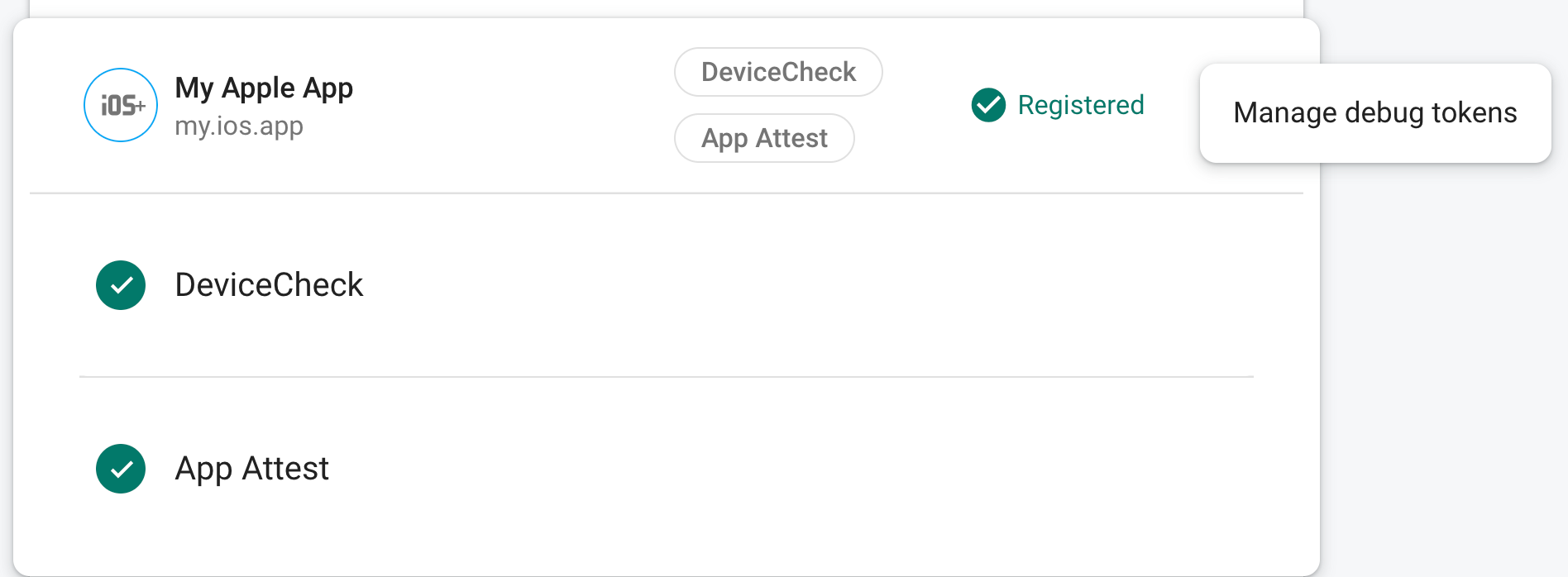
向 App Check 註冊權杖後,後端服務就會接受該權杖。
此令牌允許在沒有有效設備的情況下存取您的後端服務,因此務必妥善保管其隱私。請勿將其提交至公開存放區,或在應用程式的正式版本中發布。如果註冊的權杖遭到入侵,請立即使用 Firebase 控制台中的「管理偵錯權杖」刪除權杖。
在 CI 環境中使用偵錯提供者進行單元測試
以下是如何在持續整合 (CI) 環境中使用偵錯提供者進行單元測試的方法:
在 Firebase 控制台中建立偵錯權杖:
在 Firebase 控制台中,依序前往「Security」(安全性) >「App Check」 > 「Apps」(應用程式) 分頁標籤。
找出您的應用程式,按一下三點溢位選單 (),然後選取「管理偵錯權杖」。
按照畫面上的指示建立新的偵錯權杖。
此令牌允許在沒有有效設備的情況下存取您的後端服務,因此務必妥善保管其隱私。做不是將其提交到公共儲存庫或包含在應用程式的生產版本中。如果已註冊的令牌遭到洩露,請立即使用以下命令將其刪除:管理調試令牌在Firebase安慰。
將您剛剛建立的偵錯權杖新增至 CI 系統的安全金鑰儲存庫(例如,GitHub Actions 的 加密金鑰 或 Travis CI 的 加密變數)。
如有必要,請設定 CI 系統,在 CI 環境中以環境變數的形式提供偵錯權杖。將變數命名為類似
APP_CHECK_DEBUG_TOKEN_FROM_CI的名稱。在模組 (應用程式層級) Gradle 檔案 (通常是
<project>/<app-module>/build.gradle.kts或<project>/<app-module>/build.gradle) 中,加入 Android 適用的 App Check 程式庫依附元件。建議使用 Firebase Android BoM 控制程式庫版本管理。Kotlin
dependencies {
    // Import the BoM for the Firebase platform
    implementation(platform("com.google.firebase:firebase-bom:34.18.0"))

    // Add the dependency for the App Check library
    // When using the BoM, you don't specify versions in Firebase library dependencies
    implementation("com.google.firebase:firebase-appcheck-debug")
}
只要使用 Firebase Android BoM,應用程式就會一律使用相容的 Firebase Android 程式庫版本。
(替代做法) 不使用 BoM 新增 Firebase 程式庫依附元件
如果選擇不使用 Firebase BoM,則必須在依附元件行中指定每個 Firebase 程式庫版本。
請注意,如果應用程式使用多個 Firebase 程式庫,強烈建議使用 BoM 管理程式庫版本,確保所有版本都相容。
dependencies {
    // Add the dependency for the App Check library
    // When NOT using the BoM, you must specify versions in Firebase library dependencies
    implementation("com.google.firebase:firebase-appcheck-debug:19.4.1")
}
Java
dependencies {
    // Import the BoM for the Firebase platform
    implementation(platform("com.google.firebase:firebase-bom:34.18.0"))

    // Add the dependency for the App Check library
    // When using the BoM, you don't specify versions in Firebase library dependencies
    implementation("com.google.firebase:firebase-appcheck-debug")
}
只要使用 Firebase Android BoM,應用程式就會一律使用相容的 Firebase Android 程式庫版本。
(替代做法) 不使用 BoM 新增 Firebase 程式庫依附元件
如果選擇不使用 Firebase BoM,則必須在依附元件行中指定每個 Firebase 程式庫版本。
請注意,如果應用程式使用多個 Firebase 程式庫,強烈建議使用 BoM 管理程式庫版本,確保所有版本都相容。
dependencies {
    // Add the dependency for the App Check library
    // When NOT using the BoM, you must specify versions in Firebase library dependencies
    implementation("com.google.firebase:firebase-appcheck-debug:19.4.1")
}
在 CI 建構變化版本的設定中新增下列內容:
testInstrumentationRunnerArguments["firebaseAppCheckDebugSecret"] =
    System.getenv("APP_CHECK_DEBUG_TOKEN_FROM_CI") ?: ""
在測試類別中,使用
DebugAppCheckTestHelper包裝任何需要 App Check 權杖的程式碼:Kotlin
@RunWith(AndroidJunit4::class)
class MyTests {
    private val debugAppCheckTestHelper =
        DebugAppCheckTestHelper.fromInstrumentationArgs()

    @Test
    fun testWithDefaultApp() {
        debugAppCheckTestHelper.withDebugProvider {
            // Test code that requires a debug AppCheckToken.
        }
    }

    @Test
    fun testWithNonDefaultApp() {
        debugAppCheckTestHelper.withDebugProvider(
            FirebaseApp.getInstance("nonDefaultApp")
        ) {
            // Test code that requires a debug AppCheckToken.
        }
    }
}
Java
@RunWith(AndroidJunit4.class)
public class YourTests {
    private final DebugAppCheckTestHelper debugAppCheckTestHelper =
            DebugAppCheckTestHelper.fromInstrumentationArgs();

    @Test
    public void testWithDefaultApp() {
        debugAppCheckTestHelper.withDebugProvider(() -> {
            // Test code that requires a debug AppCheckToken.
        });
    }

    @Test
    public void testWithNonDefaultApp() {
        debugAppCheckTestHelper.withDebugProvider(
                FirebaseApp.getInstance("nonDefaultApp"),
                () -> {
                    // Test code that requires a debug AppCheckToken.
                });
    }
}
當你的應用程式在 CI 環境中運行時,你的後端服務會接受它發送的令牌作為有效令牌。