

對後端服務強制執行 App Check 後,應用程式中依賴該後端服務的功能,將無法在模擬器或持續整合 (CI) 環境中執行,因為這些環境不符合有效裝置的條件。如要在開發和測試期間於這些環境中執行應用程式,您必須建立應用程式的偵錯版本,並使用 App Check 偵錯服務,而非正式環境認證服務。
在模擬器中使用偵錯服務
在模擬器中以互動方式執行應用程式時 (例如在本機開發期間),請按照下列步驟使用偵錯服務:
在模組 (應用程式層級) Gradle 檔案 (通常是
<project>/<app-module>/build.gradle.kts或<project>/<app-module>/build.gradle) 中,新增 Android 專用 App Check 程式庫的依附元件。建議使用 Firebase Android BoM 控制程式庫版本管理。dependencies { // Import the BoM for the Firebase platform implementation(platform("com.google.firebase:firebase-bom:35.0.2")) // Add the dependencies for the App Check libraries // When using the BoM, you don't specify versions in Firebase library dependencies implementation("com.google.firebase:firebase-appcheck-debug") }
只要使用 Firebase Android BoM,應用程式就會一律使用相容的 Firebase Android 程式庫版本。
(替代方案) 不使用 BoM,新增 Firebase 程式庫依附元件
如果選擇不使用 Firebase BoM,則必須在依附元件行中指定每個 Firebase 程式庫版本。
請注意,如果您的應用程式使用多個 Firebase 程式庫,強烈建議您使用 BoM 管理程式庫版本,確保所有版本都相容。
dependencies {
    // Add the dependencies for the App Check libraries
    // When NOT using the BoM, you must specify versions in Firebase library dependencies
    implementation("com.google.firebase:firebase-appcheck-debug:20.0.0")
}
在偵錯版本中,將 App Check 設為使用偵錯服務工廠:
Kotlin
Firebase.initialize(context = this) Firebase.appCheck.installAppCheckProviderFactory( DebugAppCheckProviderFactory.getInstance(), )
Java
FirebaseApp.initializeApp(/*context=*/ this); FirebaseAppCheck firebaseAppCheck = FirebaseAppCheck.getInstance(); firebaseAppCheck.installAppCheckProviderFactory( DebugAppCheckProviderFactory.getInstance());
取得偵錯權杖:
在模擬器或測試裝置上執行應用程式。
在記錄中尋找 App Check 偵錯權杖。例如:
D DebugAppCheckProvider: Enter this debug secret into the allow list
in the Firebase Console for your project: 123a4567-b89c-12d3-e456-789012345678
複製權杖 (例如
123a4567-b89c-12d3-e456-789012345678)。
向 App Check 註冊偵錯權杖:
在 Firebase 控制台中,依序前往「Security」(安全性) >「App Check」 >「Apps」(應用程式) 分頁標籤。
找到應用程式,按一下三點溢位選單 (),然後選取「Manage debug tokens」。
按照畫面上的指示註冊偵錯權杖。
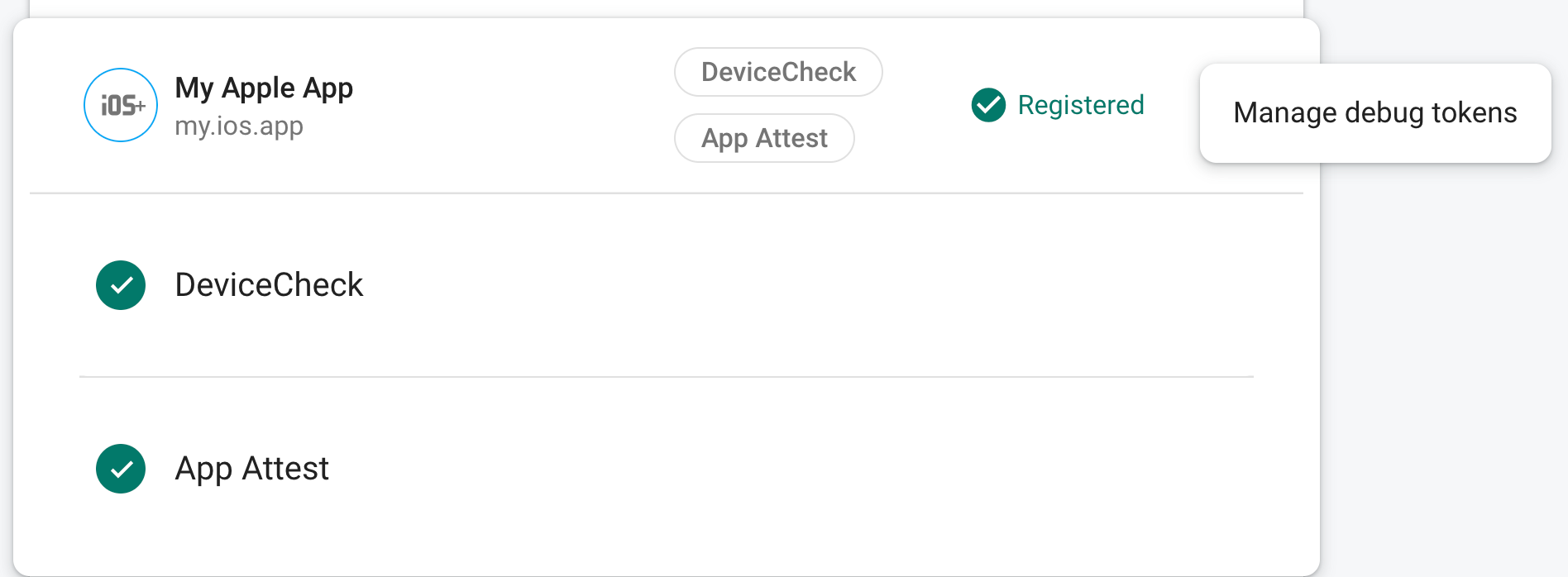
向 App Check 註冊權杖後,後端服務就會接受該權杖為有效。
這個權杖可讓使用者在沒有有效裝置的情況下存取後端服務,因此請務必保密。請勿將權杖提交至公開存放區,或在應用程式的正式版本中提供。如果註冊的權杖遭到入侵,請立即在 Firebase 控制台中使用「Manage debug tokens」刪除權杖。
在 CI 環境中使用偵錯服務進行單元測試
如要在持續整合 (CI) 環境中使用偵錯服務進行單元測試,請按照下列步驟操作:
在 Firebase 控制台中建立偵錯權杖:
在 Firebase 控制台中,依序前往「Security」(安全性) >「App Check」 >「Apps」(應用程式) 分頁標籤。
找到應用程式,按一下三點溢位選單 (),然後選取「Manage debug tokens」。
按照畫面上的指示建立新的偵錯權杖。
這個權杖可讓使用者在沒有有效裝置的情況下存取後端服務,因此請務必保密。請勿將權杖提交至公開存放區,或在應用程式的正式版本中提供。如果註冊的權杖遭到入侵,請立即在 Firebase 控制台中使用「Manage debug tokens」刪除權杖。
將您剛建立的偵錯權杖新增至 CI 系統的安全金鑰儲存庫 (例如 GitHub Actions 的加密密鑰或 Travis CI 的加密變數)。
如有需要,請設定 CI 系統,讓偵錯權杖在 CI 環境中做為環境變數使用。將變數命名為
APP_CHECK_DEBUG_TOKEN_FROM_CI。在模組 (應用程式層級) Gradle 檔案 (通常是
<project>/<app-module>/build.gradle.kts或<project>/<app-module>/build.gradle) 中,新增 Android 專用 App Check 程式庫的依附元件。建議使用 Firebase Android BoM 控制程式庫版本管理。Kotlin
dependencies {
    // Import the BoM for the Firebase platform
    implementation(platform("com.google.firebase:firebase-bom:35.0.2"))

    // Add the dependency for the App Check library
    // When using the BoM, you don't specify versions in Firebase library dependencies
    implementation("com.google.firebase:firebase-appcheck-debug")
}
只要使用 Firebase Android BoM,應用程式就會一律使用相容的 Firebase Android 程式庫版本。
(替代方案) 不使用 BoM,新增 Firebase 程式庫依附元件
如果選擇不使用 Firebase BoM,則必須在依附元件行中指定每個 Firebase 程式庫版本。
請注意,如果您的應用程式使用多個 Firebase 程式庫,強烈建議您使用 BoM 管理程式庫版本,確保所有版本都相容。
dependencies {
    // Add the dependency for the App Check library
    // When NOT using the BoM, you must specify versions in Firebase library dependencies
    implementation("com.google.firebase:firebase-appcheck-debug:20.0.0")
}
Java
dependencies {
    // Import the BoM for the Firebase platform
    implementation(platform("com.google.firebase:firebase-bom:35.0.2"))

    // Add the dependency for the App Check library
    // When using the BoM, you don't specify versions in Firebase library dependencies
    implementation("com.google.firebase:firebase-appcheck-debug")
}
只要使用 Firebase Android BoM,應用程式就會一律使用相容的 Firebase Android 程式庫版本。
(替代方案) 不使用 BoM,新增 Firebase 程式庫依附元件
如果選擇不使用 Firebase BoM,則必須在依附元件行中指定每個 Firebase 程式庫版本。
請注意,如果您的應用程式使用多個 Firebase 程式庫,強烈建議您使用 BoM 管理程式庫版本,確保所有版本都相容。
dependencies {
    // Add the dependency for the App Check library
    // When NOT using the BoM, you must specify versions in Firebase library dependencies
    implementation("com.google.firebase:firebase-appcheck-debug:20.0.0")
}
在 CI 建構變化版本的設定中,加入下列內容:
testInstrumentationRunnerArguments["firebaseAppCheckDebugSecret"] =
    System.getenv("APP_CHECK_DEBUG_TOKEN_FROM_CI") ?: ""
在測試類別中,使用
DebugAppCheckTestHelper包裝任何需要 App Check 權杖的程式碼:Kotlin
@RunWith(AndroidJunit4::class)
class MyTests {
    private val debugAppCheckTestHelper =
        DebugAppCheckTestHelper.fromInstrumentationArgs()

    @Test
    fun testWithDefaultApp() {
        debugAppCheckTestHelper.withDebugProvider {
            // Test code that requires a debug AppCheckToken.
        }
    }

    @Test
    fun testWithNonDefaultApp() {
        debugAppCheckTestHelper.withDebugProvider(
            FirebaseApp.getInstance("nonDefaultApp")
        ) {
            // Test code that requires a debug AppCheckToken.
        }
    }
}
Java
@RunWith(AndroidJunit4.class)
public class YourTests {
    private final DebugAppCheckTestHelper debugAppCheckTestHelper =
            DebugAppCheckTestHelper.fromInstrumentationArgs();

    @Test
    public void testWithDefaultApp() {
        debugAppCheckTestHelper.withDebugProvider(() -> {
            // Test code that requires a debug AppCheckToken.
        });
    }

    @Test
    public void testWithNonDefaultApp() {
        debugAppCheckTestHelper.withDebugProvider(
                FirebaseApp.getInstance("nonDefaultApp"),
                () -> {
                    // Test code that requires a debug AppCheckToken.
                });
    }
}
當應用程式在 CI 環境中執行時,後端服務會接受應用程式傳送的權杖,並視為有效。