
Firebase App Hosting utilizes Cloud Build to transform your application source code into a containerized format suitable for deployment on Cloud Run.
The build process operates through the following key stages:
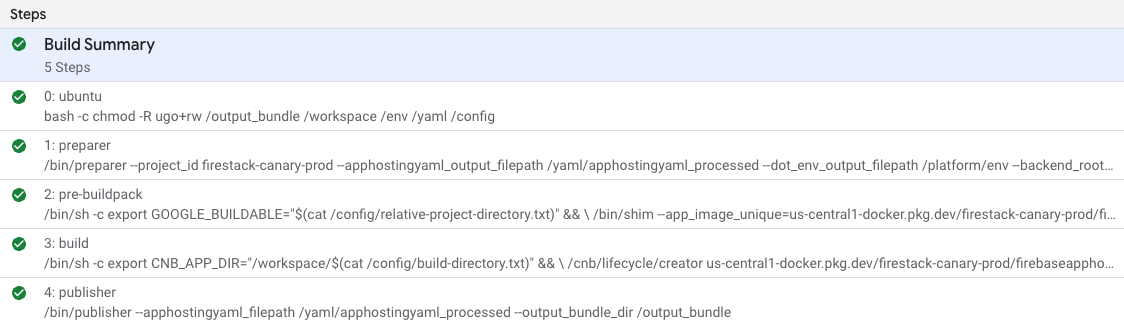
ubuntu: Workspace initialization.
preparer: Gathers your application source code and configuration.
pre-buildpack: Prepares the buildpack environment.
build: Installs dependencies and builds your application.
publisher: Finalizes the production Cloud Run container.
These five steps correspond directly to build steps as displayed in Cloud Build in the Google Cloud console:
Workspace Initialization
This stage corresponds to the ubuntu build step. It initializes the build workspace, ensuring the correct file permissions are set for the directories used by the subsequent build steps.
Preparer
This stage is responsible for handling pre-build logic. It reads, sanitizes, and
writes user-defined environment variables. It also dereferences and pins any
secrets specified in the apphosting.yaml file.
Pre-buildpack
This step prepares the environment for the Cloud Native Buildpacks lifecycle. This involves running a shim that translates the configurations and environment variables prepared in the previous stage into the format expected by the CNB tools.
Build
This is the core of the build process, responsible for generating a runnable
container image and a bundle.yaml file defining your build configuration.
It utilizes the Cloud Native Buildpacks
and the lifecycle creator
binary to package the
application efficiently. More information on the bundle.yaml file can be found
on GitHub.
Buildpacks are responsible for transforming your application source code into production ready container images. Firebase App Hosting chains together several buildpacks to complete the build process:
- Runtime Buildpack: Ensures all necessary components for running a basic Node.js application are included and dependencies are installed.
- Monorepo Buildpack: Configures subsequent buildpacks to handle different monorepo scenarios.
Framework Buildpack: Installs the correct framework adapter (like Angular or Next.js) and prepares subsequent buildpacks.
Framework adapters are in charge of running the productionized build command and mapping any relevant framework-specific config values to a standard format readable by App Hosting.
Package Manager Buildpack: Executes the installation of dependencies and builds the app using npm, yarn, or pnpm.
Output Bundle Buildpack: Defines the run command and prepares the output bundle for execution.
Publisher
This final stage packages all the information extracted from the application source code plus the build container image and sends it to the App Hosting backend. The App Hosting backend then uses this information to set up Cloud Run with the proper configurations.
Build cleanup policy
Firebase App Hosting enforces an automated build retention and cleanup policy. Under this policy, App Hosting retains your successful builds and their associated Cloud Run revisions from the past 14 days. Additionally, to ensure you always have a build to roll back to, App Hosting retains your 5 most recently successful builds and rollouts regardless of their age.
App Hosting won't delete or remove a build that is currently in your active traffic split or is associated with an in-progress rollout.
When older builds exceed these retention limits, their internal status is
updated to EXPIRED. You can't perform an instant rollback on an EXPIRED
build, and the option to roll back to these builds will be removed from the
Firebase console. Instead, you'll need to
create a new build targeting the same source
(either a git commit,
a container in Artifact Registry, or a Google Cloud Storage bucket) and roll that
out.
One way to conserve build resources is to control how frequently you trigger automatic rollouts. See manage automatic rollouts.
Learn more
The entire App Hosting build process is open source.
- The buildpack code is in the Google Cloud buildpacks repo
- Code for framework adapters is in the apphosting-adapters repo
- Learn more about Cloud Native buildpacks and Cloud Build