

您可以透過 Firebase SDK,在應用程式中整合以網頁為基礎的一般 OAuth 登入功能,讓使用者透過 Microsoft Azure Active Directory 等 OAuth 提供者驗證 Firebase,完成端對端登入流程。
事前準備
如要使用 Microsoft 帳戶 (Azure Active Directory 和個人 Microsoft 帳戶) 登入使用者,請先為 Firebase 專案啟用 Microsoft 做為登入供應商:
- 將 Firebase 新增至 Apple 專案。
- 在 Firebase 控制台中,依序前往「安全性」>「驗證」。
- 在「登入方式」分頁中,啟用「Microsoft」登入供應商。
-
將該供應商開發人員控制台的用戶端 ID 和用戶端密鑰新增至供應商設定:
- 如要註冊 Microsoft OAuth 用戶端,請按照「快速入門:向 Azure Active Directory v2.0 端點註冊應用程式」中的操作說明進行。 請注意,這個端點支援使用 Microsoft 個人帳戶和 Azure Active Directory 帳戶登入。進一步瞭解 Azure Active Directory v2.0。
-
向這些供應商註冊應用程式時,請務必將專案的
*.firebaseapp.com網域註冊為應用程式的重新導向網域。
- 按一下「儲存」。
使用 Firebase SDK 處理登入流程
如要使用 Firebase Apple 平台 SDK 處理登入流程,請按照下列步驟操作:
在 Xcode 專案中新增自訂網址架構:
- 開啟專案設定:在左側樹狀檢視畫面中,按兩下專案名稱。在「目標」部分選取應用程式,然後選取「資訊」分頁標籤,並展開「網址類型」部分。
-
按一下 +按鈕,然後將已編碼的應用程式 ID 新增為網址配置。將其他欄位留空。
您可以在 Firebase 控制台中找到編碼後的應用程式 ID:依序前往「
設定 」>「一般」分頁標籤,然後向下捲動至「您的應用程式」部分,即可查看 iOS 應用程式的詳細資料。完成後,您的設定應與下列內容類似 (但會使用應用程式專屬值):
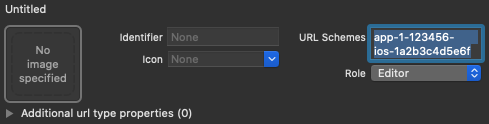
使用提供者 ID microsoft.com 建立 OAuthProvider 的執行個體。
Swift
var provider = OAuthProvider(providerID: "microsoft.com")
Objective-C
FIROAuthProvider *provider = [FIROAuthProvider providerWithProviderID:@"microsoft.com"];
選用:指定要隨 OAuth 要求傳送的其他自訂 OAuth 參數。
Swift
    provider.customParameters = [
      "prompt": "consent",
      "login_hint": "user@firstadd.onmicrosoft.com"
    ]
Objective-C
[provider setCustomParameters:@{@"prompt": @"consent", @"login_hint": @"user@firstadd.onmicrosoft.com"}];
如要瞭解 Microsoft 支援的參數,請參閱 Microsoft OAuth 說明文件。請注意,您無法使用
setCustomParameters傳遞 Firebase 必要參數。這些參數包括 client_id、response_type、redirect_uri、state、scope 和 response_mode。如要只允許特定 Azure AD 租戶的使用者登入應用程式,可以使用 Azure AD 租戶的易記網域名稱或租戶的 GUID ID。如要執行這項操作,請在自訂參數物件中指定「租戶」欄位。
Swift
    provider.customParameters = [
      // Optional "tenant" parameter in case you are using an Azure AD
      // tenant. eg. '8eaef023-2b34-4da1-9baa-8bc8c9d6a490' or
      // 'contoso.onmicrosoft.com' or "common" for tenant-independent
      // tokens. The default value is "common".
      "tenant": "TENANT_ID"
    ]
Objective-C
    // Optional "tenant" parameter in case you are using an Azure AD tenant.
    // eg. '8eaef023-2b34-4da1-9baa-8bc8c9d6a490' or
    // 'contoso.onmicrosoft.com' or "common" for tenant-independent tokens.
    // The default value is "common".
    provider.customParameters = @{@"tenant": @"TENANT_ID"};
選用:指定基本設定檔以外的其他 OAuth 2.0 範圍,向驗證供應商提出要求。
Swift
provider.scopes = ["mail.read", "calendars.read"]
Objective-C
[provider setScopes:@[@"mail.read", @"calendars.read"]];
詳情請參閱 Microsoft 權限和同意聲明說明文件。
選用:如要自訂應用程式向使用者顯示 reCAPTCHA 時呈現
SFSafariViewController或UIWebView的方式,請建立符合AuthUIDelegate通訊協定的自訂類別,並將其傳遞至credentialWithUIDelegate。使用 OAuth 供應商物件向 Firebase 驗證。
Swift
    // Replace nil with the custom class that conforms to AuthUIDelegate
    // you created in last step to use a customized web view.
    provider.getCredentialWith(nil) { credential, error in
      if error != nil {
        // Handle error.
      }
      if credential != nil {
        Auth().signIn(with: credential) { authResult, error in
          if error != nil {
            // Handle error.
          }
          // User is signed in.
          // IdP data available in authResult.additionalUserInfo.profile.
          // OAuth access token can also be retrieved:
          // (authResult.credential as? OAuthCredential)?.accessToken
          // OAuth ID token can also be retrieved:
          // (authResult.credential as? OAuthCredential)?.idToken
        }
      }
    }
Objective-C
    [provider getCredentialWithUIDelegate:nil
                               completion:^(FIRAuthCredential *_Nullable credential, NSError *_Nullable error) {
      if (error) {
       // Handle error.
      }
      if (credential) {
        [[FIRAuth auth] signInWithCredential:credential
                                  completion:^(FIRAuthDataResult *_Nullable authResult, NSError *_Nullable error) {
          if (error) {
            // Handle error.
          }
          // User is signed in.
          // IdP data available in authResult.additionalUserInfo.profile.
          // OAuth access token can also be retrieved:
          // ((FIROAuthCredential *)authResult.credential).accessToken
          // OAuth ID token can also be retrieved:
          // ((FIROAuthCredential *)authResult.credential).idToken
        }];
      }
    }];
您可以使用 OAuth 存取權杖呼叫 Microsoft Graph API。
舉例來說,如要取得基本設定檔資訊,可以呼叫 REST API,並在
Authorization標頭中傳遞存取權杖:https://graph.microsoft.com/v1.0/me
與 Firebase Auth 支援的其他供應商不同,Microsoft 不會提供相片網址,而是必須透過 Microsoft Graph API 要求設定檔相片的二進位資料。
除了 OAuth 存取權杖,也可以從
OAuthCredential物件擷取使用者的 OAuth ID 權杖。ID 權杖中的sub聲明是應用程式專屬,不會與 Firebase Auth 使用的聯合使用者 ID 相符,且可透過user.providerData[0].uid存取。請改用oid聲明欄位。使用 Azure AD 租戶登入時,oid宣告會完全相符。不過,如果不是租戶案例,oid欄位會填補空白。如果是同盟 ID4b2eabcdefghijkl,oid的形式為00000000-0000-0000-4b2e-abcdefghijkl。雖然上述範例著重於登入流程,但您也可以使用
linkWithCredential,將 Microsoft 供應商連結至現有使用者。舉例來說,您可以將多個供應商連結至同一位使用者,讓使用者透過任一供應商登入。Swift
    Auth().currentUser.link(withCredential: credential) { authResult, error in
      if error != nil {
        // Handle error.
      }
      // Microsoft credential is linked to the current user.
      // IdP data available in authResult.additionalUserInfo.profile.
      // OAuth access token can also be retrieved:
      // (authResult.credential as? OAuthCredential)?.accessToken
      // OAuth ID token can also be retrieved:
      // (authResult.credential as? OAuthCredential)?.idToken
    }
Objective-C
    [[FIRAuth auth].currentUser
        linkWithCredential:credential
                completion:^(FIRAuthDataResult * _Nullable authResult, NSError * _Nullable error) {
      if (error) {
        // Handle error.
      }
      // Microsoft credential is linked to the current user.
      // IdP data available in authResult.additionalUserInfo.profile.
      // OAuth access token can also be retrieved:
      // ((FIROAuthCredential *)authResult.credential).accessToken
      // OAuth ID token can also be retrieved:
      // ((FIROAuthCredential *)authResult.credential).idToken
    }];
您也可以將相同模式用於
reauthenticateWithCredential,以便為需要最近登入的敏感作業擷取新憑證。Swift
    Auth().currentUser.reauthenticateWithCredential(withCredential: credential) { authResult, error in
      if error != nil {
        // Handle error.
      }
      // User is re-authenticated with fresh tokens minted and
      // should be able to perform sensitive operations like account
      // deletion and email or password update.
      // IdP data available in result.additionalUserInfo.profile.
      // Additional OAuth access token can also be retrieved:
      // (authResult.credential as? OAuthCredential)?.accessToken
      // OAuth ID token can also be retrieved:
      // (authResult.credential as? OAuthCredential)?.idToken
    }
Objective-C
    [[FIRAuth auth].currentUser
        reauthenticateWithCredential:credential
                          completion:^(FIRAuthDataResult * _Nullable authResult, NSError * _Nullable error) {
      if (error) {
        // Handle error.
      }
      // User is re-authenticated with fresh tokens minted and
      // should be able to perform sensitive operations like account
      // deletion and email or password update.
      // IdP data available in result.additionalUserInfo.profile.
      // Additional OAuth access token can also be retrieved:
      // ((FIROAuthCredential *)authResult.credential).accessToken
      // OAuth ID token can also be retrieved:
      // ((FIROAuthCredential *)authResult.credential).idToken
    }];
使用者首次登入後,系統會建立新的使用者帳戶,並連結至使用者登入時使用的憑證 (即使用者名稱和密碼、電話號碼或驗證供應商資訊)。這個新帳戶會儲存在 Firebase 專案中,可用於識別專案中每個應用程式的使用者,無論使用者如何登入。
在 Firebase Realtime Database 和 Cloud Storage 安全規則中,您可以從
auth變數取得已登入使用者的專屬使用者 ID, 並用來控管使用者可存取的資料。
您可以將驗證供應商憑證連結至現有使用者帳戶,允許使用者透過多個驗證供應商登入應用程式。
如要登出使用者,請呼叫
signOut:。
Swift
let firebaseAuth = Auth.auth()
do {
  try firebaseAuth.signOut()
} catch let signOutError as NSError {
  print("Error signing out: %@", signOutError)
}
Objective-C
NSError *signOutError;
BOOL status = [[FIRAuth auth] signOut:&signOutError];
if (!status) {
  NSLog(@"Error signing out: %@", signOutError);
  return;
}
您也可以為各種驗證錯誤新增錯誤處理程式碼。請參閱「處理錯誤」。