

如果您已升級至 Firebase Authentication with Identity Platform,可以使用符合 OpenID Connect (OIDC) 標準的自選提供者,透過 Firebase 驗證使用者。因此,您可以使用 Firebase 原生不支援的身分提供者。
事前準備
如要使用 OIDC 提供者登入使用者,請先從提供者收集一些資訊:
用戶端 ID:供應商專屬的字串,用於識別您的應用程式。供應商可能會為您支援的每個平台指派不同的用戶端 ID。這是您供應商核發 ID 權杖中的
aud聲明值之一。用戶端密鑰:供應商用來確認用戶端 ID 擁有權的密鑰字串。每個用戶端 ID 都需要相符的用戶端密鑰。 (只有在使用授權碼流程時才需要這個值,強烈建議您使用授權碼流程。)
簽發者:用於識別供應商的字串。這個值必須是網址,附加
/.well-known/openid-configuration後,即為供應商 OIDC 探索文件的位置。舉例來說,如果發行者是https://auth.example.com,探索文件必須位於https://auth.example.com/.well-known/openid-configuration。
取得上述資訊後,請為 Firebase 專案啟用 OpenID Connect 做為登入供應商:
如果尚未升級至 Firebase Authentication with Identity Platform,請先升級。只有升級後的專案才能使用 OpenID Connect 驗證。
在「登入方法」分頁中,按一下「新增供應商」,然後按一下「OpenID Connect」。
選取要使用授權碼流程或隱含授權流程。
如果供應商支援,您應一律使用程式碼流程。隱含流程的安全性較低,強烈建議不要使用。
為這個供應商命名。記下系統產生的供應商 ID,例如
oidc.example-provider。在應用程式中加入登入程式碼時,您需要這個 ID。指定用戶端 ID 和用戶端密碼,以及供應商的簽發者字串。 這些值必須與供應商指派給您的值完全一致。
儲存變更。
使用 Firebase SDK 處理登入流程
如要使用 OIDC 提供者透過 Firebase 驗證使用者,最簡單的方法是使用 Firebase SDK 處理整個登入流程。
如要使用 Firebase Apple 平台 SDK 處理登入流程,請按照下列步驟操作:
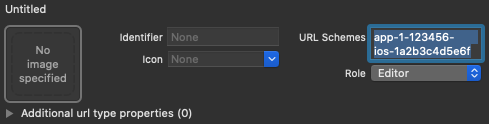
在 Xcode 專案中新增自訂網址架構:
- 開啟專案設定:在左側樹狀檢視中按兩下專案名稱。在「目標」部分選取您的應用程式,然後選取「資訊」分頁標籤,並展開「網址類型」部分。
-
按一下 + 按鈕,然後將編碼後的應用程式 ID 新增為網址配置。將其他欄位留空。
您可以在 Firebase 控制台中找到編碼後的應用程式 ID:依序前往「設定」
>「一般」分頁標籤,然後向下捲動至「您的應用程式」部分,即可查看 iOS 應用程式的詳細資料。 完成後,您的設定應如下所示 (但會使用應用程式專屬值):
使用您在 Firebase 控制台中取得的供應商 ID,建立
OAuthProvider的執行個體。Swift
var provider = OAuthProvider(providerID: "oidc.example-provider")Objective-C
FIROAuthProvider *provider = [FIROAuthProvider providerWithProviderID:@"oidc.example-provider"];選用:指定要隨 OAuth 要求傳送的其他自訂 OAuth 參數。
Swift
provider.customParameters = [
  "login_hint": "user@example.com"
]
Objective-C
[provider setCustomParameters:@{@"login_hint": @"user@example.com"}];請向供應商確認支援的參數。請注意,您無法使用
setCustomParameters傳遞 Firebase 必要參數。這些參數包括client_id、response_type、redirect_uri、state、scope和response_mode。選用:指定基本設定檔以外的其他 OAuth 2.0 範圍,以便向驗證供應商要求。
Swift
provider.scopes = ["mail.read", "calendars.read"]Objective-C
[provider setScopes:@[@"mail.read", @"calendars.read"]];請洽詢供應商,瞭解支援的範圍。
選用:如要自訂應用程式向使用者顯示 reCAPTCHA 時呈現
SFSafariViewController或UIWebView的方式,請建立符合AuthUIDelegate協定的自訂類別。使用 OAuth 供應商物件向 Firebase 進行驗證。
Swift
// If you created a custom class that conforms to AuthUIDelegate,
// pass it instead of nil:
provider.getCredentialWith(nil) { credential, error in
  if error != nil {
    // Handle error.
  }
  if credential != nil {
    Auth().signIn(with: credential) { authResult, error in
      if error != nil {
        // Handle error.
      }
      // User is signed in.
      // IdP data available in authResult.additionalUserInfo.profile.
      // OAuth access token can also be retrieved:
      // (authResult.credential as? OAuthCredential)?.accessToken
      // OAuth ID token can also be retrieved:
      // (authResult.credential as? OAuthCredential)?.idToken
    }
  }
}
Objective-C
// If you created a custom class that conforms to AuthUIDelegate,
// pass it instead of nil:
[provider getCredentialWithUIDelegate:nil
                            completion:^(FIRAuthCredential *_Nullable credential, NSError *_Nullable error) {
  if (error) {
    // Handle error.
  }
  if (credential) {
    [[FIRAuth auth] signInWithCredential:credential
                              completion:^(FIRAuthDataResult *_Nullable authResult, NSError *_Nullable error) {
      if (error) {
        // Handle error.
      }
      // User is signed in.
      // IdP data available in authResult.additionalUserInfo.profile.
      // OAuth access token can also be retrieved:
      // ((FIROAuthCredential *)authResult.credential).accessToken
      // OAuth ID token can also be retrieved:
      // ((FIROAuthCredential *)authResult.credential).idToken
    }];
  }
}];
雖然上述範例著重於登入流程,但您也可以使用
linkWithCredential,將 OIDC 提供者連結至現有使用者。舉例來說,您可以將多個供應商連結至同一位使用者,讓使用者透過任一供應商登入。Swift
Auth().currentUser.link(withCredential: credential) { authResult, error in
  if error != nil {
    // Handle error.
  }
  // OIDC credential is linked to the current user.
  // IdP data available in authResult.additionalUserInfo.profile.
  // OAuth access token can also be retrieved:
  // (authResult.credential as? OAuthCredential)?.accessToken
  // OAuth ID token can also be retrieved:
  // (authResult.credential as? OAuthCredential)?.idToken
}
Objective-C
[[FIRAuth auth].currentUser
    linkWithCredential:credential
            completion:^(FIRAuthDataResult * _Nullable authResult, NSError * _Nullable error) {
  if (error) {
    // Handle error.
  }
  // OIDC credential is linked to the current user.
  // IdP data available in authResult.additionalUserInfo.profile.
  // OAuth access token can also be retrieved:
  // ((FIROAuthCredential *)authResult.credential).accessToken
  // OAuth ID token can also be retrieved:
  // ((FIROAuthCredential *)authResult.credential).idToken
}];
您可以使用相同的模式搭配
reauthenticateWithCredential,為需要最近登入的敏感作業擷取最新憑證。Swift
Auth().currentUser.reauthenticateWithCredential(withCredential: credential) { authResult, error in
  if error != nil {
    // Handle error.
  }
  // User is re-authenticated with fresh tokens minted and
  // should be able to perform sensitive operations like account
  // deletion and email or password update.
  // IdP data available in result.additionalUserInfo.profile.
  // Additional OAuth access token can also be retrieved:
  // (authResult.credential as? OAuthCredential)?.accessToken
  // OAuth ID token can also be retrieved:
  // (authResult.credential as? OAuthCredential)?.idToken
}
Objective-C
[[FIRAuth auth].currentUser
    reauthenticateWithCredential:credential
                      completion:^(FIRAuthDataResult * _Nullable authResult, NSError * _Nullable error) {
  if (error) {
    // Handle error.
  }
  // User is re-authenticated with fresh tokens minted and
  // should be able to perform sensitive operations like account
  // deletion and email or password update.
  // IdP data available in result.additionalUserInfo.profile.
  // Additional OAuth access token can also be retrieved:
  // ((FIROAuthCredential *)authResult.credential).accessToken
  // OAuth ID token can also be retrieved:
  // ((FIROAuthCredential *)authResult.credential).idToken
}];
手動處理登入流程
如果您已在應用程式中實作 OpenID Connect 登入流程,可以直接使用 ID 權杖向 Firebase 進行驗證:
Swift
let credential = OAuthProvider.credential(
    withProviderID: "oidc.example-provider",  // As registered in Firebase console.
    idToken: idToken,  // ID token from OpenID Connect flow.
    rawNonce: nil
)
Auth.auth().signIn(with: credential) { authResult, error in
    if error {
        // Handle error.
        return
    }
    // User is signed in.
    // IdP data available in authResult?.additionalUserInfo?.profile
}
Objective-C
FIROAuthCredential *credential =
    [FIROAuthProvider credentialWithProviderID:@"oidc.example-provider"  // As registered in Firebase console.
                                       IDToken:idToken  // ID token from OpenID Connect flow.
                                      rawNonce:nil];
[[FIRAuth auth] signInWithCredential:credential
                          completion:^(FIRAuthDataResult * _Nullable authResult,
                                      NSError * _Nullable error) {
    if (error != nil) {
        // Handle error.
        return;
    }
    // User is signed in.
    // IdP data available in authResult.additionalUserInfo.profile
}];
後續步驟
使用者首次登入後,系統會建立新的使用者帳戶,並連結至使用者登入時使用的憑證 (即使用者名稱和密碼、電話號碼或驗證供應商資訊)。這個新帳戶會儲存在 Firebase 專案中,可用於識別專案中每個應用程式的使用者,無論使用者登入方式為何。
在 Firebase Realtime Database 和 Cloud Storage 安全規則中,您可以從
auth變數取得已登入使用者的專屬使用者 ID, 並使用該 ID 控制使用者可存取的資料。
您可以將驗證供應商憑證連結至現有使用者帳戶,允許使用者透過多個驗證供應商登入應用程式。
如要登出使用者,請呼叫
signOut:。
Swift
let firebaseAuth = Auth.auth()
do {
  try firebaseAuth.signOut()
} catch let signOutError as NSError {
  print("Error signing out: %@", signOutError)
}
Objective-C
NSError *signOutError;
BOOL status = [[FIRAuth auth] signOut:&signOutError];
if (!status) {
  NSLog(@"Error signing out: %@", signOutError);
  return;
}
您也可以新增錯誤處理程式碼,處理各種驗證錯誤。請參閱「處理錯誤」。