

คุณอนุญาตให้ผู้ใช้ตรวจสอบสิทธิ์กับ Firebase โดยใช้ผู้ให้บริการ OAuth เช่น Yahoo ได้โดยการผสานรวมการเข้าสู่ระบบ OAuth ทั่วไปเข้ากับแอปโดยใช้ Firebase SDK เพื่อดำเนินการขั้นตอนการลงชื่อเข้าใช้แบบครบวงจร
ก่อนเริ่มต้น
หากต้องการให้ผู้ใช้ลงชื่อเข้าใช้โดยใช้บัญชี Yahoo คุณต้องเปิดใช้ Yahoo เป็นผู้ให้บริการลงชื่อเข้าใช้สำหรับโปรเจ็กต์ Firebase ก่อน โดยทำดังนี้
- เพิ่ม Firebase ในโปรเจ็กต์ Apple
- ในFirebase คอนโซล ให้ไปที่ ความปลอดภัย > การตรวจสอบสิทธิ์
- ในแท็บวิธีการลงชื่อเข้าใช้ ให้เปิดใช้ผู้ให้บริการลงชื่อเข้าใช้ Yahoo
-
เพิ่มรหัสไคลเอ็นต์และรหัสลับไคลเอ็นต์จาก
คอนโซลนักพัฒนาซอฟต์แวร์ของผู้ให้บริการรายนั้นลงในการกำหนดค่าผู้ให้บริการ
-
หากต้องการลงทะเบียนไคลเอ็นต์ OAuth ของ Yahoo ให้ทำตามเอกสารประกอบสำหรับนักพัฒนาแอปของ Yahoo เกี่ยวกับการลงทะเบียนเว็บแอปพลิเคชันกับ Yahoo
อย่าลืมเลือกสิทธิ์ API ของ OpenID Connect 2 รายการ ได้แก่
profileและemail -
เมื่อลงทะเบียนแอปกับผู้ให้บริการเหล่านี้ โปรดลงทะเบียน
*.firebaseapp.comโดเมนสำหรับโปรเจ็กต์เป็นโดเมนเปลี่ยนเส้นทางสำหรับแอป
-
- คลิกบันทึก
จัดการขั้นตอนการลงชื่อเข้าใช้ด้วย Firebase SDK
หากต้องการจัดการขั้นตอนการลงชื่อเข้าใช้ด้วย Firebase Apple Platforms SDK ให้ทำตามขั้นตอนต่อไปนี้
เพิ่มรูปแบบ URL ที่กำหนดเองลงในโปรเจ็กต์ Xcode โดยทำดังนี้
- เปิดการกำหนดค่าโปรเจ็กต์โดยดับเบิลคลิกชื่อโปรเจ็กต์ในมุมมองแบบต้นไม้ทางด้านซ้าย เลือกแอปจากส่วนเป้าหมาย จากนั้น เลือกแท็บข้อมูล แล้วขยายส่วนประเภท URL
-
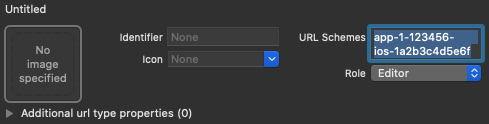
คลิกปุ่ม + แล้วเพิ่มรหัสแอปที่เข้ารหัสเป็น URL Scheme
เว้นช่องอื่นๆ ว่างไว้
คุณดูรหัสแอปที่เข้ารหัสได้ในFirebase Console โดยไปที่
การตั้งค่า > แท็บทั่วไป จากนั้นเลื่อนลงไปที่ส่วนแอปของคุณเพื่อดูรายละเอียดเกี่ยวกับ แอป iOSเมื่อเสร็จแล้ว การกำหนดค่าควรมีลักษณะคล้ายกับ ต่อไปนี้ (แต่มีค่าเฉพาะแอปพลิเคชันของคุณ)
สร้างอินสแตนซ์ของ OAuthProvider โดยใช้รหัสผู้ให้บริการ yahoo.com
Swift
var provider = OAuthProvider(providerID: "yahoo.com")
Objective-C
FIROAuthProvider *provider = [FIROAuthProvider providerWithProviderID:@"yahoo.com"];
ไม่บังคับ: ระบุพารามิเตอร์ OAuth ที่กำหนดเองเพิ่มเติมที่ต้องการ ส่งพร้อมกับคำขอ OAuth
Swift
provider.customParameters = [
"prompt": "login",
"language": "fr"
]
Objective-C
[provider setCustomParameters:@{@"prompt": @"login", @"language": @"fr"}];
ดูพารามิเตอร์ที่ Yahoo รองรับได้ที่ เอกสารประกอบเกี่ยวกับ OAuth ของ Yahoo โปรดทราบว่าคุณไม่สามารถส่งพารามิเตอร์ที่ Firebase กําหนดด้วย
setCustomParametersพารามิเตอร์เหล่านี้คือ client_id, redirect_uri, response_type, scope และ stateไม่บังคับ: ระบุขอบเขต OAuth 2.0 เพิ่มเติมนอกเหนือจาก
profileและemailที่คุณต้องการขอจากผู้ให้บริการตรวจสอบสิทธิ์ หากแอปพลิเคชันของคุณต้องเข้าถึงข้อมูลผู้ใช้ส่วนตัวจาก Yahoo API คุณจะต้องขอสิทธิ์เข้าถึง Yahoo API ในส่วนสิทธิ์ API ในคอนโซลนักพัฒนาซอฟต์แวร์ของ Yahoo ขอบเขต OAuth ที่ขอต้องตรงกับขอบเขตที่กำหนดค่าไว้ล่วงหน้าในสิทธิ์ API ของแอปทุกประการ เช่น หากมีการขอสิทธิ์เข้าถึงแบบอ่าน/เขียนไปยังรายชื่อติดต่อของผู้ใช้และมีการกำหนดค่าล่วงหน้าในสิทธิ์ API ของแอปsdct-wจะต้องส่งแทนขอบเขต OAuth แบบอ่านอย่างเดียวsdct-rไม่เช่นนั้นโฟลว์จะล้มเหลวและข้อผิดพลาดจะแสดงต่อ ผู้ใช้ปลายทางSwift
// Request access to Yahoo Mail API.
// Request read/write access to user contacts.
// This must be preconfigured in the app's API permissions.
provider.scopes = ["mail-r", "sdct-w"]
Objective-C
// Request access to Yahoo Mail API.
// Request read/write access to user contacts.
// This must be preconfigured in the app's API permissions.
[provider setScopes:@[@"mail-r", @"sdct-w"]];
ดูข้อมูลเพิ่มเติมได้ที่เอกสารประกอบเกี่ยวกับขอบเขตของ Yahoo
ไม่บังคับ: หากต้องการปรับแต่งวิธีที่แอปแสดง
SFSafariViewControllerหรือUIWebViewเมื่อแสดง reCAPTCHA ต่อผู้ใช้ ให้สร้างคลาสที่กำหนดเองซึ่งเป็นไปตามโปรโตคอลAuthUIDelegateแล้วส่งไปยังcredentialWithUIDelegateตรวจสอบสิทธิ์ด้วย Firebase โดยใช้ออบเจ็กต์ผู้ให้บริการ OAuth
Swift
provider.getCredentialWith(nil) { credential, error in
if error != nil {
// Handle error.
}
if credential != nil {
Auth().signIn(with: credential) { authResult, error in
  if error != nil {
    // Handle error.
  }
  // User is signed in.
  // IdP data available in authResult.additionalUserInfo.profile.
  // Yahoo OAuth access token can also be retrieved by:
  // (authResult.credential as? OAuthCredential)?.accessToken
  // Yahoo OAuth ID token can be retrieved by calling:
  // (authResult.credential as? OAuthCredential)?.idToken
}
}
}
Objective-C
[provider getCredentialWithUIDelegate:nil
                       completion:^(FIRAuthCredential *_Nullable credential, NSError *_Nullable error) {
if (error) {
// Handle error.
}
if (credential) {
[[FIRAuth auth] signInWithCredential:credential
                          completion:^(FIRAuthDataResult *_Nullable authResult, NSError *_Nullable error) {
  if (error) {
    // Handle error.
  }
  // User is signed in.
  // IdP data available in authResult.additionalUserInfo.profile.
  // Yahoo OAuth access token can also be retrieved by:
  // ((FIROAuthCredential *)authResult.credential).accessToken
  // Yahoo OAuth ID token can be retrieved by calling:
  // ((FIROAuthCredential *)authResult.credential).idToken
}];
}
}];
คุณสามารถเรียกใช้ Yahoo API ได้โดยใช้โทเค็นเพื่อการเข้าถึง OAuth
เช่น หากต้องการรับข้อมูลโปรไฟล์พื้นฐาน คุณสามารถเรียกใช้ REST API โดยส่งโทเค็นเพื่อการเข้าถึงในส่วนหัว
Authorizationได้ดังนี้https://social.yahooapis.com/v1/user/YAHOO_USER_UID/profile?format=json
โดย
YAHOO_USER_UIDคือรหัสของผู้ใช้ Yahoo ซึ่งดึงข้อมูลได้จาก ฟิลด์Auth.auth.currentUser.providerData[0].uidหรือจากauthResult.additionalUserInfo.profileแม้ว่าตัวอย่างข้างต้นจะเน้นที่ขั้นตอนการลงชื่อเข้าใช้ แต่คุณก็ยังมีความสามารถในการลิงก์ผู้ให้บริการ Yahoo กับผู้ใช้ที่มีอยู่โดยใช้
linkWithPopupเช่น คุณสามารถลิงก์ผู้ให้บริการหลายรายกับผู้ใช้รายเดียวกันเพื่อให้ผู้ใช้ลงชื่อเข้าใช้ด้วยผู้ให้บริการรายใดก็ได้Swift
Auth().currentUser.link(withCredential: credential) { authResult, error in
if error != nil {
// Handle error.
}
// Yahoo credential is linked to the current user.
// IdP data available in authResult.additionalUserInfo.profile.
// Yahoo OAuth access token can also be retrieved by:
// (authResult.credential as? OAuthCredential)?.accessToken
// Yahoo OAuth ID token can be retrieved by calling:
// (authResult.credential as? OAuthCredential)?.idToken
}
Objective-C
[[FIRAuth auth].currentUser
linkWithCredential:credential
        completion:^(FIRAuthDataResult * _Nullable authResult, NSError * _Nullable error) {
if (error) {
// Handle error.
}
// Yahoo credential is linked to the current user.
// IdP data available in authResult.additionalUserInfo.profile.
// Yahoo OAuth access token is can also be retrieved by:
// ((FIROAuthCredential *)authResult.credential).accessToken
// Yahoo OAuth ID token can be retrieved by calling:
// ((FIROAuthCredential *)authResult.credential).idToken
}];
คุณสามารถใช้รูปแบบเดียวกันกับ
reauthenticateWithPopup/reauthenticateWithRedirectซึ่งใช้เพื่อ ดึงข้อมูลเข้าสู่ระบบล่าสุดสำหรับการดำเนินการที่มีความละเอียดอ่อนซึ่งต้องมีการ เข้าสู่ระบบล่าสุดSwift
Auth().currentUser.reauthenticateWithCredential(withCredential: credential) { authResult, error in
if error != nil {
// Handle error.
}
// User is re-authenticated with fresh tokens minted and
// should be able to perform sensitive operations like account
// deletion and email or password update.
// IdP data available in result.additionalUserInfo.profile.
// Additional OAuth access token is can also be retrieved by:
// (authResult.credential as? OAuthCredential)?.accessToken
// Yahoo OAuth ID token can be retrieved by calling:
// (authResult.credential as? OAuthCredential)?.idToken
}
Objective-C
[[FIRAuth auth].currentUser
reauthenticateWithCredential:credential
                  completion:^(FIRAuthDataResult * _Nullable authResult, NSError * _Nullable error) {
if (error) {
// Handle error.
}
// User is re-authenticated with fresh tokens minted and
// should be able to perform sensitive operations like account
// deletion and email or password update.
// IdP data available in result.additionalUserInfo.profile.
// Additional OAuth access token is can also be retrieved by:
// ((FIROAuthCredential *)authResult.credential).accessToken
// Yahoo OAuth ID token can be retrieved by calling:
// ((FIROAuthCredential *)authResult.credential).idToken
}];
ขั้นตอนถัดไป
หลังจากที่ผู้ใช้ลงชื่อเข้าใช้เป็นครั้งแรก ระบบจะสร้างบัญชีผู้ใช้ใหม่และ ลิงก์กับข้อมูลเข้าสู่ระบบที่ผู้ใช้ลงชื่อเข้าใช้ ซึ่งได้แก่ ชื่อผู้ใช้และรหัสผ่าน หมายเลขโทรศัพท์ หรือข้อมูลผู้ให้บริการตรวจสอบสิทธิ์ ระบบจะจัดเก็บบัญชีใหม่นี้เป็นส่วนหนึ่งของโปรเจ็กต์ Firebase และสามารถใช้เพื่อระบุตัวตน ผู้ใช้ในทุกแอปในโปรเจ็กต์ได้ ไม่ว่าผู้ใช้จะลงชื่อเข้าใช้ด้วยวิธีใดก็ตาม
-
ในแอป คุณจะดูข้อมูลโปรไฟล์พื้นฐานของผู้ใช้ได้จากออบเจ็กต์
Userดูจัดการผู้ใช้ ใน Firebase Realtime Database และ Cloud Storage กฎความปลอดภัย คุณสามารถ รับรหัสผู้ใช้ที่ไม่ซ้ำของผู้ใช้ที่ลงชื่อเข้าใช้จากตัวแปร
authและใช้รหัสดังกล่าวเพื่อควบคุมข้อมูลที่ผู้ใช้เข้าถึงได้
คุณอนุญาตให้ผู้ใช้ลงชื่อเข้าใช้แอปโดยใช้ผู้ให้บริการตรวจสอบสิทธิ์หลายรายได้โดยลิงก์ข้อมูลเข้าสู่ระบบของผู้ให้บริการตรวจสอบสิทธิ์กับบัญชีผู้ใช้ที่มีอยู่
หากต้องการออกจากระบบของผู้ใช้ ให้เรียกใช้
signOut:
Swift
let firebaseAuth = Auth.auth()
do {
  try firebaseAuth.signOut()
} catch let signOutError as NSError {
  print("Error signing out: %@", signOutError)
}
Objective-C
NSError *signOutError;
BOOL status = [[FIRAuth auth] signOut:&signOutError];
if (!status) {
  NSLog(@"Error signing out: %@", signOutError);
  return;
}
นอกจากนี้ คุณอาจต้องเพิ่มโค้ดการจัดการข้อผิดพลาดสำหรับการตรวจสอบสิทธิ์ ทั้งหมดด้วย ดูจัดการข้อผิดพลาด