
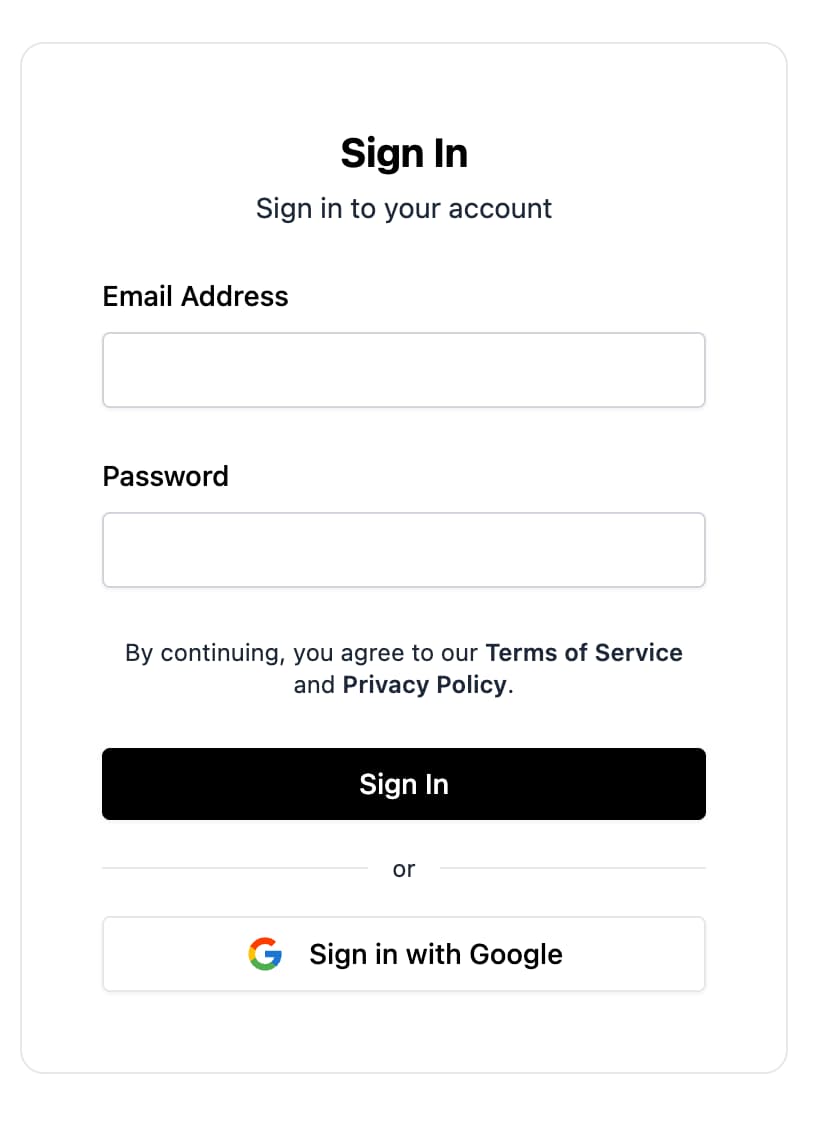
FirebaseUI for Web is a set of libraries built on the Firebase Authentication JavaScript SDK that help you ship authentication flows quickly.
FirebaseUI for Web provides these benefits:
- Modern modular SDK support with
initializeApp(...)and the current Firebase JS SDK. - Composable screens, forms, and buttons instead of a single monolithic widget.
- Support for React, Shadcn, and Angular.
- Configurable behaviors for redirect vs popup flows, Google One Tap, anonymous upgrade, phone settings, and more.
- Localization support via
@firebase-oss/ui-translations. - Built-in support for email/password, email link, phone auth, OAuth providers, and multi-factor flows.
This guide walks through installation, initialization, sign-in methods, and common configuration for React, Shadcn, and Angular apps.
Before you begin
Add Firebase to your web app:
Enable Authentication in the Firebase console.
Install
firebaseif it is not already in your project:npm install firebaseUse the modular Firebase JS SDK:
import { initializeApp } from 'firebase/app';

const app = initializeApp({
  /* your Firebase config */
});
Choose your platform and install FirebaseUI:
For shadcn/ui based React apps, add the Firebase registry to
components.json:{ "registries": { "@firebase": "https://firebaseopensource.com/r/{name}.json" } }The auth components used throughout this guide are available from that registry, including
sign-in-auth-screen,sign-up-auth-screen,email-link-auth-screen,oauth-screen,phone-auth-screen,google-sign-in-button,apple-sign-in-button, andgithub-sign-in-button.Then add the components you want to use:
npx shadcn@latest add @firebase/sign-in-auth-screen @firebase/google-sign-in-buttonThis installs the underlying React FirebaseUI dependencies for you.
For React apps without shadcn/ui, install:
npm install @firebase-oss/ui-react@beta @firebase-oss/ui-stylesFor Angular apps, install:
npm install @angular/fire @firebase-oss/ui-angular@beta @firebase-oss/ui-core@beta @firebase-oss/ui-styles@beta
Initialize FirebaseUI
Create a shared UI store with initializeUI(...), then pass it to your
framework integration.
React
import { initializeApp } from 'firebase/app';
import { initializeUI } from '@firebase-oss/ui-core';
import { FirebaseUIProvider } from '@firebase-oss/ui-react';

const app = initializeApp({
  /* your Firebase config */
});

const ui = initializeUI({
  app,
});

export function AppProviders({ children }: { children: React.ReactNode }) {
  return <FirebaseUIProvider ui={ui}>{children}</FirebaseUIProvider>;
}
Shadcn
Shadcn uses the same setup as React, because it also uses
@firebase-oss/ui-react under the hood:
import { initializeApp } from 'firebase/app';
import { initializeUI } from '@firebase-oss/ui-core';
import { FirebaseUIProvider } from '@firebase-oss/ui-react';

const app = initializeApp({
  /* your Firebase config */
});

const ui = initializeUI({
  app,
});

export function AppProviders({ children }: { children: React.ReactNode }) {
  return <FirebaseUIProvider ui={ui}>{children}</FirebaseUIProvider>;
}
These components use your existing shadcn styles; you typically do not import FirebaseUI's bundled CSS when using the shadcn registry.
Angular
import { type ApplicationConfig } from '@angular/core';
import { provideFirebaseApp, initializeApp } from '@angular/fire/app';
import { provideFirebaseUI } from '@firebase-oss/ui-angular';
import { initializeUI } from '@firebase-oss/ui-core';

export const appConfig: ApplicationConfig = {
  providers: [
    provideFirebaseApp(() =>
      initializeApp({
        /* your Firebase config */
      }),
    ),
    provideFirebaseUI((apps) =>
      initializeUI({
        app: apps[0],
      }),
    ),
  ],
};
Include styles
FirebaseUI has pre-built UI components for React and Angular. To use the components, you need to include their CSS:
If you are using Tailwind with React or Angular:
Otherwise, include the FirebaseUI styles:
@import '@firebase-oss/ui-styles/dist.min.css';
FirebaseUI for Web supports custom theming via CSS variable overrides. For more details, see the theming documentation.
Set up sign-in methods
Before users can sign in, enable each provider you want in Authentication -> Sign-in method in the Firebase console.
FirebaseUI for Web uses screens, forms, and buttons that you render directly.
Shared configuration for those flows lives in behaviors passed to
initializeUI(...).
Email address and password
- Enable Email/Password in the Firebase console.
- Render
SignInAuthScreenorSignUpAuthScreenin React, the generatedsign-in-auth-screenorsign-up-auth-screencomponents in Shadcn, orfui-sign-in-auth-screenorfui-sign-up-auth-screenin Angular.
Email link authentication
- Enable Email/Password and Email link (passwordless sign-in) in the Firebase console.
- Render
EmailLinkAuthScreenin React, the generatedemail-link-auth-screencomponent in Shadcn, orfui-email-link-auth-screenin Angular. - Complete sign-in with the current URL using the core helpers when needed.
import { completeEmailLinkSignIn } from '@firebase-oss/ui-core';

await completeEmailLinkSignIn(ui, window.location.href);
OAuth providers
FirebaseUI for Web supports built-in buttons for providers such as Google, Apple, Facebook, GitHub, Microsoft, and X/Twitter.
- Enable the provider in the Firebase console.
- Add your app domain to Authorized domains where required.
- Render
OAuthScreenwith the provider buttons you want, such asGoogleSignInButton,AppleSignInButton,FacebookSignInButton,GitHubSignInButton,MicrosoftSignInButton, orTwitterSignInButtonin React, the generated shadcn equivalents in your app, orfui-oauth-screenwithfui-google-sign-in-button,fui-apple-sign-in-button,fui-facebook-sign-in-button,fui-github-sign-in-button,fui-microsoft-sign-in-button, orfui-twitter-sign-in-buttonin Angular.
Phone number
- Enable Phone in the Firebase console.
- Add your app domain to Authorized domains.
- Render
PhoneAuthScreenorPhoneAuthFormin React, the generatedphone-auth-screenorphone-auth-formcomponents in Shadcn, orfui-phone-auth-screenin Angular.
Optional: configure allowed countries, default country, or reCAPTCHA behavior:
import {
  countryCodes,
  initializeUI,
  recaptchaVerification,
} from '@firebase-oss/ui-core';

const ui = initializeUI({
  app,
  behaviors: [
    countryCodes({
      allowedCountries: ['GB', 'US', 'FR'],
      defaultCountry: 'GB',
    }),
    recaptchaVerification({
      size: 'compact',
      theme: 'light',
    }),
  ],
});
Customization
Configure shared auth behavior in behaviors passed to initializeUI(...).
Require a display name during sign-up
import { initializeUI, requireDisplayName } from '@firebase-oss/ui-core';

const ui = initializeUI({
  app,
  behaviors: [requireDisplayName()],
});
Upgrade anonymous users
Use the autoUpgradeAnonymousUsers(...) behavior to merge an anonymous session
into a signed-in account.
import {
  autoUpgradeAnonymousUsers,
  initializeUI,
} from '@firebase-oss/ui-core';

const ui = initializeUI({
  app,
  behaviors: [
    autoUpgradeAnonymousUsers({
      async onUpgrade(ui, oldUserId, credential) {
        // Migrate or merge user data here if needed.
      },
    }),
  ],
});
For migration details, see MIGRATION.md).
Sign in
Render the auth screen you want and handle success in component callbacks or Angular outputs.
React
```tsx import { SignInAuthScreen } from '@firebase-oss/ui-react'; import { useNavigate } from 'react-router';export function SignInPage() { const navigate = useNavigate();
return (
Shadcn uses the same runtime and flow as React. The only difference is that
you import the generated component from your app instead of from
Shadcn
@firebase-oss/ui-react:
export function SignInPage() { const navigate = useNavigate();
return (
To sign users out, use the standard Firebase Authentication sign-out API: Choose the provider sign-in flow with behaviors: Popup is the default, so you only need to configure redirect explicitly: To render OAuth buttons, add them to your platform-specific screen. Use the Make sure Google sign-in is enabled in the Firebase console, then copy the
web client ID from the Google provider settings. Attach policy links through the platform provider configuration.Angular
import { Component } from '@angular/core';
import { Router } from '@angular/router';
import { SignInAuthScreenComponent } from '@firebase-oss/ui-angular';
import type { User } from '@angular/fire/auth';

@Component({
  selector: 'app-sign-in-page',
  standalone: true,
  imports: [SignInAuthScreenComponent],
  template: `
    <fui-sign-in-auth-screen (signIn)="onSignIn($event)" />
  `,
})
export class SignInPageComponent {
  constructor(private router: Router) {}

  onSignIn(user: User) {
    this.router.navigate(['/dashboard']);
  }
}
Sign out
import { getAuth, signOut } from 'firebase/auth';

const auth = getAuth(app);
await signOut(auth);
OAuth providers: popup vs redirect
providerPopupStrategy() for popup flowsproviderRedirectStrategy() for redirect flowsimport { initializeUI, providerRedirectStrategy } from '@firebase-oss/ui-core';
const ui = initializeUI({
app,
behaviors: [providerRedirectStrategy()],
});
React
import {
  GitHubSignInButton,
  GoogleSignInButton,
  OAuthScreen,
} from '@firebase-oss/ui-react';

export function OAuthPage() {
  return (
    <OAuthScreen>
      <GoogleSignInButton />
      <GitHubSignInButton />
    </OAuthScreen>
  );
}
Shadcn
import { GitHubSignInButton } from '@/components/github-sign-in-button';
import { GoogleSignInButton } from '@/components/google-sign-in-button';
import { OAuthScreen } from '@/components/oauth-screen';

export function OAuthPage() {
  return (
    <OAuthScreen>
      <GoogleSignInButton />
      <GitHubSignInButton />
    </OAuthScreen>
  );
}
Angular
import { Component } from '@angular/core';
import {
  GithubSignInButtonComponent,
  GoogleSignInButtonComponent,
  OAuthScreenComponent,
} from '@firebase-oss/ui-angular';

@Component({
  selector: 'app-oauth-page',
  standalone: true,
  imports: [
    OAuthScreenComponent,
    GoogleSignInButtonComponent,
    GithubSignInButtonComponent,
  ],
  template: `
    <fui-oauth-screen>
      <fui-google-sign-in-button />
      <fui-github-sign-in-button />
    </fui-oauth-screen>
  `,
})
export class OAuthPageComponent {}
Google One Tap
oneTapSignIn(...) behavior to enable Google One Tap:import { initializeUI, oneTapSignIn } from '@firebase-oss/ui-core';
const ui = initializeUI({
app,
behaviors: [
oneTapSignIn({
clientId: 'YOUR_GOOGLE_WEB_CLIENT_ID',
autoSelect: false,
cancelOnTapOutside: false,
}),
],
});
Terms of service and privacy policy
React
```tsx
import { FirebaseUIProvider } from '@firebase-oss/ui-react';
<FirebaseUIProvider ui={ui} policies={{ termsOfServiceUrl: 'https://example.com/terms', privacyPolicyUrl: 'https://example.com/privacy', }}
{children} ; ```
Shadcn
Use the same FirebaseUIProvider configuration as React.
Angular
import { type ApplicationConfig } from '@angular/core';
import { provideFirebaseUIPolicies } from '@firebase-oss/ui-angular';

export const appConfig: ApplicationConfig = {
  providers: [
    provideFirebaseUIPolicies(() => ({
      termsOfServiceUrl: 'https://example.com/terms',
      privacyPolicyUrl: 'https://example.com/privacy',
    })),
  ],
};
Translations
FirebaseUI for Web supports localization through
@firebase-oss/ui-translations.
import { initializeUI } from '@firebase-oss/ui-core';
import { registerLocale } from '@firebase-oss/ui-translations';

const enUsCustom = registerLocale('en-US', {
  labels: {
    signIn: 'Continue',
  },
});

const ui = initializeUI({
  app,
  locale: enUsCustom,
});
Next steps
- Read README.md for the full API, behaviors, and component reference.
- Read MIGRATION.md if you are migrating an existing app to FirebaseUI for Web.
- See the package-specific docs in packages/react/README.md, packages/shadcn/README.md, and packages/angular/README.md.
- Explore the examples in examples/react, examples/shadcn, and examples/angular.