

Tło
Operacje potoku zapewniają nowy interfejs zapytań dla Cloud Firestore, który obsługuje zaawansowane funkcje zapytań i złożone wyrażenia. Wprowadza wiele nowych funkcji, w tym min(...), max(...), substring(...), regex_match(...) i array_contains_all(...), oraz etapy umożliwiające wykonywanie złożonych przekształceń.
Pierwsze kroki
Aby zainstalować i zainicjować pakiety SDK klienta, zapoznaj się z instrukcjami w tych przewodnikach:
- Pierwsze kroki z pakietami SDK do aplikacji mobilnych i SDK do stron internetowych
- Zacznij korzystać z bibliotek klienta serwera
Składnia
W sekcjach poniżej znajdziesz omówienie składni operacji potoku.
Pojęcia
Jedną z istotnych różnic w operacjach potoku jest wprowadzenie jawnej kolejności „etapów”. Umożliwia to tworzenie bardziej złożonych zapytań. Jest to jednak znaczące odstępstwo od dotychczasowego interfejsu zapytań, który korzysta z operacji podstawowych, gdzie kolejność etapów była domyślna. Rozważ ten przykład operacji potoku:
Web
const pipeline = db.pipeline() // Step 1: Start a query with collection scope .collection("cities") // Step 2: Filter the collection .where(field("population").greaterThan(100000)) // Step 3: Sort the remaining documents .sort(field("name").ascending()) // Step 4: Return the top 10. Note applying the limit earlier in the // pipeline would have unintentional results. .limit(10);
Swift
let pipeline = db.pipeline() // Step 1: Start a query with collection scope .collection("cities") // Step 2: Filter the collection .where(Field("population").greaterThan(100000)) // Step 3: Sort the remaining documents .sort([Field("name").ascending()]) // Step 4: Return the top 10. Note applying the limit earlier in the pipeline would have // unintentional results. .limit(10)
Kotlin
val pipeline = db.pipeline() // Step 1: Start a query with collection scope .collection("cities") // Step 2: Filter the collection .where(field("population").greaterThan(100000)) // Step 3: Sort the remaining documents .sort(field("name").ascending()) // Step 4: Return the top 10. Note applying the limit earlier in the pipeline would have // unintentional results. .limit(10)
Java
Pipeline pipeline = db.pipeline() // Step 1: Start a query with collection scope .collection("cities") // Step 2: Filter the collection .where(field("population").greaterThan(100000)) // Step 3: Sort the remaining documents .sort(field("name").ascending()) // Step 4: Return the top 10. Note applying the limit earlier in the pipeline would have // unintentional results. .limit(10);
Python
from google.cloud.firestore_v1.pipeline_expressions import Field pipeline = ( client.pipeline() .collection("cities") .where(Field.of("population").greater_than(100_000)) .sort(Field.of("name").ascending()) .limit(10) )
Go
pipeline := client.Pipeline(). Collection("cities"). Where(firestore.FieldOf("population").GreaterThan(100000)). Sort(firestore.Orders(firestore.Ascending(firestore.FieldOf("name")))). Limit(10)
Zdarzenie inicjujące
Operacje potoku mają bardzo podobną składnię do istniejących zapytań Cloud Firestore. Aby rozpocząć, zainicjuj zapytanie, wpisując:
Web
const { getFirestore } = require("firebase/firestore"); const { execute } = require("firebase/firestore/pipelines"); const database = getFirestore(app, "enterprise"); const pipeline = database.pipeline();
Swift
let firestore = Firestore.firestore(database: "enterprise") let pipeline = firestore.pipeline()
Kotlin
val firestore = Firebase.firestore("enterprise") val pipeline = firestore.pipeline()
Java
FirebaseFirestore firestore = FirebaseFirestore.getInstance("enterprise"); PipelineSource pipeline = firestore.pipeline();
Python
firestore_client = firestore.client(default_app, "your-new-enterprise-database") pipeline = firestore_client.pipeline()
Go
client, err := firestore.NewClientWithDatabase(ctx, projectID, databaseID) if err != nil { fmt.Fprintf(w, "firestore.NewClientWithDatabase failed: %v", err) return err } defer client.Close() pipeline := client.Pipeline().Collection("books")
Struktura
Podczas tworzenia operacji potoku warto znać kilka ważnych pojęć: etapy, wyrażenia, funkcje i opakowania podzapytania.
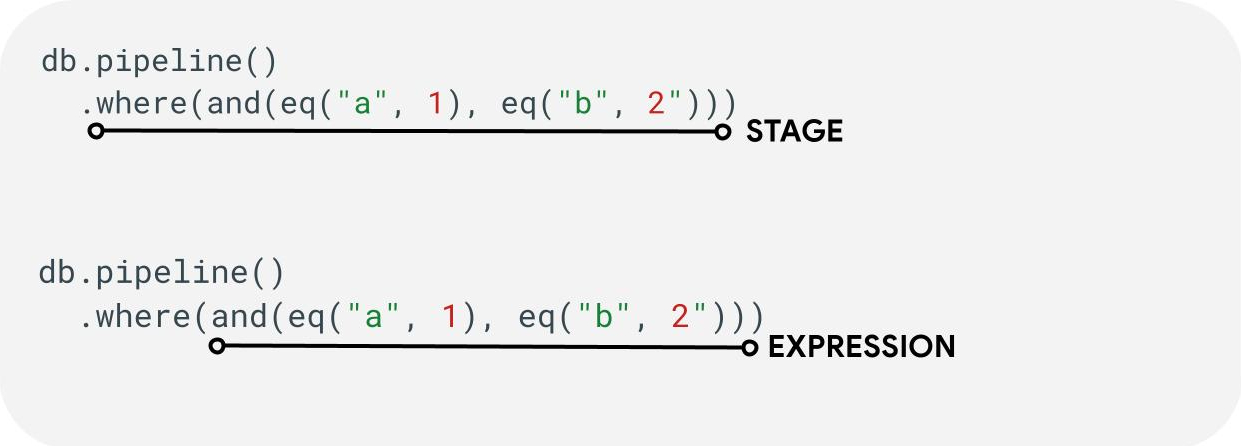
Etapy: potok może składać się z jednego lub kilku etapów. Logicznie reprezentują one serię kroków (lub etapów) wykonywanych w celu wykonania zapytania.
Wyrażenia: etapy często akceptują wyrażenia, co pozwala na tworzenie bardziej złożonych zapytań. Wyrażenie może być proste i składać się z jednej funkcji, np. eq("a", 1). Możesz też tworzyć bardziej złożone wyrażenia, zagnieżdżając je, np. and(eq("a", 1), eq("b", 2)).
Otoki podzapytania: funkcje takie jak array() i scalar() umożliwiają umieszczenie zagnieżdżonego potoku jako wyrażenia na etapie.
Pola / Stałe / Zmienne
Operacje potoku obsługują złożone wyrażenia. Dlatego ważne jest, aby odróżnić, czy wartość reprezentuje pole, stałą czy zmienną.
Pola odnoszą się do danych w dokumentach, a stałe umożliwiają określenie dowolnej wartości jako argumentu wyrażenia. Zmienne pozwalają natomiast definiować i używać wartości tymczasowych, które są ograniczone do wykonywania zapytania, a nie do przetwarzanych dokumentów. Poniżej znajdziesz omówienie tych pojęć. Więcej informacji o odczytywaniu i zapisywaniu zmiennych podczas wykonywania zapytania znajdziesz na etapie let(...).
| Pola | Stałe | Zmienne | |
|---|---|---|---|
| Purpose | uzyskiwać dostępu do pól w dokumentach ani ich przechowywać; | określić stałą wartość, | używanie wartości tymczasowych podczas wykonywania potoku |
| Korzystanie z pakietu SDK | field("name") |
constant("val") |
variable("name") |
| Zakres | lokalny dla bieżącego dokumentu | globalny | globalne dla potoku i potoków podrzędnych |
| Niezdefiniowany plik referencyjny | wynosi absent |
Nie dotyczy | generuje błąd środowiska wykonawczego |
Przykłady:
Web
const pipeline = db.pipeline() .collection("cities") .where(field("name").equal(constant("Toronto")));
Swift
let pipeline = db.pipeline() .collection("cities") .where(Field("name").equal(Constant("Toronto")))
Kotlin
val pipeline = db.pipeline() .collection("cities") .where(field("name").equal(constant("Toronto")))
Java
Pipeline pipeline = db.pipeline() .collection("cities") .where(field("name").equal(constant("Toronto")));
Python
from google.cloud.firestore_v1.pipeline_expressions import Field, Constant pipeline = ( client.pipeline() .collection("cities") .where(Field.of("name").equal(Constant.of("Toronto"))) )
Go
pipeline := client.Pipeline().Collection("cities"). Where(firestore.FieldOf("name").Equal(firestore.ConstantOf("Toronto")))
Etapy
Etapy wejściowe
Etap wejściowy reprezentuje pierwszy etap zapytania. Określa początkowy zestaw dokumentów, do których wysyłasz zapytania. W przypadku operacji potoku jest to w dużej mierze podobne do istniejących zapytań, gdzie większość zapytań zaczyna się od etapu collection(...) lub collection_group(...). Dwa nowe etapy wejściowe to database() i documents(...), gdzie database() umożliwia zwrócenie wszystkich dokumentów w bazie danych, a documents(...) działa identycznie jak odczyt zbiorczy.
Web
let results; // Return all restaurants in San Francisco results = await execute(db.pipeline().collection("cities/sf/restaurants")); // Return all restaurants results = await execute(db.pipeline().collectionGroup("restaurants")); // Return all documents across all collections in the database (the entire database) results = await execute(db.pipeline().database()); // Batch read of 3 documents results = await execute(db.pipeline().documents([ doc(db, "cities", "SF"), doc(db, "cities", "DC"), doc(db, "cities", "NY") ]));
Swift
var results: Pipeline.Snapshot // Return all restaurants in San Francisco results = try await db.pipeline().collection("cities/sf/restaurants").execute() // Return all restaurants results = try await db.pipeline().collectionGroup("restaurants").execute() // Return all documents across all collections in the database (the entire database) results = try await db.pipeline().database().execute() // Batch read of 3 documents results = try await db.pipeline().documents([ db.collection("cities").document("SF"), db.collection("cities").document("DC"), db.collection("cities").document("NY") ]).execute()
Kotlin
var results: Task<Pipeline.Snapshot> // Return all restaurants in San Francisco results = db.pipeline().collection("cities/sf/restaurants").execute() // Return all restaurants results = db.pipeline().collectionGroup("restaurants").execute() // Return all documents across all collections in the database (the entire database) results = db.pipeline().database().execute() // Batch read of 3 documents results = db.pipeline().documents( db.collection("cities").document("SF"), db.collection("cities").document("DC"), db.collection("cities").document("NY") ).execute()
Java
Task<Pipeline.Snapshot> results; // Return all restaurants in San Francisco results = db.pipeline().collection("cities/sf/restaurants").execute(); // Return all restaurants results = db.pipeline().collectionGroup("restaurants").execute(); // Return all documents across all collections in the database (the entire database) results = db.pipeline().database().execute(); // Batch read of 3 documents results = db.pipeline().documents( db.collection("cities").document("SF"), db.collection("cities").document("DC"), db.collection("cities").document("NY") ).execute();
Python
# Return all restaurants in San Francisco results = client.pipeline().collection("cities/sf/restaurants").execute() # Return all restaurants results = client.pipeline().collection_group("restaurants").execute() # Return all documents across all collections in the database (the entire database) results = client.pipeline().database().execute() # Batch read of 3 documents results = ( client.pipeline() .documents( client.collection("cities").document("SF"), client.collection("cities").document("DC"), client.collection("cities").document("NY"), ) .execute() )
Go
// Return all restaurants in San Francisco results1, err := client.Pipeline().Collection("cities/sf/restaurants").Execute(ctx).Results().GetAll() if err != nil { fmt.Fprintf(w, "GetAll failed: %v", err) return err } // Return all restaurants results2, err := client.Pipeline().CollectionGroup("restaurants").Execute(ctx).Results().GetAll() if err != nil { fmt.Fprintf(w, "GetAll failed: %v", err) return err } // Return all documents across all collections in the database (the entire database) results3, err := client.Pipeline().Database().Execute(ctx).Results().GetAll() if err != nil { fmt.Fprintf(w, "GetAll failed: %v", err) return err } // Batch read of 3 documents results4, err := client.Pipeline(). Documents([]*firestore.DocumentRef{ client.Collection("cities").Doc("SF"), client.Collection("cities").Doc("DC"), client.Collection("cities").Doc("NY"), }). Execute(ctx).Results().GetAll() if err != nil { fmt.Fprintf(w, "GetAll failed: %v", err) return err }
Podobnie jak w przypadku wszystkich innych etapów kolejność wyników z tych etapów wejściowych nie jest stabilna. Jeśli wymagana jest określona kolejność, zawsze należy dodać operator sort(...).
Gdzie
Etap where(...) działa jak standardowa operacja filtrowania dokumentów wygenerowanych na poprzednim etapie i w większości odzwierciedla istniejącą składnię „where” w przypadku istniejących zapytań. Każdy dokument, w którym dane wyrażenie ma wartość inną niż true, jest odfiltrowywany ze zwracanych dokumentów.
Można połączyć kilka instrukcji where(...), które będą działać jako wyrażenie and(...). Na przykład te 2 zapytania są logicznie równoważne i można ich używać zamiennie.
Web
let results; results = await execute(db.pipeline().collection("books") .where(field("rating").equal(5)) .where(field("published").lessThan(1900)) ); results = await execute(db.pipeline().collection("books") .where(and(field("rating").equal(5), field("published").lessThan(1900))) );
Swift
var results: Pipeline.Snapshot results = try await db.pipeline().collection("books") .where(Field("rating").equal(5)) .where(Field("published").lessThan(1900)) .execute() results = try await db.pipeline().collection("books") .where(Field("rating").equal(5) && Field("published").lessThan(1900)) .execute()
Kotlin
var results: Task<Pipeline.Snapshot> results = db.pipeline().collection("books") .where(field("rating").equal(5)) .where(field("published").lessThan(1900)) .execute() results = db.pipeline().collection("books") .where(Expression.and(field("rating").equal(5), field("published").lessThan(1900))) .execute()
Java
Task<Pipeline.Snapshot> results; results = db.pipeline().collection("books") .where(field("rating").equal(5)) .where(field("published").lessThan(1900)) .execute(); results = db.pipeline().collection("books") .where(Expression.and( field("rating").equal(5), field("published").lessThan(1900) )) .execute();
Python
from google.cloud.firestore_v1.pipeline_expressions import And, Field results = ( client.pipeline() .collection("books") .where(Field.of("rating").equal(5)) .where(Field.of("published").less_than(1900)) .execute() ) results = ( client.pipeline() .collection("books") .where(And(Field.of("rating").equal(5), Field.of("published").less_than(1900))) .execute() )
Go
results1, err := client.Pipeline(). Collection("books"). Where(firestore.FieldOf("rating").Equal(5)). Where(firestore.FieldOf("published").LessThan(1900)). Execute(ctx).Results().GetAll() if err != nil { fmt.Fprintf(w, "GetAll failed: %v", err) return err } results2, err := client.Pipeline(). Collection("books"). Where(firestore.And( firestore.FieldOf("rating").Equal(5), firestore.FieldOf("published").LessThan(1900), )). Execute(ctx).Results().GetAll() if err != nil { fmt.Fprintf(w, "GetAll failed: %v", err) return err }
Wybieranie, dodawanie i usuwanie pól
select(...), add_fields(...) i remove_fields(...) umożliwiają modyfikowanie pól zwracanych z poprzedniego etapu. Te 3 sceny są ogólnie określane
jako sceny projekcyjne.
Funkcje select(...) i add_fields(...) umożliwiają określenie wyniku wyrażenia w podanej przez użytkownika nazwie pola. select(...) zwraca tylko dokumenty z określonymi nazwami pól, a add_fields(...) rozszerza schemat poprzedniego etapu (potencjalnie zastępując wartości o identycznych nazwach pól).
remove_fields(...) umożliwia określenie zbioru pól, które mają zostać usunięte z poprzedniego etapu. Podanie nazw pól, które nie istnieją, nie powoduje żadnego działania.
Zobacz sekcję Ograniczanie zwracanych pól poniżej, ale ogólnie użycie takiego etapu do ograniczenia wyniku tylko do pól potrzebnych w kliencie pomaga zmniejszyć koszty i czas oczekiwania w przypadku większości zapytań.
Zbiorcze / niepowtarzalne
Etap aggregate(...) umożliwia wykonanie serii agregacji na dokumentach wejściowych. Domyślnie wszystkie dokumenty są agregowane razem, ale można podać opcjonalny argument grouping, który umożliwia agregowanie dokumentów wejściowych w różnych zasobnikach.
Web
const results = await execute(db.pipeline() .collection("books") .aggregate( field("rating").average().as("avg_rating") ) .distinct(field("genre")) );
Swift
let results = try await db.pipeline() .collection("books") .aggregate([ Field("rating").average().as("avg_rating") ], groups: [ Field("genre") ]) .execute()
Kotlin
val results = db.pipeline() .collection("books") .aggregate( AggregateStage .withAccumulators(AggregateFunction.average("rating").alias("avg_rating")) .withGroups(field("genre")) ) .execute()
Java
Task<Pipeline.Snapshot> results = db.pipeline() .collection("books") .aggregate(AggregateStage .withAccumulators( AggregateFunction.average("rating").alias("avg_rating")) .withGroups(field("genre"))) .execute();
Python
from google.cloud.firestore_v1.pipeline_expressions import Field results = ( client.pipeline() .collection("books") .aggregate( Field.of("rating").average().as_("avg_rating"), groups=[Field.of("genre")] ) .execute() )
Go
snapshot := client.Pipeline(). Collection("books"). Aggregate( firestore.Accumulators(firestore.Average("rating").As("avg_rating")), firestore.WithAggregateGroups("genre"), ). Execute(ctx)
Jeśli nie podasz wartości groupings, ten etap wygeneruje tylko 1 dokument. W przeciwnym razie zostanie wygenerowany dokument dla każdej unikalnej kombinacji wartości groupings.
Etap distinct(...) to uproszczony operator agregacji, który umożliwia generowanie tylko unikalnych wartości groupings bez żadnych akumulatorów. Pod wszystkimi innymi względami działa identycznie jak aggregate(...). Poniższy przykład pokazuje:
Web
const results = await execute(db.pipeline() .collection("books") .distinct( field("author").toUpper().as("author"), field("genre") ) );
Swift
let results = try await db.pipeline() .collection("books") .distinct([ Field("author").toUpper().as("author"), Field("genre") ]) .execute()
Kotlin
val results = db.pipeline() .collection("books") .distinct( field("author").toUpper().alias("author"), field("genre") ) .execute()
Java
Task<Pipeline.Snapshot> results = db.pipeline() .collection("books") .distinct( field("author").toUpper().alias("author"), field("genre") ) .execute();
Python
from google.cloud.firestore_v1.pipeline_expressions import Field results = ( client.pipeline() .collection("books") .distinct(Field.of("author").to_upper().as_("author"), "genre") .execute() )
Go
snapshot := client.Pipeline(). Collection("books"). Distinct(firestore.Fields( firestore.ToUpper(firestore.FieldOf("author")).As("author"), firestore.FieldOf("genre"), )). Execute(ctx)
Funkcje
Funkcje są elementem składowym do tworzenia wyrażeń i złożonych zapytań. Pełną listę funkcji wraz z przykładami znajdziesz w dokumentacji funkcji. Przypomnijmy strukturę typowego zapytania:

Wiele etapów akceptuje wyrażenia zawierające co najmniej 1 funkcję. Najczęstsze zastosowanie funkcji można znaleźć na etapach where(...) i select(...). Istnieją 2 główne typy funkcji,
które warto znać:
Web
let results; // Type 1: Scalar (for use in non-aggregation stages) // Example: Return the min store price for each book. results = await execute(db.pipeline().collection("books") .select(field("current").logicalMinimum(field("updated")).as("price_min")) ); // Type 2: Aggregation (for use in aggregate stages) // Example: Return the min price of all books. results = await execute(db.pipeline().collection("books") .aggregate(field("price").minimum().as("min_price")) );
Swift
var results: Pipeline.Snapshot // Type 1: Scalar (for use in non-aggregation stages) // Example: Return the min store price for each book. results = try await db.pipeline().collection("books") .select([ Field("current").logicalMinimum(["updated"]).as("price_min") ]) .execute() // Type 2: Aggregation (for use in aggregate stages) // Example: Return the min price of all books. results = try await db.pipeline().collection("books") .aggregate([Field("price").minimum().as("min_price")]) .execute()
Kotlin
var results: Task<Pipeline.Snapshot> // Type 1: Scalar (for use in non-aggregation stages) // Example: Return the min store price for each book. results = db.pipeline().collection("books") .select( field("current").logicalMinimum("updated").alias("price_min") ) .execute() // Type 2: Aggregation (for use in aggregate stages) // Example: Return the min price of all books. results = db.pipeline().collection("books") .aggregate(AggregateFunction.minimum("price").alias("min_price")) .execute()
Java
Task<Pipeline.Snapshot> results; // Type 1: Scalar (for use in non-aggregation stages) // Example: Return the min store price for each book. results = db.pipeline().collection("books") .select( field("current").logicalMinimum("updated").alias("price_min") ) .execute(); // Type 2: Aggregation (for use in aggregate stages) // Example: Return the min price of all books. results = db.pipeline().collection("books") .aggregate(AggregateFunction.minimum("price").alias("min_price")) .execute();
Python
from google.cloud.firestore_v1.pipeline_expressions import Field # Type 1: Scalar (for use in non-aggregation stages) # Example: Return the min store price for each book. results = ( client.pipeline() .collection("books") .select( Field.of("current").logical_minimum(Field.of("updated")).as_("price_min") ) .execute() ) # Type 2: Aggregation (for use in aggregate stages) # Example: Return the min price of all books. results = ( client.pipeline() .collection("books") .aggregate(Field.of("price").minimum().as_("min_price")) .execute() )
Go
// Type 1: Scalar (for use in non-aggregation stages) // Example: Return the min store price for each book. results1, err := client.Pipeline(). Collection("books"). Select(firestore.Fields( firestore.LogicalMinimum(firestore.FieldOf("current"), firestore.FieldOf("updated")).As("price_min"), )). Execute(ctx).Results().GetAll() if err != nil { fmt.Fprintf(w, "GetAll failed: %v", err) return err } // Type 2: Aggregation (for use in aggregate stages) // Example: Return the min price of all books. results2, err := client.Pipeline(). Collection("books"). Aggregate(firestore.Accumulators( firestore.Minimum("price").As("min_price"), )). Execute(ctx).Results().GetAll() if err != nil { fmt.Fprintf(w, "GetAll failed: %v", err) return err }
Limity
W większości przypadków wersja Enterprise nie nakłada ograniczeń na kształt zapytania. Innymi słowy, nie musisz ograniczać się do niewielkiej liczby wartości w zapytaniu IN lub OR. Zamiast tego musisz pamiętać o 2 głównych ograniczeniach:
- Termin: 60 sekund (identycznie jak w wersji Standard).
- Wykorzystanie pamięci: limit 128 MiB na ilość danych zmaterializowanych podczas wykonywania zapytania.
Błędy
Zapytania mogą się nie powieść z różnych powodów. Oto link do typowych błędów i powiązanych z nimi działań, które możesz podjąć:
| Kod błędu | Czynność |
DEADLINE_EXCEEDED
|
Wykonywane zapytanie przekracza 60-sekundowy limit czasu i wymaga dodatkowej optymalizacji. Wskazówki znajdziesz w sekcji dotyczącej skuteczności. Jeśli nie możesz znaleźć głównej przyczyny problemu, skontaktuj się z zespołem. |
RESOURCE_EXHAUSTED
|
Wykonywane zapytanie przekracza limity pamięci i wymaga dodatkowej optymalizacji. Wskazówki znajdziesz w sekcji dotyczącej skuteczności. Jeśli nie możesz znaleźć głównej przyczyny problemu, skontaktuj się z zespołem. |
INTERNAL
|
Skontaktuj się z zespołem, aby uzyskać pomoc. |
Wydajność
Bazy danych w wersji Enterprise nie wymagają, aby indeks był zawsze obecny.
Oznacza to, że zapytanie może mieć większe opóźnienie w porównaniu z dotychczasowymi zapytaniami, które natychmiast kończyły się błędem FAILED_PRECONDITION dotyczącym braku indeksu. Aby zwiększyć wydajność operacji potoku, możesz wykonać kilka czynności.
Tworzenie indeksów
Użyty indeks
Dzięki funkcji wyjaśniania zapytania możesz sprawdzić, czy zapytanie jest obsługiwane przez indeks, czy też wraca do mniej wydajnej operacji, takiej jak skanowanie tabeli. Jeśli zapytanie nie jest w pełni obsługiwane przez indeks, możesz utworzyć indeks, postępując zgodnie z instrukcjami.
Tworzenie indeksów
Aby utworzyć indeksy, możesz postępować zgodnie z istniejącą dokumentacją dotyczącą zarządzania indeksami. Zanim utworzysz indeks, zapoznaj się z ogólnymi sprawdzonymi metodami dotyczącymi indeksów w Cloud Firestore. Aby mieć pewność, że zapytanie może korzystać z indeksów, postępuj zgodnie ze sprawdzonymi metodami tworzenia indeksów z polami w tej kolejności:
- Wszystkie pola, które będą używane w filtrach równości (w dowolnej kolejności).
- Wszystkie pola, według których będzie przeprowadzane sortowanie (w tej samej kolejności)
- Pola, które będą używane w filtrach zakresu lub nierówności, w kolejności malejącej według selektywności ograniczeń zapytania.
Na przykład w przypadku tego zapytania:
Web
const results = await execute(db.pipeline() .collection("books") .where(field("published").lessThan(1900)) .where(field("genre").equal("Science Fiction")) .where(field("rating").greaterThan(4.3)) .sort(field("published").descending()) );
Swift
let results = try await db.pipeline() .collection("books") .where(Field("published").lessThan(1900)) .where(Field("genre").equal("Science Fiction")) .where(Field("rating").greaterThan(4.3)) .sort([Field("published").descending()]) .execute()
Kotlin
val results = db.pipeline() .collection("books") .where(field("published").lessThan(1900)) .where(field("genre").equal("Science Fiction")) .where(field("rating").greaterThan(4.3)) .sort(field("published").descending()) .execute()
Java
Task<Pipeline.Snapshot> results = db.pipeline() .collection("books") .where(field("published").lessThan(1900)) .where(field("genre").equal("Science Fiction")) .where(field("rating").greaterThan(4.3)) .sort(field("published").descending()) .execute();
Python
from google.cloud.firestore_v1.pipeline_expressions import Field results = ( client.pipeline() .collection("books") .where(Field.of("published").less_than(1900)) .where(Field.of("genre").equal("Science Fiction")) .where(Field.of("rating").greater_than(4.3)) .sort(Field.of("published").descending()) .execute() )
Go
snapshot := client.Pipeline(). Collection("books"). Where(firestore.FieldOf("published").LessThan(1900)). Where(firestore.FieldOf("genre").Equal("Science Fiction")). Where(firestore.FieldOf("rating").GreaterThan(4.3)). Sort(firestore.Orders(firestore.Descending(firestore.FieldOf("published")))). Execute(ctx)
Zalecany indeks to indeks zakresu kolekcji w books dla (genre [...], published DESC, avg_rating DESC).
Gęstość indeksu
Cloud Firestore obsługuje indeksy rozproszone i nierozproszone. Więcej informacji znajdziesz w artykule na temat gęstości indeksu.
Zapytania pokryte + indeksy dodatkowe
Cloud Firestore może pominąć pobieranie pełnego dokumentu i zwrócić wyniki z indeksu, jeśli wszystkie zwracane pola znajdują się w indeksie pomocniczym. Zwykle prowadzi to do znacznego skrócenia czasu oczekiwania (i obniżenia kosztów). Użyj tego przykładowego zapytania:
Web
const results = await execute(db.pipeline() .collection("books") .where(field("category").like("%fantasy%")) .where(field("title").exists()) .where(field("author").exists()) .select(field("title"), field("author")) );
Swift
let results = try await db.pipeline() .collection("books") .where(Field("category").like("%fantasy%")) .where(Field("title").exists()) .where(Field("author").exists()) .select([Field("title"), Field("author")]) .execute()
Kotlin
val results = db.pipeline() .collection("books") .where(field("category").like("%fantasy%")) .where(field("title").exists()) .where(field("author").exists()) .select(field("title"), field("author")) .execute()
Java
Task<Pipeline.Snapshot> results = db.pipeline() .collection("books") .where(field("category").like("%fantasy%")) .where(field("title").exists()) .where(field("author").exists()) .select(field("title"), field("author")) .execute();
Python
from google.cloud.firestore_v1.pipeline_expressions import Field results = ( client.pipeline() .collection("books") .where(Field.of("category").like("%fantasy%")) .where(Field.of("title").exists()) .where(Field.of("author").exists()) .select("title", "author") .execute() )
Go
snapshot := client.Pipeline(). Collection("books"). Where(firestore.FieldOf("category").Like("%fantasy%")). Where(firestore.FieldOf("title").FieldExists()). Where(firestore.FieldOf("author").FieldExists()). Select(firestore.Fields("title", "author")). Execute(ctx)
Jeśli baza danych ma już indeks zakresu kolekcji w polu books dla (category [...], title [...], author [...]), może uniknąć pobierania danych z głównych dokumentów. W takim przypadku kolejność w indeksie nie ma znaczenia, co jest oznaczone symbolem [...].
Ograniczanie pól do zwrócenia
Domyślnie zapytanie Cloud Firestore zwraca wszystkie pola w dokumencie, podobnie jak SELECT * w systemach relacyjnych. Jeśli jednak aplikacja potrzebuje tylko podzbioru pól, możesz użyć etapów select(...) lub restrict(...), aby przenieść to filtrowanie po stronie serwera. Zmniejszy to rozmiar odpowiedzi (co obniży koszty ruchu wychodzącego z sieci) i poprawi czas oczekiwania.
Narzędzia rozwiązywania problemów
Wyjaśnienie zapytania
Funkcja Query Explain umożliwia wyświetlanie wskaźników wykonywania i szczegółów dotyczących używanych indeksów.
Dane
Operacje potoku są w pełni zintegrowane z dotychczasowymi wskaźnikami Cloud Firestore.
Znane problemy i ograniczenia
Indeksy specjalistyczne
Operacje potoku nie obsługują jeszcze istniejących typów indeksów array-contains i vector. Zamiast odrzucać takie zapytania, Cloud Firestore spróbuje użyć innych istniejących indeksów ascending i descending. Z tego powodu wyrażenia array_contains lub find_nearest będą działać wolniej niż ich dotychczasowe odpowiedniki.
Obsługa w czasie rzeczywistym i offline
Operacje potoku nie mają funkcji czasu rzeczywistego ani funkcji offline.
Co dalej?
- Zacznij od zapoznania się z dokumentacją referencyjną funkcji i etapów.
- Dowiedz się, jak wykonywać złączenia z podzapytaniami.