

Thông tin khái quát
Các thao tác trong quy trình cung cấp một giao diện truy vấn mới cho Cloud Firestore, hỗ trợ chức năng truy vấn nâng cao và các biểu thức phức tạp. Thư viện này giới thiệu nhiều hàm mới, bao gồm min(...), max(...), substring(...), regex_match(...) và array_contains_all(...), cũng như các giai đoạn để có thể thực hiện các phép biến đổi phức tạp.
Bắt đầu
Để cài đặt và khởi chạy SDK ứng dụng khách, hãy tham khảo hướng dẫn trong các hướng dẫn sau:
Cú pháp
Các phần sau đây cung cấp thông tin tổng quan về cú pháp cho các thao tác trong quy trình.
Khái niệm
Một điểm khác biệt đáng chú ý với các thao tác trong Pipeline là việc giới thiệu thứ tự "giai đoạn" rõ ràng. Điều này giúp bạn có thể thể hiện các truy vấn phức tạp hơn. Tuy nhiên, đây là một điểm khác biệt đáng chú ý so với giao diện truy vấn hiện có bằng cách sử dụng các thao tác Core, trong đó thứ tự của các giai đoạn được ngầm hiểu. Hãy xem xét ví dụ sau về các thao tác trong Pipeline:
Web
const pipeline = db.pipeline() // Step 1: Start a query with collection scope .collection("cities") // Step 2: Filter the collection .where(field("population").greaterThan(100000)) // Step 3: Sort the remaining documents .sort(field("name").ascending()) // Step 4: Return the top 10. Note applying the limit earlier in the // pipeline would have unintentional results. .limit(10);
Swift
let pipeline = db.pipeline() // Step 1: Start a query with collection scope .collection("cities") // Step 2: Filter the collection .where(Field("population").greaterThan(100000)) // Step 3: Sort the remaining documents .sort([Field("name").ascending()]) // Step 4: Return the top 10. Note applying the limit earlier in the pipeline would have // unintentional results. .limit(10)
Kotlin
val pipeline = db.pipeline() // Step 1: Start a query with collection scope .collection("cities") // Step 2: Filter the collection .where(field("population").greaterThan(100000)) // Step 3: Sort the remaining documents .sort(field("name").ascending()) // Step 4: Return the top 10. Note applying the limit earlier in the pipeline would have // unintentional results. .limit(10)
Java
Pipeline pipeline = db.pipeline() // Step 1: Start a query with collection scope .collection("cities") // Step 2: Filter the collection .where(field("population").greaterThan(100000)) // Step 3: Sort the remaining documents .sort(field("name").ascending()) // Step 4: Return the top 10. Note applying the limit earlier in the pipeline would have // unintentional results. .limit(10);
Python
from google.cloud.firestore_v1.pipeline_expressions import Field pipeline = ( client.pipeline() .collection("cities") .where(Field.of("population").greater_than(100_000)) .sort(Field.of("name").ascending()) .limit(10) )
Bắt đầu
pipeline := client.Pipeline(). Collection("cities"). Where(firestore.FieldOf("population").GreaterThan(100000)). Sort(firestore.Orders(firestore.Ascending(firestore.FieldOf("name")))). Limit(10)
Khởi chạy
Các thao tác trong quy trình có một cú pháp rất quen thuộc bắt nguồn từ các truy vấn Cloud Firestore hiện có. Để bắt đầu, bạn khởi chạy một truy vấn bằng cách viết như sau:
Web
const { getFirestore } = require("firebase/firestore"); const { execute } = require("firebase/firestore/pipelines"); const database = getFirestore(app, "enterprise"); const pipeline = database.pipeline();
Swift
let firestore = Firestore.firestore(database: "enterprise") let pipeline = firestore.pipeline()
Kotlin
val firestore = Firebase.firestore("enterprise") val pipeline = firestore.pipeline()
Java
FirebaseFirestore firestore = FirebaseFirestore.getInstance("enterprise"); PipelineSource pipeline = firestore.pipeline();
Python
firestore_client = firestore.client(default_app, "your-new-enterprise-database") pipeline = firestore_client.pipeline()
Bắt đầu
client, err := firestore.NewClientWithDatabase(ctx, projectID, databaseID) if err != nil { fmt.Fprintf(w, "firestore.NewClientWithDatabase failed: %v", err) return err } defer client.Close() pipeline := client.Pipeline().Collection("books")
Cấu trúc
Có một số thuật ngữ quan trọng mà bạn cần hiểu khi tạo các thao tác trong Pipeline: giai đoạn, biểu thức, hàm và trình bao bọc truy vấn phụ.
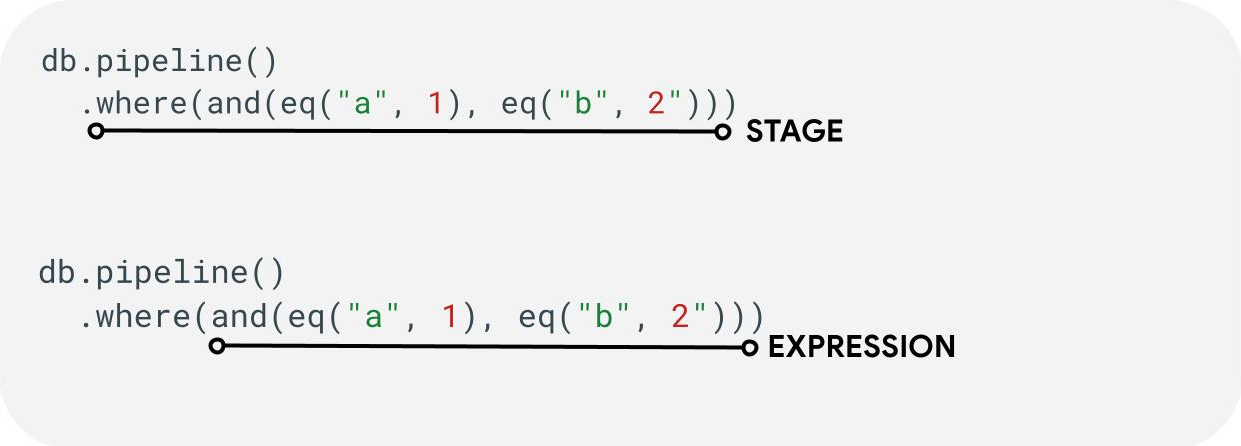
Giai đoạn: Một quy trình có thể bao gồm một hoặc nhiều giai đoạn. Về mặt logic, các bước này thể hiện chuỗi các bước (hoặc giai đoạn) được thực hiện để chạy truy vấn.
Biểu thức: Các giai đoạn thường chấp nhận một biểu thức cho phép bạn thể hiện các truy vấn phức tạp hơn. Biểu thức có thể đơn giản và chỉ bao gồm một hàm duy nhất như eq("a", 1). Bạn cũng có thể biểu thị các biểu thức phức tạp hơn bằng cách lồng các biểu thức như and(eq("a", 1), eq("b", 2)).
Trình bao bọc truy vấn phụ: Các hàm như array() và scalar() cho phép bạn nhúng một quy trình lồng nhau dưới dạng biểu thức trong một giai đoạn.
Trường / Hằng số / Biến
Các thao tác trong quy trình hỗ trợ các biểu thức phức tạp. Do đó, điều quan trọng là phải phân biệt xem một giá trị có đại diện cho một trường, một hằng số hay một biến hay không.
Trong khi các trường đề cập đến dữ liệu trong tài liệu và hằng số cho phép chỉ định bất kỳ giá trị nào làm đối số cho một biểu thức, thì các biến cho phép xác định và sử dụng các giá trị tạm thời được giới hạn trong quá trình thực thi truy vấn thay vì các tài liệu đang được xử lý. Sau đây là thông tin tổng quan về các khái niệm này, hãy xem giai đoạn let(...) để biết thêm thông tin về cách đọc và ghi biến trong quá trình thực thi truy vấn.
| Trường | Hằng số | Biến | |
|---|---|---|---|
| Mục đích | truy cập hoặc lưu trữ các trường vào tài liệu | chỉ định một giá trị cố định | sử dụng các giá trị tạm thời trong quá trình thực thi quy trình |
| Sử dụng SDK | field("name") |
constant("val") |
variable("name") |
| Phạm vi | cục bộ đối với tài liệu hiện tại | toàn cầu | từ toàn cầu đến đường ống và đường ống phụ |
| Tham chiếu chưa xác định | đánh giá thành absent |
Không áp dụng | tạo lỗi thời gian chạy |
Ví dụ:
Web
const pipeline = db.pipeline() .collection("cities") .where(field("name").equal(constant("Toronto")));
Swift
let pipeline = db.pipeline() .collection("cities") .where(Field("name").equal(Constant("Toronto")))
Kotlin
val pipeline = db.pipeline() .collection("cities") .where(field("name").equal(constant("Toronto")))
Java
Pipeline pipeline = db.pipeline() .collection("cities") .where(field("name").equal(constant("Toronto")));
Python
from google.cloud.firestore_v1.pipeline_expressions import Field, Constant pipeline = ( client.pipeline() .collection("cities") .where(Field.of("name").equal(Constant.of("Toronto"))) )
Bắt đầu
pipeline := client.Pipeline().Collection("cities"). Where(firestore.FieldOf("name").Equal(firestore.ConstantOf("Toronto")))
Sân khấu
Giai đoạn đầu vào
Giai đoạn đầu vào biểu thị giai đoạn đầu tiên của một truy vấn. Nó xác định bộ tài liệu ban đầu mà bạn đang truy vấn. Đối với các thao tác trong Pipeline, điều này phần lớn tương tự như các truy vấn hiện có, trong đó hầu hết các truy vấn đều bắt đầu bằng giai đoạn collection(...) hoặc collection_group(...). Hai giai đoạn đầu vào mới là database() và documents(...), trong đó database() cho phép trả về tất cả các tài liệu trong cơ sở dữ liệu, trong khi documents(...) hoạt động giống như một lượt đọc hàng loạt.
Web
let results; // Return all restaurants in San Francisco results = await execute(db.pipeline().collection("cities/sf/restaurants")); // Return all restaurants results = await execute(db.pipeline().collectionGroup("restaurants")); // Return all documents across all collections in the database (the entire database) results = await execute(db.pipeline().database()); // Batch read of 3 documents results = await execute(db.pipeline().documents([ doc(db, "cities", "SF"), doc(db, "cities", "DC"), doc(db, "cities", "NY") ]));
Swift
var results: Pipeline.Snapshot // Return all restaurants in San Francisco results = try await db.pipeline().collection("cities/sf/restaurants").execute() // Return all restaurants results = try await db.pipeline().collectionGroup("restaurants").execute() // Return all documents across all collections in the database (the entire database) results = try await db.pipeline().database().execute() // Batch read of 3 documents results = try await db.pipeline().documents([ db.collection("cities").document("SF"), db.collection("cities").document("DC"), db.collection("cities").document("NY") ]).execute()
Kotlin
var results: Task<Pipeline.Snapshot> // Return all restaurants in San Francisco results = db.pipeline().collection("cities/sf/restaurants").execute() // Return all restaurants results = db.pipeline().collectionGroup("restaurants").execute() // Return all documents across all collections in the database (the entire database) results = db.pipeline().database().execute() // Batch read of 3 documents results = db.pipeline().documents( db.collection("cities").document("SF"), db.collection("cities").document("DC"), db.collection("cities").document("NY") ).execute()
Java
Task<Pipeline.Snapshot> results; // Return all restaurants in San Francisco results = db.pipeline().collection("cities/sf/restaurants").execute(); // Return all restaurants results = db.pipeline().collectionGroup("restaurants").execute(); // Return all documents across all collections in the database (the entire database) results = db.pipeline().database().execute(); // Batch read of 3 documents results = db.pipeline().documents( db.collection("cities").document("SF"), db.collection("cities").document("DC"), db.collection("cities").document("NY") ).execute();
Python
# Return all restaurants in San Francisco results = client.pipeline().collection("cities/sf/restaurants").execute() # Return all restaurants results = client.pipeline().collection_group("restaurants").execute() # Return all documents across all collections in the database (the entire database) results = client.pipeline().database().execute() # Batch read of 3 documents results = ( client.pipeline() .documents( client.collection("cities").document("SF"), client.collection("cities").document("DC"), client.collection("cities").document("NY"), ) .execute() )
Bắt đầu
// Return all restaurants in San Francisco results1, err := client.Pipeline().Collection("cities/sf/restaurants").Execute(ctx).Results().GetAll() if err != nil { fmt.Fprintf(w, "GetAll failed: %v", err) return err } // Return all restaurants results2, err := client.Pipeline().CollectionGroup("restaurants").Execute(ctx).Results().GetAll() if err != nil { fmt.Fprintf(w, "GetAll failed: %v", err) return err } // Return all documents across all collections in the database (the entire database) results3, err := client.Pipeline().Database().Execute(ctx).Results().GetAll() if err != nil { fmt.Fprintf(w, "GetAll failed: %v", err) return err } // Batch read of 3 documents results4, err := client.Pipeline(). Documents([]*firestore.DocumentRef{ client.Collection("cities").Doc("SF"), client.Collection("cities").Doc("DC"), client.Collection("cities").Doc("NY"), }). Execute(ctx).Results().GetAll() if err != nil { fmt.Fprintf(w, "GetAll failed: %v", err) return err }
Giống như tất cả các giai đoạn khác, thứ tự kết quả từ các giai đoạn đầu vào này không ổn định. Bạn phải luôn thêm toán tử sort(...) nếu cần một thứ tự cụ thể.
Địa điểm
Giai đoạn where(...) hoạt động như một thao tác lọc tiêu chuẩn đối với các tài liệu được tạo từ giai đoạn trước và chủ yếu phản ánh cú pháp "where" hiện có cho các truy vấn hiện có. Mọi tài liệu mà một biểu thức nhất định đánh giá thành giá trị không phải true đều sẽ được lọc ra khỏi các tài liệu được trả về.
Bạn có thể xâu chuỗi nhiều câu lệnh where(...) với nhau và hoạt động như một biểu thức and(...). Ví dụ: hai truy vấn sau đây tương đương về mặt logic và có thể dùng thay thế cho nhau.
Web
let results; results = await execute(db.pipeline().collection("books") .where(field("rating").equal(5)) .where(field("published").lessThan(1900)) ); results = await execute(db.pipeline().collection("books") .where(and(field("rating").equal(5), field("published").lessThan(1900))) );
Swift
var results: Pipeline.Snapshot results = try await db.pipeline().collection("books") .where(Field("rating").equal(5)) .where(Field("published").lessThan(1900)) .execute() results = try await db.pipeline().collection("books") .where(Field("rating").equal(5) && Field("published").lessThan(1900)) .execute()
Kotlin
var results: Task<Pipeline.Snapshot> results = db.pipeline().collection("books") .where(field("rating").equal(5)) .where(field("published").lessThan(1900)) .execute() results = db.pipeline().collection("books") .where(Expression.and(field("rating").equal(5), field("published").lessThan(1900))) .execute()
Java
Task<Pipeline.Snapshot> results; results = db.pipeline().collection("books") .where(field("rating").equal(5)) .where(field("published").lessThan(1900)) .execute(); results = db.pipeline().collection("books") .where(Expression.and( field("rating").equal(5), field("published").lessThan(1900) )) .execute();
Python
from google.cloud.firestore_v1.pipeline_expressions import And, Field results = ( client.pipeline() .collection("books") .where(Field.of("rating").equal(5)) .where(Field.of("published").less_than(1900)) .execute() ) results = ( client.pipeline() .collection("books") .where(And(Field.of("rating").equal(5), Field.of("published").less_than(1900))) .execute() )
Bắt đầu
results1, err := client.Pipeline(). Collection("books"). Where(firestore.FieldOf("rating").Equal(5)). Where(firestore.FieldOf("published").LessThan(1900)). Execute(ctx).Results().GetAll() if err != nil { fmt.Fprintf(w, "GetAll failed: %v", err) return err } results2, err := client.Pipeline(). Collection("books"). Where(firestore.And( firestore.FieldOf("rating").Equal(5), firestore.FieldOf("published").LessThan(1900), )). Execute(ctx).Results().GetAll() if err != nil { fmt.Fprintf(w, "GetAll failed: %v", err) return err }
Chọn / Thêm và xoá trường
select(...), add_fields(...) và remove_fields(...) đều cho phép bạn sửa đổi các trường được trả về từ giai đoạn trước. Ba loại này thường được gọi là sân khấu kiểu chiếu.
select(...) và add_fields(...) cho phép bạn chỉ định kết quả của một biểu thức cho tên trường do người dùng cung cấp. select(...) sẽ chỉ trả về các tài liệu có tên trường được chỉ định, trong khi add_fields(...) sẽ mở rộng giản đồ của giai đoạn trước (có khả năng ghi đè các giá trị có tên trường giống hệt nhau).
remove_fields(...) cho phép chỉ định một tập hợp các trường cần xoá khỏi giai đoạn trước. Việc chỉ định tên trường không tồn tại là không có tác dụng.
Hãy xem phần Hạn chế các trường cần trả về bên dưới, nhưng nói chung, việc sử dụng giai đoạn như vậy để hạn chế kết quả chỉ ở các trường cần thiết trong ứng dụng sẽ giúp giảm chi phí và độ trễ cho hầu hết các truy vấn.
Tổng hợp / Riêng biệt
Giai đoạn aggregate(...) cho phép bạn thực hiện một loạt các hoạt động tổng hợp trên các tài liệu đầu vào. Theo mặc định, tất cả các tài liệu đều được tổng hợp với nhau, nhưng bạn có thể cung cấp một đối số grouping (không bắt buộc), cho phép tổng hợp các tài liệu đầu vào thành nhiều nhóm.
Web
const results = await execute(db.pipeline() .collection("books") .aggregate( field("rating").average().as("avg_rating") ) .distinct(field("genre")) );
Swift
let results = try await db.pipeline() .collection("books") .aggregate([ Field("rating").average().as("avg_rating") ], groups: [ Field("genre") ]) .execute()
Kotlin
val results = db.pipeline() .collection("books") .aggregate( AggregateStage .withAccumulators(AggregateFunction.average("rating").alias("avg_rating")) .withGroups(field("genre")) ) .execute()
Java
Task<Pipeline.Snapshot> results = db.pipeline() .collection("books") .aggregate(AggregateStage .withAccumulators( AggregateFunction.average("rating").alias("avg_rating")) .withGroups(field("genre"))) .execute();
Python
from google.cloud.firestore_v1.pipeline_expressions import Field results = ( client.pipeline() .collection("books") .aggregate( Field.of("rating").average().as_("avg_rating"), groups=[Field.of("genre")] ) .execute() )
Bắt đầu
snapshot := client.Pipeline(). Collection("books"). Aggregate( firestore.Accumulators(firestore.Average("rating").As("avg_rating")), firestore.WithAggregateGroups("genre"), ). Execute(ctx)
Khi bạn không chỉ định groupings, giai đoạn này sẽ chỉ tạo ra một tài liệu duy nhất, nếu không, một tài liệu sẽ được tạo cho mỗi tổ hợp giá trị groupings riêng biệt.
Giai đoạn distinct(...) là một toán tử tổng hợp đơn giản, chỉ cho phép tạo groupings duy nhất mà không có bất kỳ bộ tích luỹ nào. Nó hoạt động giống hệt như aggregate(...) về mọi mặt khác. Ví dụ sau đây minh hoạ:
Web
const results = await execute(db.pipeline() .collection("books") .distinct( field("author").toUpper().as("author"), field("genre") ) );
Swift
let results = try await db.pipeline() .collection("books") .distinct([ Field("author").toUpper().as("author"), Field("genre") ]) .execute()
Kotlin
val results = db.pipeline() .collection("books") .distinct( field("author").toUpper().alias("author"), field("genre") ) .execute()
Java
Task<Pipeline.Snapshot> results = db.pipeline() .collection("books") .distinct( field("author").toUpper().alias("author"), field("genre") ) .execute();
Python
from google.cloud.firestore_v1.pipeline_expressions import Field results = ( client.pipeline() .collection("books") .distinct(Field.of("author").to_upper().as_("author"), "genre") .execute() )
Bắt đầu
snapshot := client.Pipeline(). Collection("books"). Distinct(firestore.Fields( firestore.ToUpper(firestore.FieldOf("author")).As("author"), firestore.FieldOf("genre"), )). Execute(ctx)
Hàm
Hàm là một thành phần để tạo biểu thức và truy vấn phức tạp. Để xem danh sách đầy đủ các hàm kèm theo ví dụ, hãy tham khảo Tài liệu tham khảo về hàm. Xin lưu ý rằng bạn nên cân nhắc cấu trúc của một cụm từ tìm kiếm thông thường:

Nhiều giai đoạn chấp nhận các biểu thức chứa một hoặc nhiều hàm. Cách sử dụng hàm phổ biến nhất sẽ có trong các giai đoạn where(...) và select(...). Có 2 loại hàm chính mà bạn nên biết:
Web
let results; // Type 1: Scalar (for use in non-aggregation stages) // Example: Return the min store price for each book. results = await execute(db.pipeline().collection("books") .select(field("current").logicalMinimum(field("updated")).as("price_min")) ); // Type 2: Aggregation (for use in aggregate stages) // Example: Return the min price of all books. results = await execute(db.pipeline().collection("books") .aggregate(field("price").minimum().as("min_price")) );
Swift
var results: Pipeline.Snapshot // Type 1: Scalar (for use in non-aggregation stages) // Example: Return the min store price for each book. results = try await db.pipeline().collection("books") .select([ Field("current").logicalMinimum(["updated"]).as("price_min") ]) .execute() // Type 2: Aggregation (for use in aggregate stages) // Example: Return the min price of all books. results = try await db.pipeline().collection("books") .aggregate([Field("price").minimum().as("min_price")]) .execute()
Kotlin
var results: Task<Pipeline.Snapshot> // Type 1: Scalar (for use in non-aggregation stages) // Example: Return the min store price for each book. results = db.pipeline().collection("books") .select( field("current").logicalMinimum("updated").alias("price_min") ) .execute() // Type 2: Aggregation (for use in aggregate stages) // Example: Return the min price of all books. results = db.pipeline().collection("books") .aggregate(AggregateFunction.minimum("price").alias("min_price")) .execute()
Java
Task<Pipeline.Snapshot> results; // Type 1: Scalar (for use in non-aggregation stages) // Example: Return the min store price for each book. results = db.pipeline().collection("books") .select( field("current").logicalMinimum("updated").alias("price_min") ) .execute(); // Type 2: Aggregation (for use in aggregate stages) // Example: Return the min price of all books. results = db.pipeline().collection("books") .aggregate(AggregateFunction.minimum("price").alias("min_price")) .execute();
Python
from google.cloud.firestore_v1.pipeline_expressions import Field # Type 1: Scalar (for use in non-aggregation stages) # Example: Return the min store price for each book. results = ( client.pipeline() .collection("books") .select( Field.of("current").logical_minimum(Field.of("updated")).as_("price_min") ) .execute() ) # Type 2: Aggregation (for use in aggregate stages) # Example: Return the min price of all books. results = ( client.pipeline() .collection("books") .aggregate(Field.of("price").minimum().as_("min_price")) .execute() )
Bắt đầu
// Type 1: Scalar (for use in non-aggregation stages) // Example: Return the min store price for each book. results1, err := client.Pipeline(). Collection("books"). Select(firestore.Fields( firestore.LogicalMinimum(firestore.FieldOf("current"), firestore.FieldOf("updated")).As("price_min"), )). Execute(ctx).Results().GetAll() if err != nil { fmt.Fprintf(w, "GetAll failed: %v", err) return err } // Type 2: Aggregation (for use in aggregate stages) // Example: Return the min price of all books. results2, err := client.Pipeline(). Collection("books"). Aggregate(firestore.Accumulators( firestore.Minimum("price").As("min_price"), )). Execute(ctx).Results().GetAll() if err != nil { fmt.Fprintf(w, "GetAll failed: %v", err) return err }
Giới hạn
Phần lớn phiên bản Enterprise không áp đặt giới hạn về hình dạng của truy vấn. Nói cách khác, bạn không bị giới hạn ở một số ít giá trị trong truy vấn IN hoặc OR. Thay vào đó, bạn cần lưu ý đến 2 giới hạn chính:
- Thời hạn: 60 giây (giống với phiên bản Chuẩn).
- Mức sử dụng bộ nhớ: Giới hạn 128 MiB đối với lượng dữ liệu được hiện thực hoá trong quá trình thực thi truy vấn.
Lỗi
Bạn có thể gặp phải các truy vấn không thành công vì một số lý do. Sau đây là đường liên kết đến các lỗi thường gặp và hành động tương ứng mà bạn có thể thực hiện:
| Mã lỗi | Hành động |
DEADLINE_EXCEEDED
|
Cụm từ tìm kiếm mà bạn đang thực hiện vượt quá thời hạn 60 giây và cần được tối ưu hoá thêm. Hãy xem phần hiệu suất để biết các mẹo. Nếu bạn không thể tìm ra nguyên nhân gốc rễ của vấn đề, hãy liên hệ với nhóm. |
RESOURCE_EXHAUSTED
|
Truy vấn mà bạn đang thực thi vượt quá giới hạn bộ nhớ và cần được tối ưu hoá thêm. Hãy xem phần hiệu suất để biết các mẹo. Nếu bạn không thể tìm ra nguyên nhân gốc rễ của vấn đề, hãy liên hệ với nhóm. |
INTERNAL
|
Liên hệ với nhóm hỗ trợ. |
Hiệu suất
Cơ sở dữ liệu phiên bản dành cho doanh nghiệp không yêu cầu chỉ mục luôn phải có.
Điều này có nghĩa là một truy vấn có thể có độ trễ cao hơn so với các truy vấn hiện có. Các truy vấn này sẽ không thành công ngay lập tức do lỗi thiếu chỉ mục FAILED_PRECONDITION. Để cải thiện hiệu suất của các thao tác trong Pipeline, bạn có thể thực hiện một số bước.
Tạo chỉ mục
Chỉ mục được dùng
Tính năng giải thích truy vấn giúp bạn xác định xem truy vấn của bạn có đang được một chỉ mục phân phát hay không hoặc đang quay lại một thao tác kém hiệu quả hơn như quét bảng. Nếu truy vấn của bạn không được phân phát đầy đủ từ một chỉ mục, bạn có thể tạo chỉ mục bằng cách làm theo hướng dẫn.
Tạo chỉ mục
Bạn có thể làm theo tài liệu quản lý chỉ mục hiện có để tạo chỉ mục. Trước khi tạo chỉ mục, hãy làm quen với các phương pháp hay nhất chung đối với chỉ mục trong Cloud Firestore. Để đảm bảo truy vấn của bạn có thể tận dụng các chỉ mục, hãy làm theo các phương pháp hay nhất để tạo chỉ mục có các trường theo thứ tự sau:
- Tất cả các trường sẽ được dùng trong bộ lọc bình đẳng (theo bất kỳ thứ tự nào)
- Tất cả các trường sẽ được sắp xếp (theo cùng một thứ tự)
- Các trường sẽ được dùng trong bộ lọc phạm vi hoặc bộ lọc bất đẳng thức theo thứ tự giảm dần của độ chọn lọc ràng buộc truy vấn
Ví dụ: đối với truy vấn sau,
Web
const results = await execute(db.pipeline() .collection("books") .where(field("published").lessThan(1900)) .where(field("genre").equal("Science Fiction")) .where(field("rating").greaterThan(4.3)) .sort(field("published").descending()) );
Swift
let results = try await db.pipeline() .collection("books") .where(Field("published").lessThan(1900)) .where(Field("genre").equal("Science Fiction")) .where(Field("rating").greaterThan(4.3)) .sort([Field("published").descending()]) .execute()
Kotlin
val results = db.pipeline() .collection("books") .where(field("published").lessThan(1900)) .where(field("genre").equal("Science Fiction")) .where(field("rating").greaterThan(4.3)) .sort(field("published").descending()) .execute()
Java
Task<Pipeline.Snapshot> results = db.pipeline() .collection("books") .where(field("published").lessThan(1900)) .where(field("genre").equal("Science Fiction")) .where(field("rating").greaterThan(4.3)) .sort(field("published").descending()) .execute();
Python
from google.cloud.firestore_v1.pipeline_expressions import Field results = ( client.pipeline() .collection("books") .where(Field.of("published").less_than(1900)) .where(Field.of("genre").equal("Science Fiction")) .where(Field.of("rating").greater_than(4.3)) .sort(Field.of("published").descending()) .execute() )
Bắt đầu
snapshot := client.Pipeline(). Collection("books"). Where(firestore.FieldOf("published").LessThan(1900)). Where(firestore.FieldOf("genre").Equal("Science Fiction")). Where(firestore.FieldOf("rating").GreaterThan(4.3)). Sort(firestore.Orders(firestore.Descending(firestore.FieldOf("published")))). Execute(ctx)
Chỉ mục được đề xuất là chỉ mục phạm vi tập hợp trên books cho (genre [...], published DESC, avg_rating DESC).
Mật độ chỉ mục
Cloud Firestore hỗ trợ các chỉ mục thưa và không thưa. Để biết thêm thông tin, hãy xem bài viết Mật độ chỉ mục.
Truy vấn được đề cập + Chỉ mục phụ
Cloud Firestore có thể bỏ qua việc tìm nạp toàn bộ tài liệu và chỉ trả về kết quả từ chỉ mục nếu tất cả các trường được trả về đều có trong chỉ mục phụ. Điều này thường giúp giảm đáng kể độ trễ (và chi phí). Sử dụng truy vấn mẫu bên dưới:
Web
const results = await execute(db.pipeline() .collection("books") .where(field("category").like("%fantasy%")) .where(field("title").exists()) .where(field("author").exists()) .select(field("title"), field("author")) );
Swift
let results = try await db.pipeline() .collection("books") .where(Field("category").like("%fantasy%")) .where(Field("title").exists()) .where(Field("author").exists()) .select([Field("title"), Field("author")]) .execute()
Kotlin
val results = db.pipeline() .collection("books") .where(field("category").like("%fantasy%")) .where(field("title").exists()) .where(field("author").exists()) .select(field("title"), field("author")) .execute()
Java
Task<Pipeline.Snapshot> results = db.pipeline() .collection("books") .where(field("category").like("%fantasy%")) .where(field("title").exists()) .where(field("author").exists()) .select(field("title"), field("author")) .execute();
Python
from google.cloud.firestore_v1.pipeline_expressions import Field results = ( client.pipeline() .collection("books") .where(Field.of("category").like("%fantasy%")) .where(Field.of("title").exists()) .where(Field.of("author").exists()) .select("title", "author") .execute() )
Bắt đầu
snapshot := client.Pipeline(). Collection("books"). Where(firestore.FieldOf("category").Like("%fantasy%")). Where(firestore.FieldOf("title").FieldExists()). Where(firestore.FieldOf("author").FieldExists()). Select(firestore.Fields("title", "author")). Execute(ctx)
Nếu cơ sở dữ liệu đã có một chỉ mục phạm vi tập hợp trên books cho (category [...], title [...], author [...]) thì cơ sở dữ liệu đó có thể tránh tìm nạp bất kỳ nội dung nào từ chính các tài liệu chính. Trong trường hợp này, thứ tự trong chỉ mục không quan trọng, [...] được dùng để biểu thị điều đó.
Hạn chế các trường cần trả về
Theo mặc định, truy vấn Cloud Firestore sẽ trả về tất cả các trường trong một tài liệu, tương tự như SELECT * trong các hệ thống quan hệ. Tuy nhiên, nếu ứng dụng của bạn chỉ cần một tập hợp con của các trường, thì bạn có thể dùng giai đoạn select(...) hoặc restrict(...) để đẩy quá trình lọc này phía máy chủ. Điều này sẽ làm giảm cả kích thước phản hồi (giảm chi phí truyền dữ liệu ra khỏi mạng) cũng như cải thiện độ trễ.
Công cụ khắc phục sự cố
Giải thích truy vấn
Tính năng Giải thích truy vấn giúp bạn nắm được các chỉ số thực thi và thông tin chi tiết về các chỉ mục được dùng.
Chỉ số
Các thao tác trong quy trình nếu được tích hợp đầy đủ với các chỉ số Cloud Firestore hiện có.
Vấn đề / hạn chế đã biết
Chỉ mục chuyên biệt
Các thao tác trong quy trình hiện chưa hỗ trợ các loại chỉ mục array-contains và vector hiện có. Thay vì chỉ từ chối những truy vấn như vậy, Cloud Firestore sẽ cố gắng sử dụng các chỉ mục ascending và descending hiện có khác. Do đó, dự kiến các biểu thức array_contains hoặc find_nearest như vậy sẽ chậm hơn so với các biểu thức tương đương hiện có.
Hỗ trợ theo thời gian thực và ngoại tuyến
Các thao tác trong quy trình không có khả năng hoạt động theo thời gian thực và khi không có mạng.
Bước tiếp theo
- Bắt đầu khám phá tài liệu tham khảo về Hàm và Giai đoạn.
- Tìm hiểu cách Thực hiện các thao tác kết hợp bằng truy vấn phụ.