

পটভূমি
পাইপলাইন অপারেশন Cloud Firestore জন্য একটি নতুন কোয়েরি ইন্টারফেস প্রদান করে যা উন্নত কোয়েরি কার্যকারিতা এবং জটিল এক্সপ্রেশন সমর্থন করে। এটি জটিল রূপান্তর সম্পাদনের জন্য min(...) , max(...) , substring(...) , regex_match(...) , এবং array_contains_all(...) সহ অনেক নতুন ফাংশন এবং স্টেজ চালু করেছে।
শুরু করা
ক্লায়েন্ট SDK ইনস্টল এবং চালু করতে, নিম্নলিখিত গাইডগুলিতে দেওয়া নির্দেশাবলী দেখুন:
সিনট্যাক্স
নিম্নলিখিত বিভাগগুলিতে পাইপলাইন অপারেশনের সিনট্যাক্স সম্পর্কে একটি সংক্ষিপ্ত বিবরণ দেওয়া হয়েছে।
ধারণা
পাইপলাইন অপারেশনের একটি উল্লেখযোগ্য পার্থক্য হলো সুস্পষ্ট 'স্টেজ' ক্রমবিন্যাসের প্রবর্তন। এর ফলে আরও জটিল কোয়েরি প্রকাশ করা সম্ভব হয়। তবে, এটি কোর অপারেশন ব্যবহার করে বিদ্যমান কোয়েরি ইন্টারফেস থেকে একটি উল্লেখযোগ্য বিচ্যুতি, যেখানে স্টেজগুলোর ক্রমবিন্যাস অন্তর্নিহিত ছিল। নিম্নলিখিত পাইপলাইন অপারেশনের উদাহরণটি বিবেচনা করুন:
Web
const pipeline = db.pipeline() // Step 1: Start a query with collection scope .collection("cities") // Step 2: Filter the collection .where(field("population").greaterThan(100000)) // Step 3: Sort the remaining documents .sort(field("name").ascending()) // Step 4: Return the top 10. Note applying the limit earlier in the // pipeline would have unintentional results. .limit(10);
সুইফট
let pipeline = db.pipeline() // Step 1: Start a query with collection scope .collection("cities") // Step 2: Filter the collection .where(Field("population").greaterThan(100000)) // Step 3: Sort the remaining documents .sort([Field("name").ascending()]) // Step 4: Return the top 10. Note applying the limit earlier in the pipeline would have // unintentional results. .limit(10)
Kotlin
val pipeline = db.pipeline() // Step 1: Start a query with collection scope .collection("cities") // Step 2: Filter the collection .where(field("population").greaterThan(100000)) // Step 3: Sort the remaining documents .sort(field("name").ascending()) // Step 4: Return the top 10. Note applying the limit earlier in the pipeline would have // unintentional results. .limit(10)
Java
Pipeline pipeline = db.pipeline() // Step 1: Start a query with collection scope .collection("cities") // Step 2: Filter the collection .where(field("population").greaterThan(100000)) // Step 3: Sort the remaining documents .sort(field("name").ascending()) // Step 4: Return the top 10. Note applying the limit earlier in the pipeline would have // unintentional results. .limit(10);
পাইথন
from google.cloud.firestore_v1.pipeline_expressions import Field pipeline = ( client.pipeline() .collection("cities") .where(Field.of("population").greater_than(100_000)) .sort(Field.of("name").ascending()) .limit(10) )
যান
pipeline := client.Pipeline(). Collection("cities"). Where(firestore.FieldOf("population").GreaterThan(100000)). Sort(firestore.Orders(firestore.Ascending(firestore.FieldOf("name")))). Limit(10)
প্রারম্ভিকীকরণ
পাইপলাইন অপারেশনগুলোর সিনট্যাক্স খুবই পরিচিত, যা বিদ্যমান Cloud Firestore কোয়েরিগুলো থেকে এসেছে। শুরু করার জন্য, আপনাকে নিম্নলিখিতটি লিখে একটি কোয়েরি ইনিশিয়ালাইজ করতে হবে:
Web
const { getFirestore } = require("firebase/firestore"); const { execute } = require("firebase/firestore/pipelines"); const database = getFirestore(app, "enterprise"); const pipeline = database.pipeline();
সুইফট
let firestore = Firestore.firestore(database: "enterprise") let pipeline = firestore.pipeline()
Kotlin
val firestore = Firebase.firestore("enterprise") val pipeline = firestore.pipeline()
Java
FirebaseFirestore firestore = FirebaseFirestore.getInstance("enterprise"); PipelineSource pipeline = firestore.pipeline();
পাইথন
firestore_client = firestore.client(default_app, "your-new-enterprise-database") pipeline = firestore_client.pipeline()
যান
client, err := firestore.NewClientWithDatabase(ctx, projectID, databaseID) if err != nil { fmt.Fprintf(w, "firestore.NewClientWithDatabase failed: %v", err) return err } defer client.Close() pipeline := client.Pipeline().Collection("books")
কাঠামো
পাইপলাইন অপারেশন তৈরি করার সময় কয়েকটি পরিভাষা বোঝা গুরুত্বপূর্ণ: স্টেজ, এক্সপ্রেশন এবং ফাংশন ও সাবকোয়েরি র্যাপার।
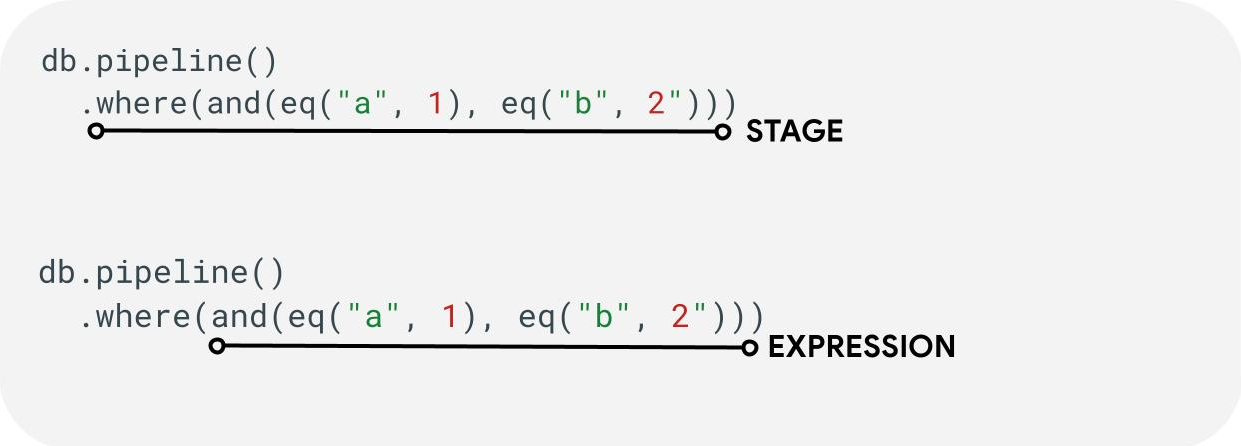
পর্যায়সমূহ: একটি পাইপলাইন এক বা একাধিক পর্যায় নিয়ে গঠিত হতে পারে। যৌক্তিকভাবে, এগুলো কোয়েরিটি সম্পাদন করার জন্য গৃহীত ধারাবাহিক পদক্ষেপ (বা পর্যায়)-কে নির্দেশ করে।
এক্সপ্রেশন: স্টেজগুলো প্রায়শই একটি এক্সপ্রেশন গ্রহণ করে, যা আপনাকে আরও জটিল কোয়েরি প্রকাশ করার সুযোগ দেয়। এক্সপ্রেশনটি সহজ হতে পারে এবং eq("a", 1) -এর মতো একটিমাত্র ফাংশন দিয়ে গঠিত হতে পারে। এছাড়াও আপনি and(eq("a", 1), eq("b", 2)).
সাবকোয়েরি র্যাপার: array() এবং scalar() এর মতো ফাংশনগুলো আপনাকে একটি স্টেজের মধ্যে এক্সপ্রেশন হিসেবে একটি নেস্টেড পাইপলাইন এম্বেড করার সুযোগ দেয়।
ক্ষেত্র / ধ্রুবক / চলক
পাইপলাইন অপারেশন জটিল এক্সপ্রেশন সমর্থন করে। তাই, কোনো মান একটি ফিল্ড , একটি কনস্ট্যান্ট , নাকি একটি ভেরিয়েবলকে নির্দেশ করে, তা আলাদা করে বোঝা গুরুত্বপূর্ণ।
ফিল্ড বলতে ডকুমেন্টের ভেতরের ডেটাকে বোঝায় এবং কনস্ট্যান্ট কোনো এক্সপ্রেশনের আর্গুমেন্ট হিসেবে যেকোনো মান নির্দিষ্ট করার সুযোগ দেয়, অন্যদিকে ভ্যারিয়েবল এমন অস্থায়ী মান সংজ্ঞায়িত ও ব্যবহার করার সুযোগ দেয় যা প্রসেস করা ডকুমেন্টের পরিবর্তে কোয়েরি এক্সিকিউশনের মধ্যেই সীমাবদ্ধ থাকে। নিচে এই ধারণাগুলোর একটি সংক্ষিপ্ত বিবরণ দেওয়া হলো; কোয়েরি এক্সিকিউশনের সময় কীভাবে ভ্যারিয়েবল পড়তে ও লিখতে হয়, সে সম্পর্কে আরও তথ্যের জন্য let(...) পর্যায়টি দেখুন।
| ক্ষেত্র | ধ্রুবক | ভেরিয়েবল | |
|---|---|---|---|
| উদ্দেশ্য | ডকুমেন্টে ফিল্ড অ্যাক্সেস বা সংরক্ষণ করুন | একটি নির্দিষ্ট মান উল্লেখ করুন | পাইপলাইন নির্বাহের সময় অস্থায়ী মান ব্যবহার করুন |
| এসডিকে ব্যবহার | field("name") | constant("val") | variable("name") |
| পরিধি | বর্তমান নথির স্থানীয় | বিশ্বব্যাপী | বিশ্বব্যাপী পাইপলাইন এবং উপ-পাইপলাইন |
| অনির্দিষ্ট রেফারেন্স | absent হিসাবে মূল্যায়ন করা হয় | প্রযোজ্য নয় | রানটাইম ত্রুটি তৈরি করে |
উদাহরণ:
Web
const pipeline = db.pipeline() .collection("cities") .where(field("name").equal(constant("Toronto")));
সুইফট
let pipeline = db.pipeline() .collection("cities") .where(Field("name").equal(Constant("Toronto")))
Kotlin
val pipeline = db.pipeline() .collection("cities") .where(field("name").equal(constant("Toronto")))
Java
Pipeline pipeline = db.pipeline() .collection("cities") .where(field("name").equal(constant("Toronto")));
পাইথন
from google.cloud.firestore_v1.pipeline_expressions import Field, Constant pipeline = ( client.pipeline() .collection("cities") .where(Field.of("name").equal(Constant.of("Toronto"))) )
যান
pipeline := client.Pipeline().Collection("cities"). Where(firestore.FieldOf("name").Equal(firestore.ConstantOf("Toronto")))
পর্যায়
ইনপুট পর্যায়গুলি
ইনপুট স্টেজ একটি কোয়েরির প্রথম ধাপকে বোঝায়। এটি সেইসব ডকুমেন্টের প্রাথমিক সেট নির্ধারণ করে, যেগুলোর ওপর আপনি কোয়েরি চালাবেন। পাইপলাইন অপারেশনের ক্ষেত্রে, এটি মূলত বিদ্যমান কোয়েরিগুলোর মতোই, যেখানে বেশিরভাগ কোয়েরি collection(...) অথবা collection_group(...) স্টেজ দিয়ে শুরু হয়। দুটি নতুন ইনপুট স্টেজ হলো database() এবং documents(...) যেখানে database() ডাটাবেসের সমস্ত ডকুমেন্ট ফেরত দেয়, আর documents(...) একটি ব্যাচ রিডের মতোই কাজ করে।
Web
let results; // Return all restaurants in San Francisco results = await execute(db.pipeline().collection("cities/sf/restaurants")); // Return all restaurants results = await execute(db.pipeline().collectionGroup("restaurants")); // Return all documents across all collections in the database (the entire database) results = await execute(db.pipeline().database()); // Batch read of 3 documents results = await execute(db.pipeline().documents([ doc(db, "cities", "SF"), doc(db, "cities", "DC"), doc(db, "cities", "NY") ]));
সুইফট
var results: Pipeline.Snapshot // Return all restaurants in San Francisco results = try await db.pipeline().collection("cities/sf/restaurants").execute() // Return all restaurants results = try await db.pipeline().collectionGroup("restaurants").execute() // Return all documents across all collections in the database (the entire database) results = try await db.pipeline().database().execute() // Batch read of 3 documents results = try await db.pipeline().documents([ db.collection("cities").document("SF"), db.collection("cities").document("DC"), db.collection("cities").document("NY") ]).execute()
Kotlin
var results: Task<Pipeline.Snapshot> // Return all restaurants in San Francisco results = db.pipeline().collection("cities/sf/restaurants").execute() // Return all restaurants results = db.pipeline().collectionGroup("restaurants").execute() // Return all documents across all collections in the database (the entire database) results = db.pipeline().database().execute() // Batch read of 3 documents results = db.pipeline().documents( db.collection("cities").document("SF"), db.collection("cities").document("DC"), db.collection("cities").document("NY") ).execute()
Java
Task<Pipeline.Snapshot> results; // Return all restaurants in San Francisco results = db.pipeline().collection("cities/sf/restaurants").execute(); // Return all restaurants results = db.pipeline().collectionGroup("restaurants").execute(); // Return all documents across all collections in the database (the entire database) results = db.pipeline().database().execute(); // Batch read of 3 documents results = db.pipeline().documents( db.collection("cities").document("SF"), db.collection("cities").document("DC"), db.collection("cities").document("NY") ).execute();
পাইথন
# Return all restaurants in San Francisco results = client.pipeline().collection("cities/sf/restaurants").execute() # Return all restaurants results = client.pipeline().collection_group("restaurants").execute() # Return all documents across all collections in the database (the entire database) results = client.pipeline().database().execute() # Batch read of 3 documents results = ( client.pipeline() .documents( client.collection("cities").document("SF"), client.collection("cities").document("DC"), client.collection("cities").document("NY"), ) .execute() )
যান
// Return all restaurants in San Francisco results1, err := client.Pipeline().Collection("cities/sf/restaurants").Execute(ctx).Results().GetAll() if err != nil { fmt.Fprintf(w, "GetAll failed: %v", err) return err } // Return all restaurants results2, err := client.Pipeline().CollectionGroup("restaurants").Execute(ctx).Results().GetAll() if err != nil { fmt.Fprintf(w, "GetAll failed: %v", err) return err } // Return all documents across all collections in the database (the entire database) results3, err := client.Pipeline().Database().Execute(ctx).Results().GetAll() if err != nil { fmt.Fprintf(w, "GetAll failed: %v", err) return err } // Batch read of 3 documents results4, err := client.Pipeline(). Documents([]*firestore.DocumentRef{ client.Collection("cities").Doc("SF"), client.Collection("cities").Doc("DC"), client.Collection("cities").Doc("NY"), }). Execute(ctx).Results().GetAll() if err != nil { fmt.Fprintf(w, "GetAll failed: %v", err) return err }
অন্যান্য সমস্ত ধাপের মতোই, এই ইনপুট ধাপগুলো থেকে প্রাপ্ত ফলাফলের ক্রম স্থিতিশীল নয়। যদি একটি নির্দিষ্ট ক্রমবিন্যাস প্রয়োজন হয়, তবে সর্বদা একটি sort(...) অপারেটর যোগ করা উচিত।
কোথায়
` where(...) ধাপটি পূর্ববর্তী ধাপ থেকে তৈরি হওয়া ডকুমেন্টগুলোর উপর একটি সাধারণ ফিল্টার অপারেশন হিসেবে কাজ করে এবং এটি মূলত বিদ্যমান কোয়েরিগুলোর `where` সিনট্যাক্সকেই প্রতিফলিত করে। যে ডকুমেন্টের ক্ষেত্রে কোনো প্রদত্ত এক্সপ্রেশনের মান একটি অ- true (non-true) মানে দাঁড়ায়, সেই ডকুমেন্টটি ফেরত আসা ডকুমেন্টগুলো থেকে ফিল্টার করে বাদ দেওয়া হয়।
একাধিক where(...) স্টেটমেন্টকে একসাথে জুড়ে দেওয়া যায়, এবং and(...) এক্সপ্রেশন হিসেবে কাজ করে। উদাহরণস্বরূপ, নিম্নলিখিত দুটি কোয়েরি যৌক্তিকভাবে সমতুল্য এবং একে অপরের পরিবর্তে ব্যবহার করা যেতে পারে।
Web
let results; results = await execute(db.pipeline().collection("books") .where(field("rating").equal(5)) .where(field("published").lessThan(1900)) ); results = await execute(db.pipeline().collection("books") .where(and(field("rating").equal(5), field("published").lessThan(1900))) );
সুইফট
var results: Pipeline.Snapshot results = try await db.pipeline().collection("books") .where(Field("rating").equal(5)) .where(Field("published").lessThan(1900)) .execute() results = try await db.pipeline().collection("books") .where(Field("rating").equal(5) && Field("published").lessThan(1900)) .execute()
Kotlin
var results: Task<Pipeline.Snapshot> results = db.pipeline().collection("books") .where(field("rating").equal(5)) .where(field("published").lessThan(1900)) .execute() results = db.pipeline().collection("books") .where(Expression.and(field("rating").equal(5), field("published").lessThan(1900))) .execute()
Java
Task<Pipeline.Snapshot> results; results = db.pipeline().collection("books") .where(field("rating").equal(5)) .where(field("published").lessThan(1900)) .execute(); results = db.pipeline().collection("books") .where(Expression.and( field("rating").equal(5), field("published").lessThan(1900) )) .execute();
পাইথন
from google.cloud.firestore_v1.pipeline_expressions import And, Field results = ( client.pipeline() .collection("books") .where(Field.of("rating").equal(5)) .where(Field.of("published").less_than(1900)) .execute() ) results = ( client.pipeline() .collection("books") .where(And(Field.of("rating").equal(5), Field.of("published").less_than(1900))) .execute() )
যান
results1, err := client.Pipeline(). Collection("books"). Where(firestore.FieldOf("rating").Equal(5)). Where(firestore.FieldOf("published").LessThan(1900)). Execute(ctx).Results().GetAll() if err != nil { fmt.Fprintf(w, "GetAll failed: %v", err) return err } results2, err := client.Pipeline(). Collection("books"). Where(firestore.And( firestore.FieldOf("rating").Equal(5), firestore.FieldOf("published").LessThan(1900), )). Execute(ctx).Results().GetAll() if err != nil { fmt.Fprintf(w, "GetAll failed: %v", err) return err }
ফিল্ড নির্বাচন করুন / যোগ করুন এবং সরান
` select(...) , add_fields(...) , এবং remove_fields(...) এই সবগুলোই আপনাকে পূর্ববর্তী পর্যায় থেকে ফেরত আসা ফিল্ডগুলো পরিবর্তন করার সুযোগ দেয়। এই তিনটিকে সাধারণত প্রজেকশন-স্টাইল পর্যায় বলা হয়।
select(...) এবং add_fields(...) আপনাকে কোনো এক্সপ্রেশনের ফলাফল ব্যবহারকারীর দেওয়া ফিল্ডের নামে নির্দিষ্ট করার সুযোগ দেয়। select(...) শুধুমাত্র নির্দিষ্ট ফিল্ডের নামযুক্ত ডকুমেন্টগুলোই ফেরত দেবে, অন্যদিকে add_fields(...) পূর্ববর্তী ধাপের স্কিমা প্রসারিত করে (যার ফলে একই ফিল্ডের নামযুক্ত ভ্যালুগুলো ওভাররাইট হয়ে যেতে পারে)।
` remove_fields(...) ফাংশনটি পূর্ববর্তী পর্যায় থেকে অপসারণ করার জন্য একগুচ্ছ ফিল্ড নির্দিষ্ট করার সুযোগ দেয়। যেসব ফিল্ডের অস্তিত্ব নেই, সেগুলোর নাম নির্দিষ্ট করলে কোনো কাজ হয় না।
নিচের ‘ফেরতযোগ্য ফিল্ড সীমাবদ্ধ করুন’ অংশটি দেখুন, তবে সাধারণভাবে, ফলাফলকে শুধুমাত্র ক্লায়েন্টের প্রয়োজনীয় ফিল্ডগুলিতে সীমাবদ্ধ করার জন্য এই ধরনের একটি পর্যায় ব্যবহার করা বেশিরভাগ কোয়েরির খরচ এবং লেটেন্সি কমাতে সহায়ক।
সমষ্টিগত / স্বতন্ত্র
` aggregate(...) পর্যায়টি আপনাকে ইনপুট ডকুমেন্টগুলোর উপর একাধিক অ্যাগ্রিগেশন সম্পাদন করার সুযোগ দেয়। ডিফল্টরূপে, সমস্ত ডকুমেন্ট একসাথে অ্যাগ্রিগেট করা হয়, কিন্তু একটি ঐচ্ছিক grouping আর্গুমেন্ট প্রদান করা যেতে পারে, যার ফলে ইনপুট ডকুমেন্টগুলোকে বিভিন্ন বাকেটে অ্যাগ্রিগেট করা সম্ভব হয়।
Web
const results = await execute(db.pipeline() .collection("books") .aggregate( field("rating").average().as("avg_rating") ) .distinct(field("genre")) );
সুইফট
let results = try await db.pipeline() .collection("books") .aggregate([ Field("rating").average().as("avg_rating") ], groups: [ Field("genre") ]) .execute()
Kotlin
val results = db.pipeline() .collection("books") .aggregate( AggregateStage .withAccumulators(AggregateFunction.average("rating").alias("avg_rating")) .withGroups(field("genre")) ) .execute()
Java
Task<Pipeline.Snapshot> results = db.pipeline() .collection("books") .aggregate(AggregateStage .withAccumulators( AggregateFunction.average("rating").alias("avg_rating")) .withGroups(field("genre"))) .execute();
পাইথন
from google.cloud.firestore_v1.pipeline_expressions import Field results = ( client.pipeline() .collection("books") .aggregate( Field.of("rating").average().as_("avg_rating"), groups=[Field.of("genre")] ) .execute() )
যান
snapshot := client.Pipeline(). Collection("books"). Aggregate( firestore.Accumulators(firestore.Average("rating").As("avg_rating")), firestore.WithAggregateGroups("genre"), ). Execute(ctx)
যখন groupings নির্দিষ্ট করা থাকে না, তখন এই পর্যায়ে কেবল একটিমাত্র ডকুমেন্ট তৈরি হবে, অন্যথায় groupings ভ্যালুগুলোর প্রতিটি স্বতন্ত্র সমন্বয়ের জন্য একটি করে ডকুমেন্ট তৈরি করা হবে।
distinct(...) পর্যায়টি একটি সরলীকৃত অ্যাগ্রিগেশন অপারেটর যা কোনো অ্যাকুমুলেটর ছাড়াই শুধুমাত্র অনন্য groupings তৈরি করতে দেয়। অন্য সব দিক থেকে এটি aggregate(...) এর মতোই আচরণ করে। নিচের উদাহরণটি তা দেখায়:
Web
const results = await execute(db.pipeline() .collection("books") .distinct( field("author").toUpper().as("author"), field("genre") ) );
সুইফট
let results = try await db.pipeline() .collection("books") .distinct([ Field("author").toUpper().as("author"), Field("genre") ]) .execute()
Kotlin
val results = db.pipeline() .collection("books") .distinct( field("author").toUpper().alias("author"), field("genre") ) .execute()
Java
Task<Pipeline.Snapshot> results = db.pipeline() .collection("books") .distinct( field("author").toUpper().alias("author"), field("genre") ) .execute();
পাইথন
from google.cloud.firestore_v1.pipeline_expressions import Field results = ( client.pipeline() .collection("books") .distinct(Field.of("author").to_upper().as_("author"), "genre") .execute() )
যান
snapshot := client.Pipeline(). Collection("books"). Distinct(firestore.Fields( firestore.ToUpper(firestore.FieldOf("author")).As("author"), firestore.FieldOf("genre"), )). Execute(ctx)
কার্যাবলী
ফাংশন হলো এক্সপ্রেশন এবং জটিল কোয়েরি তৈরির মূল ভিত্তি। উদাহরণসহ ফাংশনের সম্পূর্ণ তালিকার জন্য, ফাংশন রেফারেন্স দেখুন। দ্রুত মনে করিয়ে দেওয়ার জন্য, একটি সাধারণ কোয়েরির গঠন বিবেচনা করুন:

অনেক ধাপে এমন এক্সপ্রেশন গ্রহণ করা হয়, যেগুলোতে এক বা একাধিক ফাংশন থাকে। ফাংশনের সবচেয়ে সাধারণ ব্যবহার where(...) এবং select(...) ধাপে দেখা যাবে। দুই ধরনের প্রধান ফাংশন রয়েছে, যেগুলোর সাথে আপনার পরিচিত থাকা উচিত:
Web
let results; // Type 1: Scalar (for use in non-aggregation stages) // Example: Return the min store price for each book. results = await execute(db.pipeline().collection("books") .select(field("current").logicalMinimum(field("updated")).as("price_min")) ); // Type 2: Aggregation (for use in aggregate stages) // Example: Return the min price of all books. results = await execute(db.pipeline().collection("books") .aggregate(field("price").minimum().as("min_price")) );
সুইফট
var results: Pipeline.Snapshot // Type 1: Scalar (for use in non-aggregation stages) // Example: Return the min store price for each book. results = try await db.pipeline().collection("books") .select([ Field("current").logicalMinimum(["updated"]).as("price_min") ]) .execute() // Type 2: Aggregation (for use in aggregate stages) // Example: Return the min price of all books. results = try await db.pipeline().collection("books") .aggregate([Field("price").minimum().as("min_price")]) .execute()
Kotlin
var results: Task<Pipeline.Snapshot> // Type 1: Scalar (for use in non-aggregation stages) // Example: Return the min store price for each book. results = db.pipeline().collection("books") .select( field("current").logicalMinimum("updated").alias("price_min") ) .execute() // Type 2: Aggregation (for use in aggregate stages) // Example: Return the min price of all books. results = db.pipeline().collection("books") .aggregate(AggregateFunction.minimum("price").alias("min_price")) .execute()
Java
Task<Pipeline.Snapshot> results; // Type 1: Scalar (for use in non-aggregation stages) // Example: Return the min store price for each book. results = db.pipeline().collection("books") .select( field("current").logicalMinimum("updated").alias("price_min") ) .execute(); // Type 2: Aggregation (for use in aggregate stages) // Example: Return the min price of all books. results = db.pipeline().collection("books") .aggregate(AggregateFunction.minimum("price").alias("min_price")) .execute();
পাইথন
from google.cloud.firestore_v1.pipeline_expressions import Field # Type 1: Scalar (for use in non-aggregation stages) # Example: Return the min store price for each book. results = ( client.pipeline() .collection("books") .select( Field.of("current").logical_minimum(Field.of("updated")).as_("price_min") ) .execute() ) # Type 2: Aggregation (for use in aggregate stages) # Example: Return the min price of all books. results = ( client.pipeline() .collection("books") .aggregate(Field.of("price").minimum().as_("min_price")) .execute() )
যান
// Type 1: Scalar (for use in non-aggregation stages) // Example: Return the min store price for each book. results1, err := client.Pipeline(). Collection("books"). Select(firestore.Fields( firestore.LogicalMinimum(firestore.FieldOf("current"), firestore.FieldOf("updated")).As("price_min"), )). Execute(ctx).Results().GetAll() if err != nil { fmt.Fprintf(w, "GetAll failed: %v", err) return err } // Type 2: Aggregation (for use in aggregate stages) // Example: Return the min price of all books. results2, err := client.Pipeline(). Collection("books"). Aggregate(firestore.Accumulators( firestore.Minimum("price").As("min_price"), )). Execute(ctx).Results().GetAll() if err != nil { fmt.Fprintf(w, "GetAll failed: %v", err) return err }
সীমা
বেশিরভাগ ক্ষেত্রে এন্টারপ্রাইজ সংস্করণ কোয়েরির গঠনের উপর কোনো সীমাবদ্ধতা আরোপ করে না। অন্য কথায়, আপনি একটি IN বা OR কোয়েরিতে অল্প সংখ্যক ভ্যালুর মধ্যে সীমাবদ্ধ নন। এর পরিবর্তে, দুটি প্রধান সীমাবদ্ধতা রয়েছে যা সম্পর্কে আপনার সচেতন থাকা উচিত:
- সময়সীমা: ৬০ সেকেন্ড (স্ট্যান্ডার্ড সংস্করণের অনুরূপ)।
- মেমরি ব্যবহার: কোয়েরি সম্পাদনের সময় ম্যাটেরিয়ালাইজড ডেটার পরিমাণের উপর ১২৮ MiB সীমা।
ত্রুটি
বিভিন্ন কারণে আপনার কোয়েরি ব্যর্থ হতে পারে। সাধারণ ত্রুটি এবং এর সাথে সম্পর্কিত করণীয় পদক্ষেপ সম্পর্কে জানতে এখানে একটি লিঙ্ক দেওয়া হলো:
| ত্রুটি কোড | পদক্ষেপ |
DEADLINE_EXCEEDED | আপনি যে কোয়েরিটি চালাচ্ছেন তা ৬০ সেকেন্ডের সময়সীমা অতিক্রম করেছে এবং এর জন্য অতিরিক্ত অপটিমাইজেশন প্রয়োজন। পরামর্শের জন্য পারফরম্যান্স বিভাগটি দেখুন। আপনি যদি সমস্যার মূল কারণ খুঁজে বের করতে না পারেন, তবে টিমের সাথে যোগাযোগ করুন। |
RESOURCE_EXHAUSTED | আপনি যে কোয়েরিটি চালাচ্ছেন তা মেমরি সীমা অতিক্রম করেছে এবং এর জন্য অতিরিক্ত অপ্টিমাইজেশন প্রয়োজন। পরামর্শের জন্য পারফরম্যান্স বিভাগটি দেখুন। আপনি যদি সমস্যার মূল কারণ খুঁজে বের করতে না পারেন, তবে টিমের সাথে যোগাযোগ করুন। |
INTERNAL | সহায়তার জন্য টিমের সাথে যোগাযোগ করুন । |
কর্মক্ষমতা
এন্টারপ্রাইজ এডিশন ডেটাবেসে ইনডেক্স সবসময় উপস্থিত থাকার প্রয়োজন হয় না। এর মানে হলো, একটি কোয়েরির ল্যাটেন্সি এমন বিদ্যমান কোয়েরিগুলোর তুলনায় বেশি হতে পারে, যেগুলো FAILED_PRECONDITION মিসিং ইনডেক্স এররের কারণে সাথে সাথেই ফেইল হয়ে যেত। পাইপলাইন অপারেশনের পারফরম্যান্স উন্নত করার জন্য আপনি কয়েকটি পদক্ষেপ নিতে পারেন।
ইনডেক্স তৈরি করুন
ব্যবহৃত সূচক
কোয়েরি এক্সপ্লেইন আপনাকে শনাক্ত করতে সাহায্য করে যে আপনার কোয়েরিটি কোনো ইনডেক্স থেকে কাজ করছে, নাকি টেবিল স্ক্যানের মতো কম কার্যকর কোনো অপারেশনের ওপর নির্ভর করছে। যদি আপনার কোয়েরিটি কোনো ইনডেক্স থেকে পুরোপুরি কাজ না করে, তবে আপনি নির্দেশাবলী অনুসরণ করে একটি ইনডেক্স তৈরি করতে পারেন।
ইনডেক্স তৈরি করা
ইনডেক্স তৈরি করার জন্য আপনি বিদ্যমান ইনডেক্স ম্যানেজমেন্ট ডকুমেন্টেশন অনুসরণ করতে পারেন। ইনডেক্স তৈরি করার আগে, Cloud Firestore ইনডেক্স সম্পর্কিত সাধারণ সেরা অনুশীলনগুলো সম্পর্কে ভালোভাবে জেনে নিন। আপনার কোয়েরি যাতে ইনডেক্স ব্যবহার করতে পারে, তা নিশ্চিত করতে নিম্নলিখিত ক্রমে ফিল্ডসহ ইনডেক্স তৈরির সেরা অনুশীলনগুলো অনুসরণ করুন:
- সমতা ফিল্টারে ব্যবহৃত হবে এমন সমস্ত ফিল্ড (যেকোনো ক্রমে)
- যে সমস্ত ফিল্ডের উপর ভিত্তি করে (একই ক্রমে) সর্ট করা হবে
- কোয়েরি কনস্ট্রেইন্ট সিলেক্টিভিটির অবরোহী ক্রমে রেঞ্জ বা ইনইকুয়ালিটি ফিল্টারে ব্যবহৃত ফিল্ডসমূহ।
উদাহরণস্বরূপ, নিম্নলিখিত কোয়েরির জন্য,
Web
const results = await execute(db.pipeline() .collection("books") .where(field("published").lessThan(1900)) .where(field("genre").equal("Science Fiction")) .where(field("rating").greaterThan(4.3)) .sort(field("published").descending()) );
সুইফট
let results = try await db.pipeline() .collection("books") .where(Field("published").lessThan(1900)) .where(Field("genre").equal("Science Fiction")) .where(Field("rating").greaterThan(4.3)) .sort([Field("published").descending()]) .execute()
Kotlin
val results = db.pipeline() .collection("books") .where(field("published").lessThan(1900)) .where(field("genre").equal("Science Fiction")) .where(field("rating").greaterThan(4.3)) .sort(field("published").descending()) .execute()
Java
Task<Pipeline.Snapshot> results = db.pipeline() .collection("books") .where(field("published").lessThan(1900)) .where(field("genre").equal("Science Fiction")) .where(field("rating").greaterThan(4.3)) .sort(field("published").descending()) .execute();
পাইথন
from google.cloud.firestore_v1.pipeline_expressions import Field results = ( client.pipeline() .collection("books") .where(Field.of("published").less_than(1900)) .where(Field.of("genre").equal("Science Fiction")) .where(Field.of("rating").greater_than(4.3)) .sort(Field.of("published").descending()) .execute() )
যান
snapshot := client.Pipeline(). Collection("books"). Where(firestore.FieldOf("published").LessThan(1900)). Where(firestore.FieldOf("genre").Equal("Science Fiction")). Where(firestore.FieldOf("rating").GreaterThan(4.3)). Sort(firestore.Orders(firestore.Descending(firestore.FieldOf("published")))). Execute(ctx)
প্রস্তাবিত সূচীটি হলো (genre [...], published DESC, avg_rating DESC). এর উপর ভিত্তি করে books একটি সংগ্রহ-পরিসর সূচী।
সূচক ঘনত্ব
Cloud Firestore স্পার্স এবং নন-স্পার্স ইনডেক্স সমর্থন করে। আরও তথ্যের জন্য, ইনডেক্স ডেনসিটি দেখুন।
আচ্ছাদিত কোয়েরি + সেকেন্ডারি ইনডেক্স
যদি ফেরত আসা সমস্ত ফিল্ড একটি সেকেন্ডারি ইনডেক্সে উপস্থিত থাকে, তাহলে Cloud Firestore সম্পূর্ণ ডকুমেন্ট ফেচ করা বাদ দিয়ে সরাসরি ইনডেক্স থেকে ফলাফল ফেরত দিতে পারে। এর ফলে সাধারণত ল্যাটেন্সি (এবং খরচ) উল্লেখযোগ্যভাবে কমে আসে। নিচের নমুনা কোয়েরিটি ব্যবহার করে দেখুন:
Web
const results = await execute(db.pipeline() .collection("books") .where(field("category").like("%fantasy%")) .where(field("title").exists()) .where(field("author").exists()) .select(field("title"), field("author")) );
সুইফট
let results = try await db.pipeline() .collection("books") .where(Field("category").like("%fantasy%")) .where(Field("title").exists()) .where(Field("author").exists()) .select([Field("title"), Field("author")]) .execute()
Kotlin
val results = db.pipeline() .collection("books") .where(field("category").like("%fantasy%")) .where(field("title").exists()) .where(field("author").exists()) .select(field("title"), field("author")) .execute()
Java
Task<Pipeline.Snapshot> results = db.pipeline() .collection("books") .where(field("category").like("%fantasy%")) .where(field("title").exists()) .where(field("author").exists()) .select(field("title"), field("author")) .execute();
পাইথন
from google.cloud.firestore_v1.pipeline_expressions import Field results = ( client.pipeline() .collection("books") .where(Field.of("category").like("%fantasy%")) .where(Field.of("title").exists()) .where(Field.of("author").exists()) .select("title", "author") .execute() )
যান
snapshot := client.Pipeline(). Collection("books"). Where(firestore.FieldOf("category").Like("%fantasy%")). Where(firestore.FieldOf("title").FieldExists()). Where(firestore.FieldOf("author").FieldExists()). Select(firestore.Fields("title", "author")). Execute(ctx)
যদি ডাটাবেসে books জন্য (category [...], title [...], author [...]) এর উপর আগে থেকেই একটি কালেকশন স্কোপ ইনডেক্স থাকে, তাহলে এটি মূল ডকুমেন্টগুলো থেকে কোনো কিছু ফেচ করা এড়িয়ে যেতে পারে। এই ক্ষেত্রে ইনডেক্সের ক্রম গুরুত্বপূর্ণ নয়, [...] চিহ্নটি তা বোঝাতে ব্যবহৃত হয়।
ফেরত দেওয়ার জন্য ক্ষেত্রগুলি সীমাবদ্ধ করুন
ডিফল্টরূপে, একটি Cloud Firestore কোয়েরি একটি ডকুমেন্টের সমস্ত ফিল্ড রিটার্ন করে, যা রিলেশনাল সিস্টেমের SELECT * এর অনুরূপ। তবে, যদি আপনার অ্যাপ্লিকেশনের শুধুমাত্র ফিল্ডগুলির একটি উপসেটের প্রয়োজন হয়, তাহলে এই ফিল্টারিংটি সার্ভার-সাইডে পাঠানোর জন্য select(...) বা restrict(...) পর্যায়গুলি ব্যবহার করা যেতে পারে। এটি রেসপন্স সাইজ কমানোর পাশাপাশি (নেটওয়ার্ক ইগ্রেস খরচ হ্রাস করে) ল্যাটেন্সিও উন্নত করবে।
সমস্যা সমাধানের সরঞ্জাম
প্রশ্ন ব্যাখ্যা করুন
কোয়েরি এক্সপ্লেইন আপনাকে এক্সিকিউশন মেট্রিক্স এবং ব্যবহৃত ইনডেক্সগুলোর বিস্তারিত তথ্য দেখতে সাহায্য করে।
মেট্রিক্স
পাইপলাইন অপারেশনগুলো বিদ্যমান Cloud Firestore মেট্রিক্সের সাথে সম্পূর্ণরূপে সমন্বিত।
জ্ঞাত সমস্যা / সীমাবদ্ধতা
বিশেষায়িত সূচক
পাইপলাইন অপারেশনগুলো এখনও বিদ্যমান array-contains ও vector ইনডেক্স টাইপ সমর্থন করে না। এই ধরনের কোয়েরি সরাসরি প্রত্যাখ্যান না করে, Cloud Firestore অন্যান্য বিদ্যমান ascending ও descending ইনডেক্স ব্যবহার করার চেষ্টা করবে। আশা করা যায় যে, এর ফলে এই ধরনের array_contains বা find_nearest এক্সপ্রেশনগুলো তাদের বিদ্যমান সমতুল্যগুলোর চেয়ে ধীরগতির হবে।
রিয়েলটাইম এবং অফলাইন সাপোর্ট
পাইপলাইন অপারেশনের রিয়েলটাইম এবং অফলাইন সক্ষমতা নেই।
এরপর কী?
- ফাংশন এবং পর্যায়সমূহ সম্পর্কিত রেফারেন্স ডকুমেন্টেশন অন্বেষণ করা শুরু করুন।
- সাবকোয়েরি ব্যবহার করে কীভাবে জয়েন করতে হয় তা শিখুন।