

الخلفية
توفّر عمليات خطوط النقل واجهة استعلام جديدة لـ
Cloud Firestore تتيح وظائف استعلام متقدّمة وتعبيرات معقّدة. تقدّم هذه اللغة العديد من الدوال الجديدة، بما في ذلك min(...) وmax(...) وsubstring(...) وregex_match(...) وarray_contains_all(...)، بالإضافة إلى مراحل لتنفيذ عمليات تحويل معقّدة.
البدء
لتثبيت حِزم تطوير البرامج (SDK) الخاصة بالعميل وإعدادها، يُرجى الرجوع إلى التعليمات الواردة في الأدلة التالية:
- بدء استخدام حِزم تطوير البرامج (SDK) على الأجهزة الجوّالة والويب
- بدء استخدام مكتبات برامج الخادم والعميل
البنية
تقدّم الأقسام التالية نظرة عامة على صيغة عمليات Pipeline.
المفاهيم
أحد الاختلافات الملحوظة في عمليات Pipeline هو تقديم ترتيب "المرحلة" الصريح. ويتيح ذلك إمكانية التعبير عن طلبات بحث أكثر تعقيدًا. ومع ذلك، يشكّل ذلك انحرافًا ملحوظًا عن واجهة طلب البحث الحالية التي تستخدم عمليات Core حيث كان ترتيب المراحل ضمنيًا. إليك مثالاً على عمليات Pipeline:
Web
const pipeline = db.pipeline() // Step 1: Start a query with collection scope .collection("cities") // Step 2: Filter the collection .where(field("population").greaterThan(100000)) // Step 3: Sort the remaining documents .sort(field("name").ascending()) // Step 4: Return the top 10. Note applying the limit earlier in the // pipeline would have unintentional results. .limit(10);
Swift
let pipeline = db.pipeline() // Step 1: Start a query with collection scope .collection("cities") // Step 2: Filter the collection .where(Field("population").greaterThan(100000)) // Step 3: Sort the remaining documents .sort([Field("name").ascending()]) // Step 4: Return the top 10. Note applying the limit earlier in the pipeline would have // unintentional results. .limit(10)
Kotlin
val pipeline = db.pipeline() // Step 1: Start a query with collection scope .collection("cities") // Step 2: Filter the collection .where(field("population").greaterThan(100000)) // Step 3: Sort the remaining documents .sort(field("name").ascending()) // Step 4: Return the top 10. Note applying the limit earlier in the pipeline would have // unintentional results. .limit(10)
Java
Pipeline pipeline = db.pipeline() // Step 1: Start a query with collection scope .collection("cities") // Step 2: Filter the collection .where(field("population").greaterThan(100000)) // Step 3: Sort the remaining documents .sort(field("name").ascending()) // Step 4: Return the top 10. Note applying the limit earlier in the pipeline would have // unintentional results. .limit(10);
Python
from google.cloud.firestore_v1.pipeline_expressions import Field pipeline = ( client.pipeline() .collection("cities") .where(Field.of("population").greater_than(100_000)) .sort(Field.of("name").ascending()) .limit(10) )
متابعة
pipeline := client.Pipeline(). Collection("cities"). Where(firestore.FieldOf("population").GreaterThan(100000)). Sort(firestore.Orders(firestore.Ascending(firestore.FieldOf("name")))). Limit(10)
الإعداد
تتضمّن عمليات خطوط الأنابيب بنية مألوفة جدًا مستمدة من طلبات البحث Cloud Firestore الحالية. للبدء، عليك تهيئة طلب بحث من خلال كتابة ما يلي:
Web
const { getFirestore } = require("firebase/firestore"); const { execute } = require("firebase/firestore/pipelines"); const database = getFirestore(app, "enterprise"); const pipeline = database.pipeline();
Swift
let firestore = Firestore.firestore(database: "enterprise") let pipeline = firestore.pipeline()
Kotlin
val firestore = Firebase.firestore("enterprise") val pipeline = firestore.pipeline()
Java
FirebaseFirestore firestore = FirebaseFirestore.getInstance("enterprise"); PipelineSource pipeline = firestore.pipeline();
Python
firestore_client = firestore.client(default_app, "your-new-enterprise-database") pipeline = firestore_client.pipeline()
متابعة
client, err := firestore.NewClientWithDatabase(ctx, projectID, databaseID) if err != nil { fmt.Fprintf(w, "firestore.NewClientWithDatabase failed: %v", err) return err } defer client.Close() pipeline := client.Pipeline().Collection("books")
البنية
هناك بعض المصطلحات المهمة التي يجب فهمها عند إنشاء عمليات Pipeline، وهي: المراحل والعبارات والدوال وأغلفة الاستعلامات الفرعية.
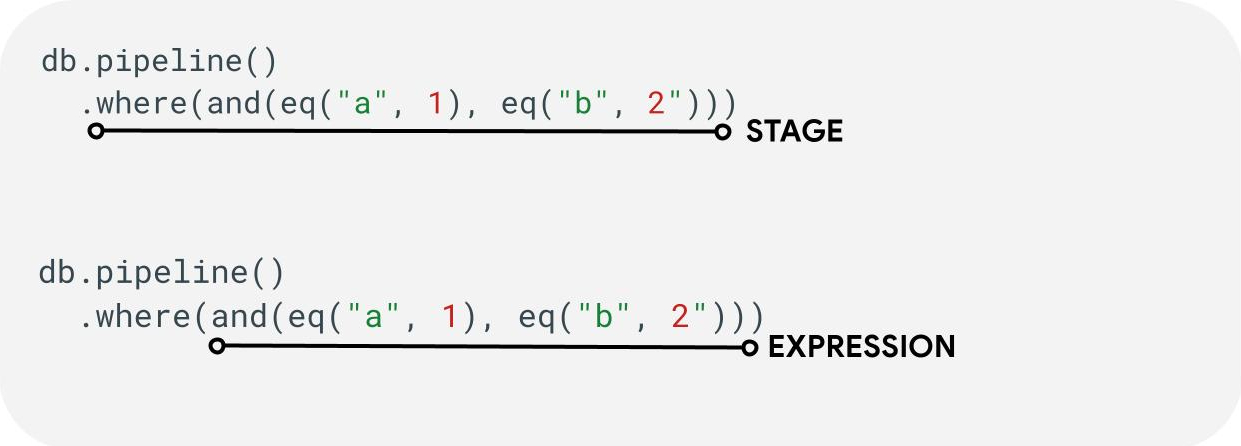
المراحل: قد تتكوّن خطة العمل من مرحلة واحدة أو أكثر. من الناحية المنطقية، تمثّل هذه الخطوات سلسلة الخطوات (أو المراحل) التي يتم اتّخاذها لتنفيذ طلب البحث.
العبارات: غالبًا ما تقبل المراحل عبارة تتيح لك التعبير عن طلبات بحث أكثر تعقيدًا. قد تكون الصيغة بسيطة وتتألف من دالة واحدة
مثل eq("a", 1). يمكنك أيضًا التعبير عن صيغ أكثر تعقيدًا من خلال تضمين صيغ مثل and(eq("a", 1), eq("b", 2)).
برامج تضمين الاستعلامات الفرعية: تتيح لك دوال مثل array() وscalar() تضمين مسار متداخل كتعبير ضمن مرحلة.
الحقول / الثوابت / المتغيّرات
تتيح عمليات خطوط النقل استخدام تعبيرات معقّدة. لذلك، من المهم التمييز بين ما إذا كانت القيمة تمثّل حقل أو ثابت أو متغير.
في حين تشير الحقول إلى البيانات داخل المستندات، وتسمح الثوابت بتحديد أي قيمة كمعلَمة لتعبير ما، تسمح المتغيرات بتحديد واستخدام قيم مؤقتة محددة بنطاق تنفيذ طلب البحث بدلاً من المستندات التي تتم معالجتها. تقدّم الفقرة التالية نظرة عامة على هذه المفاهيم، ويُرجى الاطّلاع على المرحلة let(...) للحصول على مزيد من المعلومات حول كيفية قراءة المتغيرات وكتابتها أثناء تنفيذ طلب البحث.
| الحقول | الثوابت | المتغيرات | |
|---|---|---|---|
| Purpose | الوصول إلى الحقول أو تخزينها في المستندات | تحديد قيمة ثابتة | استخدام قيم مؤقتة أثناء تنفيذ البنية الأساسية |
| استخدام حزمة تطوير البرامج (SDK) | field("name") |
constant("val") |
variable("name") |
| المستوى | محلية للمستند الحالي | في جميع أنحاء العالم | من المستوى العام إلى مسار المبيعات ومسارات المبيعات الفرعية |
| Undefined Reference | تُقيَّم إلى absent |
لا ينطبق | يؤدي إلى حدوث خطأ أثناء التشغيل |
أمثلة:
Web
const pipeline = db.pipeline() .collection("cities") .where(field("name").equal(constant("Toronto")));
Swift
let pipeline = db.pipeline() .collection("cities") .where(Field("name").equal(Constant("Toronto")))
Kotlin
val pipeline = db.pipeline() .collection("cities") .where(field("name").equal(constant("Toronto")))
Java
Pipeline pipeline = db.pipeline() .collection("cities") .where(field("name").equal(constant("Toronto")));
Python
from google.cloud.firestore_v1.pipeline_expressions import Field, Constant pipeline = ( client.pipeline() .collection("cities") .where(Field.of("name").equal(Constant.of("Toronto"))) )
متابعة
pipeline := client.Pipeline().Collection("cities"). Where(firestore.FieldOf("name").Equal(firestore.ConstantOf("Toronto")))
المسارح
مراحل الإدخال
تمثّل مرحلة الإدخال المرحلة الأولى من طلب البحث. وهي تحدّد المجموعة الأولية من المستندات التي يتم البحث فيها. بالنسبة إلى عمليات خطوط الإنتاج،
يشبه ذلك إلى حد كبير الاستعلامات الحالية، حيث تبدأ معظم الاستعلامات
إما بمرحلة collection(...) أو
collection_group(...). مرحلتان جديدتان للإدخال هما database() وdocuments(...)، حيث تتيح database() عرض جميع المستندات في قاعدة البيانات، بينما تعمل documents(...) بشكل مطابق للقراءة المجمّعة.
Web
let results; // Return all restaurants in San Francisco results = await execute(db.pipeline().collection("cities/sf/restaurants")); // Return all restaurants results = await execute(db.pipeline().collectionGroup("restaurants")); // Return all documents across all collections in the database (the entire database) results = await execute(db.pipeline().database()); // Batch read of 3 documents results = await execute(db.pipeline().documents([ doc(db, "cities", "SF"), doc(db, "cities", "DC"), doc(db, "cities", "NY") ]));
Swift
var results: Pipeline.Snapshot // Return all restaurants in San Francisco results = try await db.pipeline().collection("cities/sf/restaurants").execute() // Return all restaurants results = try await db.pipeline().collectionGroup("restaurants").execute() // Return all documents across all collections in the database (the entire database) results = try await db.pipeline().database().execute() // Batch read of 3 documents results = try await db.pipeline().documents([ db.collection("cities").document("SF"), db.collection("cities").document("DC"), db.collection("cities").document("NY") ]).execute()
Kotlin
var results: Task<Pipeline.Snapshot> // Return all restaurants in San Francisco results = db.pipeline().collection("cities/sf/restaurants").execute() // Return all restaurants results = db.pipeline().collectionGroup("restaurants").execute() // Return all documents across all collections in the database (the entire database) results = db.pipeline().database().execute() // Batch read of 3 documents results = db.pipeline().documents( db.collection("cities").document("SF"), db.collection("cities").document("DC"), db.collection("cities").document("NY") ).execute()
Java
Task<Pipeline.Snapshot> results; // Return all restaurants in San Francisco results = db.pipeline().collection("cities/sf/restaurants").execute(); // Return all restaurants results = db.pipeline().collectionGroup("restaurants").execute(); // Return all documents across all collections in the database (the entire database) results = db.pipeline().database().execute(); // Batch read of 3 documents results = db.pipeline().documents( db.collection("cities").document("SF"), db.collection("cities").document("DC"), db.collection("cities").document("NY") ).execute();
Python
# Return all restaurants in San Francisco results = client.pipeline().collection("cities/sf/restaurants").execute() # Return all restaurants results = client.pipeline().collection_group("restaurants").execute() # Return all documents across all collections in the database (the entire database) results = client.pipeline().database().execute() # Batch read of 3 documents results = ( client.pipeline() .documents( client.collection("cities").document("SF"), client.collection("cities").document("DC"), client.collection("cities").document("NY"), ) .execute() )
متابعة
// Return all restaurants in San Francisco results1, err := client.Pipeline().Collection("cities/sf/restaurants").Execute(ctx).Results().GetAll() if err != nil { fmt.Fprintf(w, "GetAll failed: %v", err) return err } // Return all restaurants results2, err := client.Pipeline().CollectionGroup("restaurants").Execute(ctx).Results().GetAll() if err != nil { fmt.Fprintf(w, "GetAll failed: %v", err) return err } // Return all documents across all collections in the database (the entire database) results3, err := client.Pipeline().Database().Execute(ctx).Results().GetAll() if err != nil { fmt.Fprintf(w, "GetAll failed: %v", err) return err } // Batch read of 3 documents results4, err := client.Pipeline(). Documents([]*firestore.DocumentRef{ client.Collection("cities").Doc("SF"), client.Collection("cities").Doc("DC"), client.Collection("cities").Doc("NY"), }). Execute(ctx).Results().GetAll() if err != nil { fmt.Fprintf(w, "GetAll failed: %v", err) return err }
وكما هو الحال مع جميع المراحل الأخرى، فإنّ ترتيب النتائج من مراحل الإدخال هذه ليس ثابتًا. يجب دائمًا إضافة عامل التشغيل sort(...) إذا كان الترتيب المحدّد مطلوبًا.
المكان
تعمل المرحلة where(...) كعملية فلترة عادية
للمستندات التي تم إنشاؤها من المرحلة السابقة، وهي تشبه إلى حد كبير
بنية "where" الحالية للطلبات الحالية. يتم استبعاد أي مستند يتم فيه تقييم تعبير معيّن بقيمة غير true من المستندات التي يتم عرضها.
يمكن ربط عبارات where(...) متعددة معًا، والتعامل معها كعبارة and(...). على سبيل المثال، فإنّ عبارتَي البحث التاليتَين متكافئتان منطقيًا ويمكن استخدامهما بالتبادل.
Web
let results; results = await execute(db.pipeline().collection("books") .where(field("rating").equal(5)) .where(field("published").lessThan(1900)) ); results = await execute(db.pipeline().collection("books") .where(and(field("rating").equal(5), field("published").lessThan(1900))) );
Swift
var results: Pipeline.Snapshot results = try await db.pipeline().collection("books") .where(Field("rating").equal(5)) .where(Field("published").lessThan(1900)) .execute() results = try await db.pipeline().collection("books") .where(Field("rating").equal(5) && Field("published").lessThan(1900)) .execute()
Kotlin
var results: Task<Pipeline.Snapshot> results = db.pipeline().collection("books") .where(field("rating").equal(5)) .where(field("published").lessThan(1900)) .execute() results = db.pipeline().collection("books") .where(Expression.and(field("rating").equal(5), field("published").lessThan(1900))) .execute()
Java
Task<Pipeline.Snapshot> results; results = db.pipeline().collection("books") .where(field("rating").equal(5)) .where(field("published").lessThan(1900)) .execute(); results = db.pipeline().collection("books") .where(Expression.and( field("rating").equal(5), field("published").lessThan(1900) )) .execute();
Python
from google.cloud.firestore_v1.pipeline_expressions import And, Field results = ( client.pipeline() .collection("books") .where(Field.of("rating").equal(5)) .where(Field.of("published").less_than(1900)) .execute() ) results = ( client.pipeline() .collection("books") .where(And(Field.of("rating").equal(5), Field.of("published").less_than(1900))) .execute() )
متابعة
results1, err := client.Pipeline(). Collection("books"). Where(firestore.FieldOf("rating").Equal(5)). Where(firestore.FieldOf("published").LessThan(1900)). Execute(ctx).Results().GetAll() if err != nil { fmt.Fprintf(w, "GetAll failed: %v", err) return err } results2, err := client.Pipeline(). Collection("books"). Where(firestore.And( firestore.FieldOf("rating").Equal(5), firestore.FieldOf("published").LessThan(1900), )). Execute(ctx).Results().GetAll() if err != nil { fmt.Fprintf(w, "GetAll failed: %v", err) return err }
اختيار الحقول أو إضافتها وإزالتها
تتيح لك كل من select(...) وadd_fields(...) وremove_fields(...) تعديل الحقول التي يتم عرضها من مرحلة سابقة. ويُشار إلى هذه المراحل الثلاث عمومًا باسم مراحل العرض.
يتيح لك الرمزان select(...) وadd_fields(...) تحديد نتيجة تعبير لاسم حقل يقدّمه المستخدم. لن تعرض select(...) سوى المستندات التي تتضمّن أسماء الحقول المحدّدة، بينما توسّع add_fields(...) مخطط المرحلة السابقة (مع إمكانية استبدال القيم بأسماء حقول متطابقة).
تسمح remove_fields(...) بتحديد مجموعة من الحقول المطلوب إزالتها من المرحلة السابقة. تحديد أسماء حقول غير متوفّرة هو عملية غير فعّالة.
راجِع القسم تقييد الحقول التي سيتم عرضها أدناه، ولكن بشكل عام، يكون استخدام مرحلة كهذه لتقييد النتيجة بالحقول المطلوبة فقط في العميل مفيدًا في خفض التكلفة ووقت الاستجابة لمعظم طلبات البحث.
مجمَّع / مميّز
تتيح لك مرحلة aggregate(...) إجراء سلسلة من عمليات التجميع على مستندات الإدخال. يتم تلقائيًا تجميع جميع المستندات معًا، ولكن يمكن تقديم وسيطة grouping اختيارية، ما يتيح تجميع مستندات الإدخال في حِزم مختلفة.
Web
const results = await execute(db.pipeline() .collection("books") .aggregate( field("rating").average().as("avg_rating") ) .distinct(field("genre")) );
Swift
let results = try await db.pipeline() .collection("books") .aggregate([ Field("rating").average().as("avg_rating") ], groups: [ Field("genre") ]) .execute()
Kotlin
val results = db.pipeline() .collection("books") .aggregate( AggregateStage .withAccumulators(AggregateFunction.average("rating").alias("avg_rating")) .withGroups(field("genre")) ) .execute()
Java
Task<Pipeline.Snapshot> results = db.pipeline() .collection("books") .aggregate(AggregateStage .withAccumulators( AggregateFunction.average("rating").alias("avg_rating")) .withGroups(field("genre"))) .execute();
Python
from google.cloud.firestore_v1.pipeline_expressions import Field results = ( client.pipeline() .collection("books") .aggregate( Field.of("rating").average().as_("avg_rating"), groups=[Field.of("genre")] ) .execute() )
متابعة
snapshot := client.Pipeline(). Collection("books"). Aggregate( firestore.Accumulators(firestore.Average("rating").As("avg_rating")), firestore.WithAggregateGroups("genre"), ). Execute(ctx)
عندما لا يتم تحديد groupings، ستنتج هذه المرحلة مستندًا واحدًا فقط، وإلا سيتم إنشاء مستند لكل مجموعة فريدة من قيم groupings.
distinct(...) هي مرحلة تجميع مبسطة تتيح إنشاء groupings الفريد فقط بدون أي أدوات تجميع. ويتشابه سلوكه تمامًا مع سلوك
aggregate(...) في جميع الجوانب الأخرى. يوضّح المثال التالي ما يلي:
Web
const results = await execute(db.pipeline() .collection("books") .distinct( field("author").toUpper().as("author"), field("genre") ) );
Swift
let results = try await db.pipeline() .collection("books") .distinct([ Field("author").toUpper().as("author"), Field("genre") ]) .execute()
Kotlin
val results = db.pipeline() .collection("books") .distinct( field("author").toUpper().alias("author"), field("genre") ) .execute()
Java
Task<Pipeline.Snapshot> results = db.pipeline() .collection("books") .distinct( field("author").toUpper().alias("author"), field("genre") ) .execute();
Python
from google.cloud.firestore_v1.pipeline_expressions import Field results = ( client.pipeline() .collection("books") .distinct(Field.of("author").to_upper().as_("author"), "genre") .execute() )
متابعة
snapshot := client.Pipeline(). Collection("books"). Distinct(firestore.Fields( firestore.ToUpper(firestore.FieldOf("author")).As("author"), firestore.FieldOf("genre"), )). Execute(ctx)
الدوال
الدوال هي لبنة أساسية لإنشاء التعبيرات وطلبات البحث المعقّدة. للحصول على قائمة كاملة بالدوال مع أمثلة، يُرجى الرجوع إلى مرجع الدوال. كتذكير سريع، إليك بنية طلب البحث العادي:

تقبل العديد من المراحل عبارات تحتوي على دالة واحدة أو أكثر. سيتم العثور على الاستخدام الأكثر شيوعًا للدوال في مرحلتَي where(...) وselect(...). هناك نوعان رئيسيان من
الدوال التي يجب أن تكون على دراية بها:
Web
let results; // Type 1: Scalar (for use in non-aggregation stages) // Example: Return the min store price for each book. results = await execute(db.pipeline().collection("books") .select(field("current").logicalMinimum(field("updated")).as("price_min")) ); // Type 2: Aggregation (for use in aggregate stages) // Example: Return the min price of all books. results = await execute(db.pipeline().collection("books") .aggregate(field("price").minimum().as("min_price")) );
Swift
var results: Pipeline.Snapshot // Type 1: Scalar (for use in non-aggregation stages) // Example: Return the min store price for each book. results = try await db.pipeline().collection("books") .select([ Field("current").logicalMinimum(["updated"]).as("price_min") ]) .execute() // Type 2: Aggregation (for use in aggregate stages) // Example: Return the min price of all books. results = try await db.pipeline().collection("books") .aggregate([Field("price").minimum().as("min_price")]) .execute()
Kotlin
var results: Task<Pipeline.Snapshot> // Type 1: Scalar (for use in non-aggregation stages) // Example: Return the min store price for each book. results = db.pipeline().collection("books") .select( field("current").logicalMinimum("updated").alias("price_min") ) .execute() // Type 2: Aggregation (for use in aggregate stages) // Example: Return the min price of all books. results = db.pipeline().collection("books") .aggregate(AggregateFunction.minimum("price").alias("min_price")) .execute()
Java
Task<Pipeline.Snapshot> results; // Type 1: Scalar (for use in non-aggregation stages) // Example: Return the min store price for each book. results = db.pipeline().collection("books") .select( field("current").logicalMinimum("updated").alias("price_min") ) .execute(); // Type 2: Aggregation (for use in aggregate stages) // Example: Return the min price of all books. results = db.pipeline().collection("books") .aggregate(AggregateFunction.minimum("price").alias("min_price")) .execute();
Python
from google.cloud.firestore_v1.pipeline_expressions import Field # Type 1: Scalar (for use in non-aggregation stages) # Example: Return the min store price for each book. results = ( client.pipeline() .collection("books") .select( Field.of("current").logical_minimum(Field.of("updated")).as_("price_min") ) .execute() ) # Type 2: Aggregation (for use in aggregate stages) # Example: Return the min price of all books. results = ( client.pipeline() .collection("books") .aggregate(Field.of("price").minimum().as_("min_price")) .execute() )
متابعة
// Type 1: Scalar (for use in non-aggregation stages) // Example: Return the min store price for each book. results1, err := client.Pipeline(). Collection("books"). Select(firestore.Fields( firestore.LogicalMinimum(firestore.FieldOf("current"), firestore.FieldOf("updated")).As("price_min"), )). Execute(ctx).Results().GetAll() if err != nil { fmt.Fprintf(w, "GetAll failed: %v", err) return err } // Type 2: Aggregation (for use in aggregate stages) // Example: Return the min price of all books. results2, err := client.Pipeline(). Collection("books"). Aggregate(firestore.Accumulators( firestore.Minimum("price").As("min_price"), )). Execute(ctx).Results().GetAll() if err != nil { fmt.Fprintf(w, "GetAll failed: %v", err) return err }
الحدود
في معظم الحالات، لا يفرض إصدار Enterprise قيودًا على شكل طلب البحث. بعبارة أخرى، لا يقتصر الأمر على عدد صغير من القيم في طلب بحث IN أو OR. بدلاً من ذلك، هناك حدّان أساسيان يجب الانتباه إليهما:
- المهلة: 60 ثانية (كما هو الحال في الإصدار Standard).
- استخدام الذاكرة: حدّ يبلغ 128 ميغابايت على كمية البيانات التي تم إنشاؤها أثناء تنفيذ طلب البحث
الأخطاء
قد تواجه طلبات بحث غير ناجحة لعدة أسباب. إليك رابط يؤدي إلى الأخطاء الشائعة والإجراءات المرتبطة التي يمكنك اتّخاذها:
| رمز الخطأ | الإجراء |
DEADLINE_EXCEEDED
|
يتجاوز طلب البحث الذي تنفّذه مهلة 60 ثانية ويتطلّب تحسينًا إضافيًا. يُرجى الاطّلاع على قسم "الأداء" للحصول على نصائح. إذا لم تتمكّن من تحديد السبب الجذري للمشكلة، تواصَل مع الفريق. |
RESOURCE_EXHAUSTED
|
يتجاوز طلب البحث الذي تنفّذه حدود الذاكرة ويتطلّب تحسينًا إضافيًا. يُرجى الاطّلاع على قسم "الأداء" للحصول على نصائح. إذا لم تتمكّن من تحديد السبب الجذري للمشكلة، تواصَل مع الفريق. |
INTERNAL
|
يُرجى التواصل مع الفريق للحصول على الدعم. |
الأداء
لا تتطلّب قواعد بيانات Enterprise Edition توفّر فهرس دائمًا.
هذا يعني أنّ طلب البحث قد يستغرق وقتًا أطول مقارنةً بطلبات البحث الحالية التي كانت ستتعذّر على الفور بسبب خطأ FAILED_PRECONDITION في الفهرس. لتحسين أداء عمليات مسار التعلّم، يمكنك اتّخاذ بعض الخطوات.
إنشاء الفهارس
الفهرس المستخدَم
تتيح لك ميزة "شرح الاستعلام" تحديد ما إذا كان الاستعلام يتم عرضه من خلال فهرس أو يتم الرجوع إلى عملية أقل كفاءة، مثل فحص الجدول. إذا لم يتم عرض نتائج طلب البحث بالكامل من أحد الفهارس، يمكنك إنشاء فهرس باتّباع التعليمات.
إنشاء الفهارس
يمكنك اتّباع مستندات إدارة الفهرس الحالية لإنشاء الفهارس. قبل إنشاء فهرس، تعرَّف على أفضل الممارسات العامة المتعلّقة بالفهارس في Cloud Firestore. لضمان إمكانية استخدام الفهارس في طلب البحث، اتّبِع أفضل الممارسات لإنشاء فهارس تتضمّن حقولاً بالترتيب التالي:
- جميع الحقول التي سيتم استخدامها في فلاتر المساواة (بأي ترتيب)
- جميع الحقول التي سيتم ترتيبها (بالترتيب نفسه)
- الحقول التي سيتم استخدامها في فلاتر النطاق أو عدم المساواة بترتيب تنازلي حسب اختيارية قيود الطلب
على سبيل المثال، بالنسبة إلى طلب البحث التالي،
Web
const results = await execute(db.pipeline() .collection("books") .where(field("published").lessThan(1900)) .where(field("genre").equal("Science Fiction")) .where(field("rating").greaterThan(4.3)) .sort(field("published").descending()) );
Swift
let results = try await db.pipeline() .collection("books") .where(Field("published").lessThan(1900)) .where(Field("genre").equal("Science Fiction")) .where(Field("rating").greaterThan(4.3)) .sort([Field("published").descending()]) .execute()
Kotlin
val results = db.pipeline() .collection("books") .where(field("published").lessThan(1900)) .where(field("genre").equal("Science Fiction")) .where(field("rating").greaterThan(4.3)) .sort(field("published").descending()) .execute()
Java
Task<Pipeline.Snapshot> results = db.pipeline() .collection("books") .where(field("published").lessThan(1900)) .where(field("genre").equal("Science Fiction")) .where(field("rating").greaterThan(4.3)) .sort(field("published").descending()) .execute();
Python
from google.cloud.firestore_v1.pipeline_expressions import Field results = ( client.pipeline() .collection("books") .where(Field.of("published").less_than(1900)) .where(Field.of("genre").equal("Science Fiction")) .where(Field.of("rating").greater_than(4.3)) .sort(Field.of("published").descending()) .execute() )
متابعة
snapshot := client.Pipeline(). Collection("books"). Where(firestore.FieldOf("published").LessThan(1900)). Where(firestore.FieldOf("genre").Equal("Science Fiction")). Where(firestore.FieldOf("rating").GreaterThan(4.3)). Sort(firestore.Orders(firestore.Descending(firestore.FieldOf("published")))). Execute(ctx)
الفهرس المقترَح هو فهرس على مستوى المجموعة في books لـ (genre [...], published DESC, avg_rating DESC).
كثافة الفهرس
يتوافق Cloud Firestore مع الفهارس المتفرقة وغير المتفرقة. لمزيد من المعلومات، يُرجى الاطّلاع على كثافة الفهرس.
طلبات البحث المغطّاة + الفهارس الثانوية
يمكن أن تتخطى Cloud Firestore عملية جلب المستند الكامل وتعرض النتائج من الفهرس فقط إذا كانت جميع الحقول المعروضة متوفرة في فهرس ثانوي. يؤدي ذلك عادةً إلى تحسين كبير في وقت الاستجابة (والتكلفة). استخدِم نموذج الاستعلام أدناه:
Web
const results = await execute(db.pipeline() .collection("books") .where(field("category").like("%fantasy%")) .where(field("title").exists()) .where(field("author").exists()) .select(field("title"), field("author")) );
Swift
let results = try await db.pipeline() .collection("books") .where(Field("category").like("%fantasy%")) .where(Field("title").exists()) .where(Field("author").exists()) .select([Field("title"), Field("author")]) .execute()
Kotlin
val results = db.pipeline() .collection("books") .where(field("category").like("%fantasy%")) .where(field("title").exists()) .where(field("author").exists()) .select(field("title"), field("author")) .execute()
Java
Task<Pipeline.Snapshot> results = db.pipeline() .collection("books") .where(field("category").like("%fantasy%")) .where(field("title").exists()) .where(field("author").exists()) .select(field("title"), field("author")) .execute();
Python
from google.cloud.firestore_v1.pipeline_expressions import Field results = ( client.pipeline() .collection("books") .where(Field.of("category").like("%fantasy%")) .where(Field.of("title").exists()) .where(Field.of("author").exists()) .select("title", "author") .execute() )
متابعة
snapshot := client.Pipeline(). Collection("books"). Where(firestore.FieldOf("category").Like("%fantasy%")). Where(firestore.FieldOf("title").FieldExists()). Where(firestore.FieldOf("author").FieldExists()). Select(firestore.Fields("title", "author")). Execute(ctx)
إذا كانت قاعدة البيانات تتضمّن فهرس نطاق مجموعة على books
(category [...], title [...], author [...])، يمكنها تجنُّب جلب أي بيانات من المستندات الرئيسية نفسها. في هذه الحالة، لا يهم الترتيب في الفهرس، ويتم استخدام [...] للإشارة إلى ذلك.
حصر الحقول التي سيتم عرضها
تُرجع عملية البحث Cloud Firestore تلقائيًا جميع الحقول في المستند،
وهي مشابهة لعملية SELECT * في الأنظمة العلائقية. إذا كان تطبيقك يحتاج فقط إلى مجموعة فرعية من الحقول، يمكن استخدام المرحلتَين select(...) أو restrict(...) لإجراء هذه الفلترة من جهة الخادم. سيؤدي ذلك إلى تقليل حجم الاستجابة (وبالتالي تقليل تكلفة نقل البيانات خارج الشبكة) وتحسين وقت الاستجابة.
أدوات تحرّي الخلل وإصلاحه
شرح الطلب
تتيح لك ميزة "شرح طلب البحث" إمكانية الاطّلاع على مقاييس التنفيذ وتفاصيل حول الفهارس المستخدَمة.
المقاييس
عمليات خط الإنتاج إذا كانت مدمجة بالكامل مع مقاييس Cloud Firestore الحالية
المشاكل والقيود المعروفة
الفهارس المتخصّصة
لا تتوافق عمليات خطوط الإنتاج بعد مع أنواع الفهرس الحالية array-contains وvector. بدلاً من رفض هذه الطلبات، سيحاول Cloud Firestore استخدام فهارس ascending وdescending أخرى حالية. من المتوقّع أن تكون تعبيرات array_contains أو find_nearest هذه أبطأ من نظيراتها الحالية بسبب ذلك.
التوافق مع ميزة "التعاون في الوقت الفعلي" و"التعديل بلا إنترنت"
لا تتوفّر إمكانات في الوقت الفعلي وبلا إنترنت لعمليات خط الإنتاج.
الخطوات التالية
- ابدأ باستكشاف المستندات المرجعية الخاصة بالدوال والمراحل.
- كيفية إجراء عمليات ربط باستخدام طلبات فرعية