

רקע
פעולות הצינור מספקות ממשק חדש לשאילתות של Cloud Firestore שתומך בפונקציונליות מתקדמת של שאילתות ובביטויים מורכבים. הוא כולל הרבה פונקציות חדשות, כולל min(...), max(...), substring(...), regex_match(...) ו-array_contains_all(...), ושלבים שמאפשרים לבצע המרות מורכבות.
תחילת העבודה
כדי להתקין ולהפעיל ערכות SDK של לקוח, פועלים לפי ההוראות במדריכים הבאים:
תחביר
בקטעים הבאים מופיעה סקירה כללית של התחביר של פעולות Pipeline.
מושגים
הבדל משמעותי אחד בפעולות של צינורות הוא ההוספה של סדר מפורש של 'שלבים'. כך אפשר להביע שאילתות מורכבות יותר. עם זאת, יש הבדל משמעותי בין הממשק החדש לבין הממשק הקיים של שאילתות באמצעות פעולות ליבה, שבו סדר השלבים היה מובלע. דוגמה לפעולות בצינור עיבוד נתונים:
Web
const pipeline = db.pipeline() // Step 1: Start a query with collection scope .collection("cities") // Step 2: Filter the collection .where(field("population").greaterThan(100000)) // Step 3: Sort the remaining documents .sort(field("name").ascending()) // Step 4: Return the top 10. Note applying the limit earlier in the // pipeline would have unintentional results. .limit(10);
Swift
let pipeline = db.pipeline() // Step 1: Start a query with collection scope .collection("cities") // Step 2: Filter the collection .where(Field("population").greaterThan(100000)) // Step 3: Sort the remaining documents .sort([Field("name").ascending()]) // Step 4: Return the top 10. Note applying the limit earlier in the pipeline would have // unintentional results. .limit(10)
Kotlin
val pipeline = db.pipeline() // Step 1: Start a query with collection scope .collection("cities") // Step 2: Filter the collection .where(field("population").greaterThan(100000)) // Step 3: Sort the remaining documents .sort(field("name").ascending()) // Step 4: Return the top 10. Note applying the limit earlier in the pipeline would have // unintentional results. .limit(10)
Java
Pipeline pipeline = db.pipeline() // Step 1: Start a query with collection scope .collection("cities") // Step 2: Filter the collection .where(field("population").greaterThan(100000)) // Step 3: Sort the remaining documents .sort(field("name").ascending()) // Step 4: Return the top 10. Note applying the limit earlier in the pipeline would have // unintentional results. .limit(10);
Python
from google.cloud.firestore_v1.pipeline_expressions import Field pipeline = ( client.pipeline() .collection("cities") .where(Field.of("population").greater_than(100_000)) .sort(Field.of("name").ascending()) .limit(10) )
המשך
pipeline := client.Pipeline(). Collection("cities"). Where(firestore.FieldOf("population").GreaterThan(100000)). Sort(firestore.Orders(firestore.Ascending(firestore.FieldOf("name")))). Limit(10)
אתחול
לפעולות של צינורות יש תחביר מוכר מאוד שדומה לשאילתות Cloud Firestore קיימות. כדי להתחיל, מאתחלים שאילתה על ידי כתיבת השורה הבאה:
Web
const { getFirestore } = require("firebase/firestore"); const { execute } = require("firebase/firestore/pipelines"); const database = getFirestore(app, "enterprise"); const pipeline = database.pipeline();
Swift
let firestore = Firestore.firestore(database: "enterprise") let pipeline = firestore.pipeline()
Kotlin
val firestore = Firebase.firestore("enterprise") val pipeline = firestore.pipeline()
Java
FirebaseFirestore firestore = FirebaseFirestore.getInstance("enterprise"); PipelineSource pipeline = firestore.pipeline();
Python
firestore_client = firestore.client(default_app, "your-new-enterprise-database") pipeline = firestore_client.pipeline()
המשך
client, err := firestore.NewClientWithDatabase(ctx, projectID, databaseID) if err != nil { fmt.Fprintf(w, "firestore.NewClientWithDatabase failed: %v", err) return err } defer client.Close() pipeline := client.Pipeline().Collection("books")
מבנה
יש כמה מונחים שחשוב להבין כשיוצרים פעולות Pipeline: שלבים, ביטויים, פונקציות ועטיפות של שאילתות משנה.
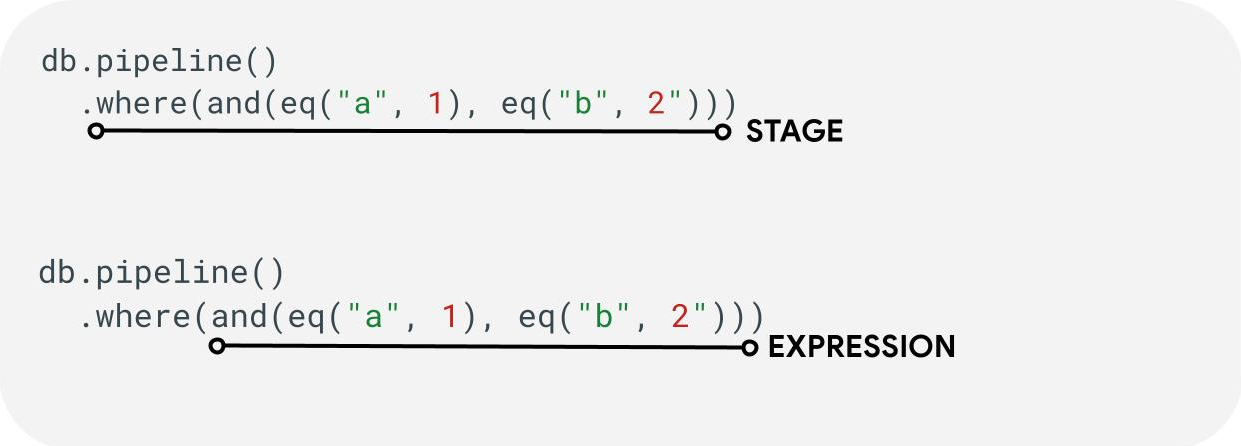
שלבים: צינור יכול לכלול שלב אחד או יותר. באופן הגיוני, הם מייצגים את סדר הפעולות (או השלבים) שמתבצעות כדי להריץ את השאילתה.
ביטויים: בשלבים מסוימים אפשר להשתמש בביטוי כדי להביע שאילתות מורכבות יותר. הביטוי יכול להיות פשוט ולהכיל פונקציה אחת כמו eq("a", 1). אפשר גם להשתמש בביטויים מורכבים יותר על ידי קינון ביטויים כמו and(eq("a", 1), eq("b", 2)).
פונקציות עוטפות של שאילתות משנה: פונקציות כמו array() ו-scalar() מאפשרות להטמיע צינור (pipeline) מקונן כביטוי בשלב מסוים.
שדות / קבועים / משתנים
פעולות בצינורות תומכות בביטויים מורכבים. לכן חשוב להבחין בין ערך שמייצג שדה, קבוע או משתנה.
שדות מתייחסים לנתונים בתוך מסמכים, וקבועים מאפשרים לציין כל ערך כארגומנט לביטוי. משתנים מאפשרים להגדיר ולהשתמש בערכים זמניים שמוגבלים לביצוע השאילתה ולא למסמכים שעוברים עיבוד. בהמשך מופיע סקירה כללית של המושגים האלה. בשלב let(...) מוסבר איך לקרוא ולכתוב משתנים במהלך ביצוע השאילתה.
| שדות | קבועים | משתנים | |
|---|---|---|---|
| מטרה | גישה לשדות או אחסון שלהם במסמכים | מציינים ערך קבוע | שימוש בערכים זמניים במהלך ההפעלה של צינור עיבוד הנתונים |
| שימוש ב-SDK | field("name") |
constant("val") |
variable("name") |
| היקף | במסמך הנוכחי | גלובלי | גלובלי לצינורות ולצינורות משנה |
| הפניה לא מוגדרת | הערך שמתקבל הוא absent |
לא רלוונטי | יוצר שגיאת זמן ריצה |
לדוגמה:
Web
const pipeline = db.pipeline() .collection("cities") .where(field("name").equal(constant("Toronto")));
Swift
let pipeline = db.pipeline() .collection("cities") .where(Field("name").equal(Constant("Toronto")))
Kotlin
val pipeline = db.pipeline() .collection("cities") .where(field("name").equal(constant("Toronto")))
Java
Pipeline pipeline = db.pipeline() .collection("cities") .where(field("name").equal(constant("Toronto")));
Python
from google.cloud.firestore_v1.pipeline_expressions import Field, Constant pipeline = ( client.pipeline() .collection("cities") .where(Field.of("name").equal(Constant.of("Toronto"))) )
המשך
pipeline := client.Pipeline().Collection("cities"). Where(firestore.FieldOf("name").Equal(firestore.ConstantOf("Toronto")))
במות
שלבי קלט
שלב הקלט מייצג את השלב הראשון של שאילתה. הוא מגדיר את קבוצת המסמכים הראשונית שאתם שולחים לגביה שאילתה. בפעולות של צינורות, זה דומה ברובו לשאילתות קיימות, שבהן רוב השאילתות מתחילות בשלב collection(...) או בשלב collection_group(...). שני שלבי קלט חדשים הם database() ו-documents(...). בשלב database() אפשר להחזיר את כל המסמכים במסד הנתונים, ואילו בשלב documents(...) הפעולה זהה לקריאת אצווה.
Web
let results; // Return all restaurants in San Francisco results = await execute(db.pipeline().collection("cities/sf/restaurants")); // Return all restaurants results = await execute(db.pipeline().collectionGroup("restaurants")); // Return all documents across all collections in the database (the entire database) results = await execute(db.pipeline().database()); // Batch read of 3 documents results = await execute(db.pipeline().documents([ doc(db, "cities", "SF"), doc(db, "cities", "DC"), doc(db, "cities", "NY") ]));
Swift
var results: Pipeline.Snapshot // Return all restaurants in San Francisco results = try await db.pipeline().collection("cities/sf/restaurants").execute() // Return all restaurants results = try await db.pipeline().collectionGroup("restaurants").execute() // Return all documents across all collections in the database (the entire database) results = try await db.pipeline().database().execute() // Batch read of 3 documents results = try await db.pipeline().documents([ db.collection("cities").document("SF"), db.collection("cities").document("DC"), db.collection("cities").document("NY") ]).execute()
Kotlin
var results: Task<Pipeline.Snapshot> // Return all restaurants in San Francisco results = db.pipeline().collection("cities/sf/restaurants").execute() // Return all restaurants results = db.pipeline().collectionGroup("restaurants").execute() // Return all documents across all collections in the database (the entire database) results = db.pipeline().database().execute() // Batch read of 3 documents results = db.pipeline().documents( db.collection("cities").document("SF"), db.collection("cities").document("DC"), db.collection("cities").document("NY") ).execute()
Java
Task<Pipeline.Snapshot> results; // Return all restaurants in San Francisco results = db.pipeline().collection("cities/sf/restaurants").execute(); // Return all restaurants results = db.pipeline().collectionGroup("restaurants").execute(); // Return all documents across all collections in the database (the entire database) results = db.pipeline().database().execute(); // Batch read of 3 documents results = db.pipeline().documents( db.collection("cities").document("SF"), db.collection("cities").document("DC"), db.collection("cities").document("NY") ).execute();
Python
# Return all restaurants in San Francisco results = client.pipeline().collection("cities/sf/restaurants").execute() # Return all restaurants results = client.pipeline().collection_group("restaurants").execute() # Return all documents across all collections in the database (the entire database) results = client.pipeline().database().execute() # Batch read of 3 documents results = ( client.pipeline() .documents( client.collection("cities").document("SF"), client.collection("cities").document("DC"), client.collection("cities").document("NY"), ) .execute() )
המשך
// Return all restaurants in San Francisco results1, err := client.Pipeline().Collection("cities/sf/restaurants").Execute(ctx).Results().GetAll() if err != nil { fmt.Fprintf(w, "GetAll failed: %v", err) return err } // Return all restaurants results2, err := client.Pipeline().CollectionGroup("restaurants").Execute(ctx).Results().GetAll() if err != nil { fmt.Fprintf(w, "GetAll failed: %v", err) return err } // Return all documents across all collections in the database (the entire database) results3, err := client.Pipeline().Database().Execute(ctx).Results().GetAll() if err != nil { fmt.Fprintf(w, "GetAll failed: %v", err) return err } // Batch read of 3 documents results4, err := client.Pipeline(). Documents([]*firestore.DocumentRef{ client.Collection("cities").Doc("SF"), client.Collection("cities").Doc("DC"), client.Collection("cities").Doc("NY"), }). Execute(ctx).Results().GetAll() if err != nil { fmt.Fprintf(w, "GetAll failed: %v", err) return err }
כמו בכל השלבים האחרים, סדר התוצאות משלבי הקלט האלה לא קבוע. אם נדרש סדר ספציפי, תמיד צריך להוסיף את האופרטור sort(...).
איפה
השלב where(...) פועל כמסנן רגיל על מסמכים שנוצרו בשלב הקודם, והוא דומה ברובו לתחביר הקיים של 'where' בשאילתות קיימות. כל מסמך שבו הערך של הביטוי שצוין הוא לא true, מסונן מהמסמכים שמוחזרים.
אפשר לשרשר כמה הצהרות של where(...), והן יפעלו כביטוי and(...). לדוגמה, שתי השאילתות הבאות שקולות מבחינה לוגית ואפשר להשתמש בהן לסירוגין.
Web
let results; results = await execute(db.pipeline().collection("books") .where(field("rating").equal(5)) .where(field("published").lessThan(1900)) ); results = await execute(db.pipeline().collection("books") .where(and(field("rating").equal(5), field("published").lessThan(1900))) );
Swift
var results: Pipeline.Snapshot results = try await db.pipeline().collection("books") .where(Field("rating").equal(5)) .where(Field("published").lessThan(1900)) .execute() results = try await db.pipeline().collection("books") .where(Field("rating").equal(5) && Field("published").lessThan(1900)) .execute()
Kotlin
var results: Task<Pipeline.Snapshot> results = db.pipeline().collection("books") .where(field("rating").equal(5)) .where(field("published").lessThan(1900)) .execute() results = db.pipeline().collection("books") .where(Expression.and(field("rating").equal(5), field("published").lessThan(1900))) .execute()
Java
Task<Pipeline.Snapshot> results; results = db.pipeline().collection("books") .where(field("rating").equal(5)) .where(field("published").lessThan(1900)) .execute(); results = db.pipeline().collection("books") .where(Expression.and( field("rating").equal(5), field("published").lessThan(1900) )) .execute();
Python
from google.cloud.firestore_v1.pipeline_expressions import And, Field results = ( client.pipeline() .collection("books") .where(Field.of("rating").equal(5)) .where(Field.of("published").less_than(1900)) .execute() ) results = ( client.pipeline() .collection("books") .where(And(Field.of("rating").equal(5), Field.of("published").less_than(1900))) .execute() )
המשך
results1, err := client.Pipeline(). Collection("books"). Where(firestore.FieldOf("rating").Equal(5)). Where(firestore.FieldOf("published").LessThan(1900)). Execute(ctx).Results().GetAll() if err != nil { fmt.Fprintf(w, "GetAll failed: %v", err) return err } results2, err := client.Pipeline(). Collection("books"). Where(firestore.And( firestore.FieldOf("rating").Equal(5), firestore.FieldOf("published").LessThan(1900), )). Execute(ctx).Results().GetAll() if err != nil { fmt.Fprintf(w, "GetAll failed: %v", err) return err }
בחירה / הוספה והסרה של שדות
הפרמטרים select(...), add_fields(...) ו-remove_fields(...) מאפשרים לשנות את השדות שמוחזרים משלב קודם. שלושת השלבים האלה נקראים בדרך כלל שלבים בסגנון הקרנה.
הפרמטרים select(...) ו-add_fields(...) מאפשרים לציין את התוצאה של ביטוי לשם שדה שסופק על ידי המשתמש. הפונקציה
select(...) תחזיר רק את המסמכים עם שמות השדות שצוינו, ואילו הפונקציה add_fields(...) מרחיבה את הסכימה של השלב הקודם (יכול להיות שהיא תחליף ערכים עם שמות שדות זהים).
התג remove_fields(...) מאפשר לציין קבוצה של שדות להסרה מהשלב הקודם. ציון שמות של שדות שלא קיימים לא משפיע על כלום.
בקטע הגבלת השדות שיוחזרו שבהמשך מוסבר איך להשתמש בשלב כזה כדי להגביל את התוצאה רק לשדות שנדרשים בלקוח. בדרך כלל, השימוש בשלב כזה עוזר להפחית את העלות ואת זמן האחזור של רוב השאילתות.
צבירה / ייחודי
בשלב aggregate(...) אפשר לבצע סדרה של צבירות על מסמכי הקלט. כברירת מחדל, כל המסמכים מצורפים יחד, אבל אפשר לספק ארגומנט אופציונלי grouping כדי לאפשר את צירוף מסמכי הקלט לדליים שונים.
Web
const results = await execute(db.pipeline() .collection("books") .aggregate( field("rating").average().as("avg_rating") ) .distinct(field("genre")) );
Swift
let results = try await db.pipeline() .collection("books") .aggregate([ Field("rating").average().as("avg_rating") ], groups: [ Field("genre") ]) .execute()
Kotlin
val results = db.pipeline() .collection("books") .aggregate( AggregateStage .withAccumulators(AggregateFunction.average("rating").alias("avg_rating")) .withGroups(field("genre")) ) .execute()
Java
Task<Pipeline.Snapshot> results = db.pipeline() .collection("books") .aggregate(AggregateStage .withAccumulators( AggregateFunction.average("rating").alias("avg_rating")) .withGroups(field("genre"))) .execute();
Python
from google.cloud.firestore_v1.pipeline_expressions import Field results = ( client.pipeline() .collection("books") .aggregate( Field.of("rating").average().as_("avg_rating"), groups=[Field.of("genre")] ) .execute() )
המשך
snapshot := client.Pipeline(). Collection("books"). Aggregate( firestore.Accumulators(firestore.Average("rating").As("avg_rating")), firestore.WithAggregateGroups("genre"), ). Execute(ctx)
אם לא מציינים את groupings, בשלב הזה יופק רק מסמך אחד. אחרת, יופק מסמך לכל שילוב ייחודי של ערכי groupings.
השלב distinct(...) הוא אופרטור צבירה פשוט שמאפשר ליצור רק את הערכים הייחודיים groupings בלי צוברים. ההתנהגות שלו זהה לזו של aggregate(...) בכל שאר ההיבטים. בדוגמה הבאה אפשר לראות:
Web
const results = await execute(db.pipeline() .collection("books") .distinct( field("author").toUpper().as("author"), field("genre") ) );
Swift
let results = try await db.pipeline() .collection("books") .distinct([ Field("author").toUpper().as("author"), Field("genre") ]) .execute()
Kotlin
val results = db.pipeline() .collection("books") .distinct( field("author").toUpper().alias("author"), field("genre") ) .execute()
Java
Task<Pipeline.Snapshot> results = db.pipeline() .collection("books") .distinct( field("author").toUpper().alias("author"), field("genre") ) .execute();
Python
from google.cloud.firestore_v1.pipeline_expressions import Field results = ( client.pipeline() .collection("books") .distinct(Field.of("author").to_upper().as_("author"), "genre") .execute() )
המשך
snapshot := client.Pipeline(). Collection("books"). Distinct(firestore.Fields( firestore.ToUpper(firestore.FieldOf("author")).As("author"), firestore.FieldOf("genre"), )). Execute(ctx)
פונקציות
פונקציות הן אבן בניין ליצירת ביטויים ושאילתות מורכבות. רשימה מלאה של הפונקציות עם דוגמאות מופיעה במאמר הפניה לפונקציות. כדי לרענן את הזיכרון, כדאי לעיין במבנה של שאילתה טיפוסית:

הרבה שלבים מקבלים ביטויים שמכילים פונקציה אחת או יותר. השימוש הנפוץ ביותר בפונקציות יהיה בשלבים where(...) וselect(...). יש שני סוגים עיקריים של פונקציות שכדאי להכיר:
Web
let results; // Type 1: Scalar (for use in non-aggregation stages) // Example: Return the min store price for each book. results = await execute(db.pipeline().collection("books") .select(field("current").logicalMinimum(field("updated")).as("price_min")) ); // Type 2: Aggregation (for use in aggregate stages) // Example: Return the min price of all books. results = await execute(db.pipeline().collection("books") .aggregate(field("price").minimum().as("min_price")) );
Swift
var results: Pipeline.Snapshot // Type 1: Scalar (for use in non-aggregation stages) // Example: Return the min store price for each book. results = try await db.pipeline().collection("books") .select([ Field("current").logicalMinimum(["updated"]).as("price_min") ]) .execute() // Type 2: Aggregation (for use in aggregate stages) // Example: Return the min price of all books. results = try await db.pipeline().collection("books") .aggregate([Field("price").minimum().as("min_price")]) .execute()
Kotlin
var results: Task<Pipeline.Snapshot> // Type 1: Scalar (for use in non-aggregation stages) // Example: Return the min store price for each book. results = db.pipeline().collection("books") .select( field("current").logicalMinimum("updated").alias("price_min") ) .execute() // Type 2: Aggregation (for use in aggregate stages) // Example: Return the min price of all books. results = db.pipeline().collection("books") .aggregate(AggregateFunction.minimum("price").alias("min_price")) .execute()
Java
Task<Pipeline.Snapshot> results; // Type 1: Scalar (for use in non-aggregation stages) // Example: Return the min store price for each book. results = db.pipeline().collection("books") .select( field("current").logicalMinimum("updated").alias("price_min") ) .execute(); // Type 2: Aggregation (for use in aggregate stages) // Example: Return the min price of all books. results = db.pipeline().collection("books") .aggregate(AggregateFunction.minimum("price").alias("min_price")) .execute();
Python
from google.cloud.firestore_v1.pipeline_expressions import Field # Type 1: Scalar (for use in non-aggregation stages) # Example: Return the min store price for each book. results = ( client.pipeline() .collection("books") .select( Field.of("current").logical_minimum(Field.of("updated")).as_("price_min") ) .execute() ) # Type 2: Aggregation (for use in aggregate stages) # Example: Return the min price of all books. results = ( client.pipeline() .collection("books") .aggregate(Field.of("price").minimum().as_("min_price")) .execute() )
המשך
// Type 1: Scalar (for use in non-aggregation stages) // Example: Return the min store price for each book. results1, err := client.Pipeline(). Collection("books"). Select(firestore.Fields( firestore.LogicalMinimum(firestore.FieldOf("current"), firestore.FieldOf("updated")).As("price_min"), )). Execute(ctx).Results().GetAll() if err != nil { fmt.Fprintf(w, "GetAll failed: %v", err) return err } // Type 2: Aggregation (for use in aggregate stages) // Example: Return the min price of all books. results2, err := client.Pipeline(). Collection("books"). Aggregate(firestore.Accumulators( firestore.Minimum("price").As("min_price"), )). Execute(ctx).Results().GetAll() if err != nil { fmt.Fprintf(w, "GetAll failed: %v", err) return err }
מגבלות
ברוב המקרים, מהדורת Enterprise לא מטילה מגבלות על מבנה השאילתה. במילים אחרות, אתם לא מוגבלים למספר קטן של ערכים בשאילתת IN או OR. במקום זאת, יש שתי מגבלות עיקריות שכדאי להכיר:
- מועד אחרון: 60 שניות (זהה למהדורה הרגילה).
- שימוש בזיכרון: מגבלה של 128MiB על כמות הנתונים המגובשים במהלך ביצוע השאילתה.
שגיאות
יכולות להיות כמה סיבות לכך ששאילתות נכשלות. הנה קישור לשגיאות נפוצות ולפעולות שאפשר לבצע כדי לפתור אותן:
| קוד שגיאה | פעולה |
DEADLINE_EXCEEDED
|
השאילתה שאתם מריצים חורגת ממגבלת הזמן של 60 שניות ונדרשת אופטימיזציה נוספת. כדי לקבל טיפים, אפשר לעיין בקטע 'ביצועים'. אם אתם לא מצליחים לזהות את שורש הבעיה, אתם יכולים לפנות לצוות. |
RESOURCE_EXHAUSTED
|
השאילתה שאתם מריצים חורגת ממגבלות הזיכרון ודורשת אופטימיזציה נוספת. כדי לקבל טיפים, אפשר לעיין בקטע 'ביצועים'. אם אתם לא מצליחים לזהות את שורש הבעיה, אתם יכולים לפנות לצוות. |
INTERNAL
|
פנו לצוות התמיכה. |
ביצועים
במסדי נתונים של מהדורת Enterprise לא נדרש שיהיה תמיד אינדקס.
המשמעות היא שזמן האחזור של שאילתה יכול להיות ארוך יותר בהשוואה לשאילתות קיימות, שהיו נכשלות באופן מיידי עם שגיאת אינדקס חסר FAILED_PRECONDITION. כדי לשפר את הביצועים של פעולות בצינור, אפשר לבצע כמה פעולות.
יצירת אינדקסים
האינדקס שנעשה בו שימוש
הסבר על שאילתה מאפשר לכם לזהות אם השאילתה מוגשת על ידי אינדקס או חוזרת לפעולה פחות יעילה כמו סריקת טבלה. אם השאילתה שלכם לא מוגשת במלואה מאינדקס, אתם יכולים ליצור אינדקס לפי ההוראות.
יצירת אינדקסים
כדי ליצור אינדקסים, אפשר לפעול לפי התיעוד הקיים לניהול אינדקסים. לפני שיוצרים אינדקס, כדאי לעיין בשיטות המומלצות הכלליות לשימוש באינדקסים ב-Cloud Firestore. כדי לוודא שהשאילתה יכולה להשתמש באינדקסים, צריך לפעול לפי השיטות המומלצות ליצירת אינדקסים עם שדות בסדר הבא:
- כל השדות שישמשו במסנני שוויון (בכל סדר)
- כל השדות שייכללו במיון (באותו סדר)
- שדות שישמשו במסנני טווח או אי-שוויון בסדר יורד של סלקטיביות אילוץ השאילתה
לדוגמה, בשאילתה הבאה,
Web
const results = await execute(db.pipeline() .collection("books") .where(field("published").lessThan(1900)) .where(field("genre").equal("Science Fiction")) .where(field("rating").greaterThan(4.3)) .sort(field("published").descending()) );
Swift
let results = try await db.pipeline() .collection("books") .where(Field("published").lessThan(1900)) .where(Field("genre").equal("Science Fiction")) .where(Field("rating").greaterThan(4.3)) .sort([Field("published").descending()]) .execute()
Kotlin
val results = db.pipeline() .collection("books") .where(field("published").lessThan(1900)) .where(field("genre").equal("Science Fiction")) .where(field("rating").greaterThan(4.3)) .sort(field("published").descending()) .execute()
Java
Task<Pipeline.Snapshot> results = db.pipeline() .collection("books") .where(field("published").lessThan(1900)) .where(field("genre").equal("Science Fiction")) .where(field("rating").greaterThan(4.3)) .sort(field("published").descending()) .execute();
Python
from google.cloud.firestore_v1.pipeline_expressions import Field results = ( client.pipeline() .collection("books") .where(Field.of("published").less_than(1900)) .where(Field.of("genre").equal("Science Fiction")) .where(Field.of("rating").greater_than(4.3)) .sort(Field.of("published").descending()) .execute() )
המשך
snapshot := client.Pipeline(). Collection("books"). Where(firestore.FieldOf("published").LessThan(1900)). Where(firestore.FieldOf("genre").Equal("Science Fiction")). Where(firestore.FieldOf("rating").GreaterThan(4.3)). Sort(firestore.Orders(firestore.Descending(firestore.FieldOf("published")))). Execute(ctx)
האינדקס המומלץ הוא אינדקס בהיקף אוסף ב-books עבור (genre [...], published DESC, avg_rating DESC).
צפיפות האינדקס
Cloud Firestore תומך באינדקסים דלילים ולא דלילים. מידע נוסף מופיע במאמר בנושא צפיפות האינדקס.
שאילתות שכלולות + אינדקסים משניים
Cloud Firestore יכול לדלג על אחזור המסמך המלא ולהחזיר רק תוצאות מהאינדקס אם כל השדות שמוחזרים נמצאים באינדקס משני. בדרך כלל זה מוביל לשיפור משמעותי בזמן האחזור (ובעלות). שימוש בשאילתה לדוגמה שבהמשך:
Web
const results = await execute(db.pipeline() .collection("books") .where(field("category").like("%fantasy%")) .where(field("title").exists()) .where(field("author").exists()) .select(field("title"), field("author")) );
Swift
let results = try await db.pipeline() .collection("books") .where(Field("category").like("%fantasy%")) .where(Field("title").exists()) .where(Field("author").exists()) .select([Field("title"), Field("author")]) .execute()
Kotlin
val results = db.pipeline() .collection("books") .where(field("category").like("%fantasy%")) .where(field("title").exists()) .where(field("author").exists()) .select(field("title"), field("author")) .execute()
Java
Task<Pipeline.Snapshot> results = db.pipeline() .collection("books") .where(field("category").like("%fantasy%")) .where(field("title").exists()) .where(field("author").exists()) .select(field("title"), field("author")) .execute();
Python
from google.cloud.firestore_v1.pipeline_expressions import Field results = ( client.pipeline() .collection("books") .where(Field.of("category").like("%fantasy%")) .where(Field.of("title").exists()) .where(Field.of("author").exists()) .select("title", "author") .execute() )
המשך
snapshot := client.Pipeline(). Collection("books"). Where(firestore.FieldOf("category").Like("%fantasy%")). Where(firestore.FieldOf("title").FieldExists()). Where(firestore.FieldOf("author").FieldExists()). Select(firestore.Fields("title", "author")). Execute(ctx)
אם במסד הנתונים כבר יש אינדקס של היקף האוסף ב-books עבור (category [...], title [...], author [...]), אפשר להימנע מאחזור נתונים מהמסמכים הראשיים עצמם. במקרה הזה, הסדר באינדקס לא משנה, ומשתמשים ב-[...] כדי לציין את זה.
הגבלת השדות שיוחזרו
כברירת מחדל, שאילתת Cloud Firestore מחזירה את כל השדות במסמך, בדומה ל-SELECT * במערכות יחסיות. עם זאת, אם האפליקציה שלכם צריכה רק קבוצת משנה של השדות, אפשר להשתמש בשלבים select(...) או restrict(...) כדי להעביר את הסינון הזה לצד השרת. הפעולה הזו תצמצם את גודל התגובה (וכך תפחית את עלות היציאה מהרשת) ותשפר את זמן האחזור.
כלים לפתרון בעיות
הסבר על שאילתה
התכונה 'הסבר על שאילתה' מאפשרת לכם לראות את מדדי הביצוע ופרטים על האינדקסים שנעשה בהם שימוש.
מדדים
פעולות בצינורות עיבוד נתונים אם הן משולבות באופן מלא עם Cloud Firestoreמדדים קיימים.
בעיות או מגבלות ידועות
מדדים מיוחדים
פעולות בצינורות לא תומכות עדיין בסוגי אינדקסים קיימים של array-contains ו-vector. במקום פשוט לדחות שאילתות כאלה, Cloud Firestore ינסה להשתמש באינדקסים קיימים אחרים של ascending ושל descending. לכן, צפוי שביטויים כאלה של array_contains או find_nearest יהיו איטיים יותר מהמקבילים הקיימים שלהם.
תמיכה בזמן אמת ובמצב אופליין
אין אפשרות לבצע פעולות בפייפליין בזמן אמת או במצב אופליין.