

В процессе разработки приложения вам может потребоваться ограничить доступ к базе данных Cloud Firestore . Однако перед запуском вам понадобятся более детальные Cloud Firestore Security Rules . С помощью эмулятора Cloud Firestore , помимо прототипирования и тестирования общих функций и поведения приложения, вы можете писать модульные тесты, проверяющие поведение ваших Cloud Firestore Security Rules .
Быстрый старт
Для нескольких простых тестовых случаев с несложными правилами попробуйте пример быстрого запуска .
Разберитесь Cloud Firestore Security Rules
Внедрите правила Firebase Authentication и Cloud Firestore Security Rules для бессерверной аутентификации, авторизации и проверки данных при использовании клиентских библиотек для мобильных и веб-приложений.
Cloud Firestore Security Rules состоят из двух частей:
- Оператор
match, идентифицирующий документы в вашей базе данных. - Выражение
allow, которое контролирует доступ к этим документам.
Firebase Authentication проверяет учетные данные пользователей и служит основой для систем доступа на основе пользователей и ролей.
Каждый запрос к базе данных из библиотеки мобильного/веб-клиента Cloud Firestore проверяется на соответствие вашим правилам безопасности перед чтением или записью каких-либо данных. Если правила запрещают доступ к любому из указанных путей к документам, весь запрос завершается ошибкой.
Подробнее о Cloud Firestore Security Rules можно узнать в разделе «Начало работы с Cloud Firestore Security Rules .
Установите эмулятор.
Для установки эмулятора Cloud Firestore используйте Firebase CLI и выполните следующую команду:
firebase setup:emulators:firestore
Запустите эмулятор
Для начала инициализируйте проект Firebase в своей рабочей директории. Это распространенный первый шаг при использовании Firebase CLI .
firebase init
Запустите эмулятор, используя следующую команду. Эмулятор будет работать до тех пор, пока вы не завершите процесс:
firebase emulators:start --only firestore
Во многих случаях вам потребуется запустить эмулятор, выполнить набор тестов, а затем остановить эмулятор после завершения тестов. Это легко сделать с помощью команды emulators:exec :
firebase emulators:exec --only firestore "./my-test-script.sh"
При запуске эмулятор попытается работать на порту по умолчанию (8080). Вы можете изменить порт эмулятора, изменив раздел "emulators" в файле firebase.json :
{
  // ...
  "emulators": {
    "firestore": {
      "port": "YOUR_PORT"
    }
  }
}
Перед запуском эмулятора
Прежде чем начать использовать эмулятор, учтите следующее:
- Эмулятор сначала загрузит правила, указанные в поле
firestore.rulesвашего файлаfirebase.json. Он ожидает имя локального файла, содержащего ваши Cloud Firestore Security Rules , и применит эти правила ко всем проектам. Если вы не укажете путь к локальному файлу или не используете методloadFirestoreRules, как описано ниже, эмулятор будет рассматривать все проекты как имеющие открытые правила. - Хотя большинство SDK Firebase работают с эмуляторами напрямую, только библиотека
@firebase/rules-unit-testingподдерживает имитациюauthв правилах безопасности, что значительно упрощает модульное тестирование. Кроме того, библиотека поддерживает несколько специфических для эмуляторов функций, таких как очистка всех данных, как указано ниже. - Эмуляторы также будут принимать токены Firebase Auth, предоставленные через клиентские SDK, и соответствующим образом оценивать правила, что позволяет напрямую подключать ваше приложение к эмуляторам в интеграционных и ручных тестах.
Запустите локальные модульные тесты
Запускайте локальные модульные тесты с помощью JavaScript SDK версии 9.
Firebase распространяет библиотеку модульного тестирования правил безопасности как с версией 9 JavaScript SDK, так и с версией 8 SDK. API библиотек существенно различаются. Мы рекомендуем библиотеку тестирования версии 9, которая более оптимизирована и требует меньше настроек для подключения к эмуляторам, что позволяет безопасно избежать случайного использования производственных ресурсов. Для обеспечения обратной совместимости мы продолжаем предоставлять библиотеку тестирования версии 8 .
- Общие методы тестирования и вспомогательные функции в SDK версии 9
- Специфические для эмулятора методы тестирования в SDK версии 9
Используйте модуль @firebase/rules-unit-testing для взаимодействия с локально запущенным эмулятором. Если вы получаете ошибки таймаута или ECONNREFUSED , убедитесь, что эмулятор действительно запущен.
Мы настоятельно рекомендуем использовать последнюю версию Node.js, чтобы вы могли использовать нотацию async/await . Практически все действия, которые вы, возможно, захотите протестировать, связаны с асинхронными функциями, и модуль тестирования разработан для работы с кодом, основанным на промисах.
Библиотека модульного тестирования v9 Rules всегда учитывает работу эмуляторов и никогда не затрагивает ваши производственные ресурсы.
Импорт библиотеки осуществляется с помощью модульных операторов импорта версии 9. Например:
import {
  assertFails,
  assertSucceeds,
  initializeTestEnvironment
} from "@firebase/rules-unit-testing"

// Use `const { … } = require("@firebase/rules-unit-testing")` if imports are not supported
// Or we suggest `const testing = require("@firebase/rules-unit-testing")` if necessary.
После импорта реализация модульных тестов включает в себя:
- Создание и настройка среды
RulesTestEnvironmentс помощью вызова функцииinitializeTestEnvironment. - Настройка тестовых данных без срабатывания правил с использованием удобного метода, позволяющего временно их обойти:
RulesTestEnvironment.withSecurityRulesDisabled. - Настройка тестового набора и хуков "до"/"после" для каждого теста с вызовами для очистки тестовых данных и среды, например,
RulesTestEnvironment.cleanup()илиRulesTestEnvironment.clearFirestore(). - Реализация тестовых случаев, имитирующих состояния аутентификации, с использованием
RulesTestEnvironment.authenticatedContextиRulesTestEnvironment.unauthenticatedContext.
Общие методы и вспомогательные функции
См. также методы тестирования, специфичные для эмулятора, в SDK версии 9 .
initializeTestEnvironment() => RulesTestEnvironment
Эта функция инициализирует тестовую среду для модульного тестирования правил. Вызовите эту функцию первой для настройки тестов. Для успешного выполнения требуется запущенный эмулятор.
Функция принимает необязательный объект, определяющий TestEnvironmentConfig , который может содержать идентификатор проекта и параметры конфигурации эмулятора.
let testEnv = await initializeTestEnvironment({
  projectId: "demo-project-1234",
  firestore: {
    rules: fs.readFileSync("firestore.rules", "utf8"),
  },
});
RulesTestEnvironment.authenticatedContext({ user_id: string, tokenOptions?: TokenOptions }) => RulesTestContext
Этот метод создает объект RulesTestContext , который ведет себя как аутентифицированный пользователь Authentication. К запросам, созданным с помощью возвращенного контекста, будет прикреплен фиктивный токен Authentication. При желании можно передать объект, определяющий пользовательские утверждения или переопределения для полезной нагрузки токена Authentication.
Используйте возвращаемый объект контекста теста в своих тестах для доступа к любым настроенным экземплярам эмулятора, включая те, которые настроены с помощью initializeTestEnvironment .
// Assuming a Firestore app and the Firestore emulator for this example
import { setDoc } from "firebase/firestore";

const alice = testEnv.authenticatedContext("alice", { … });
// Use the Firestore instance associated with this context
await assertSucceeds(setDoc(alice.firestore().doc('/users/alice'), { ... });
RulesTestEnvironment.unauthenticatedContext() => RulesTestContext
Этот метод создает объект RulesTestContext , который ведет себя как клиент, не авторизованный с помощью аутентификации. Запросы, созданные с использованием возвращенного контекста, не будут содержать прикрепленных токенов Firebase Auth.
Используйте возвращаемый объект контекста теста в своих тестах для доступа к любым настроенным экземплярам эмулятора, включая те, которые настроены с помощью initializeTestEnvironment .
// Assuming a Cloud Storage app and the Storage emulator for this example
import { getStorage, ref, deleteObject } from "firebase/storage";

const alice = testEnv.unauthenticatedContext();

// Use the Cloud Storage instance associated with this context
const desertRef = ref(alice.storage(), 'images/desert.jpg');
await assertSucceeds(deleteObject(desertRef));
RulesTestEnvironment.withSecurityRulesDisabled()
Запустите функцию настройки теста с контекстом, который ведет себя так, как если бы правила безопасности были отключены.
Этот метод принимает функцию обратного вызова, которая принимает контекст, обходящий правила безопасности, и возвращает промис. Контекст будет уничтожен после того, как промис разрешится/отклонится.
RulesTestEnvironment.cleanup()
Этот метод уничтожает все созданные в тестовой среде RulesTestContexts и очищает базовые ресурсы, обеспечивая корректный выход из программы.
Этот метод никак не изменяет состояние эмуляторов. Для сброса данных между тестами используйте метод очистки данных, специфичный для конкретного эмулятора приложения.
assertSucceeds(pr: Promise<any>)) => Promise<any>
Это вспомогательная функция для тестового примера.
Функция утверждает, что предоставленный Promise, обертывающий операцию эмулятора, будет разрешен без нарушений правил безопасности.
await assertSucceeds(setDoc(alice.firestore(), '/users/alice'), { ... });assertFails(pr: Promise<any>)) => Promise<any>
Это вспомогательная функция для тестового примера.
Данная функция утверждает, что предоставленный Promise, содержащий операцию эмулятора, будет отклонен как нарушение правил безопасности.
await assertFails(setDoc(alice.firestore(), '/users/bob'), { ... });Методы, специфичные для эмулятора
См. также общие методы тестирования и вспомогательные функции в SDK версии 9 .
RulesTestEnvironment.clearFirestore() => Promise<void>
Этот метод очищает данные в базе данных Firestore, относящиеся к projectId настроенному для эмулятора Firestore.
RulesTestContext.firestore(settings?: Firestore.FirestoreSettings) => Firestore;
Этот метод получает экземпляр Firestore для данного тестового контекста. Возвращаемый экземпляр Firebase JS Client SDK можно использовать с API клиентского SDK (модульной версии 9 или совместимой с версией 9).
Визуализация оценки правил
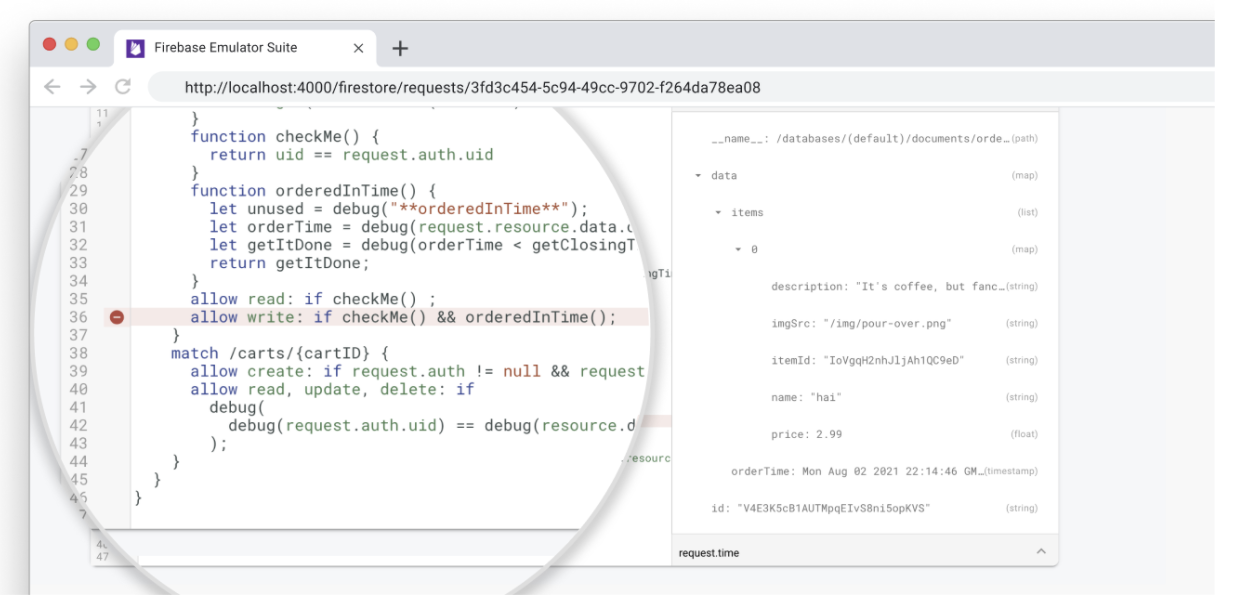
Эмулятор Cloud Firestore позволяет визуализировать запросы клиентов в пользовательском интерфейсе Emulator Suite, включая трассировку выполнения правил безопасности Firebase.
Откройте вкладку Firestore > Запросы , чтобы просмотреть подробную последовательность обработки каждого запроса.
Создание отчетов о тестировании
После выполнения набора тестов вы можете получить доступ к отчетам о покрытии тестами, которые показывают, как было оценено каждое из ваших правил безопасности.
Для получения отчетов отправьте запрос к открытой конечной точке эмулятора во время его работы. Для версии, удобной для просмотра в браузере, используйте следующий URL:
http://localhost:8080/emulator/v1/projects/<project_id>:ruleCoverage.html
Это разбивает ваши правила на выражения и подвыражения, при наведении курсора мыши на которые отображается дополнительная информация, включая количество вычислений и возвращаемые значения. Для получения необработанных данных в формате JSON добавьте в свой запрос следующий URL:
http://localhost:8080/emulator/v1/projects/<project_id>:ruleCoverage
Различия между эмулятором и производственной средой
- Нет необходимости явно создавать проект Cloud Firestore . Эмулятор автоматически создает любой доступный экземпляр.
- Эмулятор Cloud Firestore не работает со стандартным процессом Firebase Authentication . Вместо этого в Firebase Test SDK мы предоставили метод
initializeTestApp()в библиотекеrules-unit-testing, который принимает полеauth. Созданный с помощью этого метода дескриптор Firebase будет вести себя так, как если бы он успешно аутентифицировался как предоставленная вами сущность. Если вы передадитеnull, он будет вести себя как неаутентифицированный пользователь (например, правила,auth != null, завершатся ошибкой).
Устранение известных проблем
При использовании эмулятора Cloud Firestore вы можете столкнуться со следующими известными проблемами. Следуйте приведенным ниже инструкциям для устранения любых нештатных ситуаций. Эти заметки написаны с учетом библиотеки модульного тестирования Security Rules, но общие подходы применимы к любому SDK Firebase.
Поведение тестов непоследовательно.
Если ваши тесты иногда проходят, а иногда проваливаются, даже без каких-либо изменений в самих тестах, вам может потребоваться проверить их правильную последовательность. Большинство взаимодействий с эмулятором асинхронны, поэтому дважды проверьте, правильно ли выстроена последовательность всего асинхронного кода. Вы можете исправить последовательность, либо объединяя промисы в цепочку, либо широко используя нотацию await .
В частности, рассмотрите следующие асинхронные операции:
- Настройка правил безопасности, например, с помощью
initializeTestEnvironment. - Чтение и запись данных, например, с помощью
db.collection("users").doc("alice").get(). - Операционные утверждения, включая
assertSucceedsиassertFails.
Тесты проходят успешно только при первой загрузке эмулятора.
Эмулятор является состоятельным. Он хранит все записанные в него данные в памяти, поэтому любые данные теряются при завершении работы эмулятора. Если вы запускаете несколько тестов для одного и того же идентификатора проекта, каждый тест может генерировать данные, которые могут повлиять на последующие тесты. Для обхода этого поведения можно использовать любой из следующих методов:
- Используйте уникальные идентификаторы проектов для каждого теста. Обратите внимание, что если вы решите это сделать, вам потребуется вызывать
initializeTestEnvironmentв рамках каждого теста; правила автоматически загружаются только для идентификатора проекта по умолчанию. - Перестройте свои тесты таким образом, чтобы они не взаимодействовали с ранее записанными данными (например, используйте отдельную коллекцию для каждого теста).
- Удалите все данные, записанные во время тестирования.
Настройка тестовой установки очень сложная.
При настройке теста может потребоваться изменить данные способом, который не разрешен Cloud Firestore Security Rules . Если ваши правила усложняют настройку теста, попробуйте использовать RulesTestEnvironment.withSecurityRulesDisabled на этапах настройки, чтобы операции чтения и записи не вызывали ошибки PERMISSION_DENIED .
После этого ваш тест сможет выполнять операции от имени аутентифицированного или неаутентифицированного пользователя, используя RulesTestEnvironment.authenticatedContext и unauthenticatedContext соответственно. Это позволит вам проверить, правильно ли ваши Cloud Firestore Security Rules разрешают/запрещают различные случаи.