

Firebase cung cấp tính năng cảnh báo cho nhiều sự kiện quản lý dự án và ứng dụng. Sau đây là một số ví dụ về các sự kiện mà Firebase có thể gửi cho bạn loại cảnh báo này:
- Đối với Crashlytics, chúng tôi có thể cảnh báo bạn nếu ứng dụng của bạn có số lượng sự cố tăng đột biến.
- Đối với Performance Monitoring, chúng tôi có thể cảnh báo cho bạn nếu thời gian khởi động ứng dụng vượt quá ngưỡng mà bạn đã định cấu hình.
- Đối với App Distribution, chúng tôi có thể cảnh báo cho bạn nếu một trong những người kiểm thử của bạn đăng ký một thiết bị iOS mới.
Tuỳ thuộc vào cảnh báo và lựa chọn ưu tiên do thành viên dự án đặt, Firebase sẽ hiển thị các loại cảnh báo này trong bảng điều khiển Firebase hoặc gửi chúng qua email.
Trang này mô tả cách viết các hàm trong Cloud Functions for Firebase (thế hệ thứ 2) để xử lý các sự kiện cảnh báo.
Tính năng này hoạt động như thế nào?
Bạn có thể kích hoạt các hàm để phản hồi các sự kiện cảnh báo do những nguồn này phát ra:
- Xử lý sự kiện cảnh báo App Distribution
- Xử lý sự kiện cảnh báo Crashlytics
- Xử lý sự kiện cảnh báo Performance Monitoring
Trong một vòng đời điển hình, một hàm do sự kiện cảnh báo kích hoạt sẽ thực hiện những việc sau:
- Nghe/chờ một loại cảnh báo cụ thể được phát ra từ Firebase.
- Kích hoạt khi cảnh báo được phát và nhận tải trọng sự kiện chứa thông tin cụ thể về sự kiện.
- Gọi mã của hàm để xử lý tải trọng sự kiện.
Kích hoạt một hàm trên các sự kiện cảnh báo
Dùng gói con firebase-functions/v2/alerts để viết một hàm xử lý các sự kiện cảnh báo. Các ví dụ sau đây dành riêng cho sản phẩm minh hoạ một quy trình làm việc trong đó một hàm sử dụng webhook để đăng thông báo lên một kênh Discord khi một cảnh báo cho sản phẩm đó được phát ra từ Firebase.
Xử lý sự kiện cảnh báo Crashlytics
Đối với ví dụ Crashlytics sau đây, bạn sẽ dùng Cloud Functions for Firebase để xử lý một sự kiện cảnh báo về vấn đề mới gây ra lỗi nghiêm trọng. Hàm này đăng thông tin cảnh báo trong một thông báo lên kênh Discord.
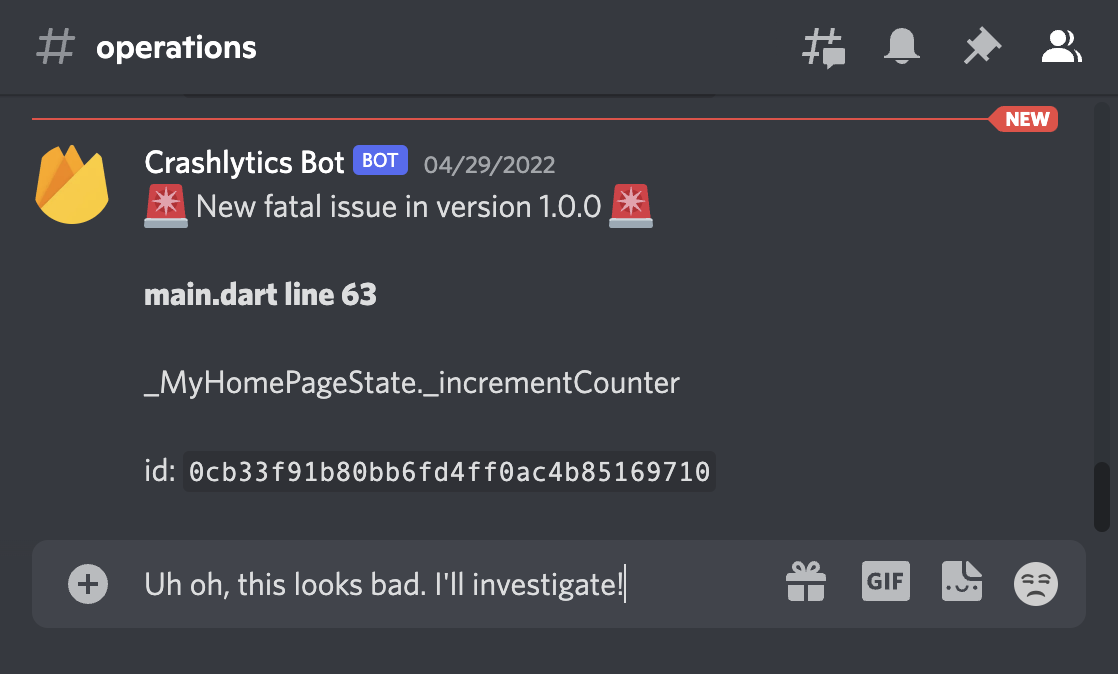
Hàm này sẽ lắng nghe sự kiện tương ứng với việc Firebase xuất bản một vấn đề nghiêm trọng mới:
Node.js
exports.postfatalissuetodiscord = onNewFatalIssuePublished(async (event) => {
Python
@crashlytics_fn.on_new_fatal_issue_published(secrets=["DISCORD_WEBHOOK_URL"])
def post_fatal_issue_to_discord(event: crashlytics_fn.CrashlyticsNewFatalIssueEvent) -> None:
"""Publishes a message to Discord whenever a new Crashlytics fatal issue occurs."""
Sau đó, hàm này sẽ phân tích cú pháp đối tượng sự kiện được trả về, phân tích cú pháp thông tin hữu ích từ tải trọng sự kiện và tạo một thông báo để đăng lên kênh Discord:
Node.js
// construct a helpful message to send to Discord
const appId = event.appId;
const {id, title, subtitle, appVersion} = event.data.payload.issue;
const message = `
🚨 New fatal issue for ${appId} in version ${appVersion} 🚨
**${title}**
${subtitle}
id: \`${id}\`
`;
Python
# Construct a helpful message to send to Discord.
app_id = event.app_id
issue = event.data.payload.issue
message = f"""
🚨 New fatal issue for {app_id} in version {issue.app_version} 🚨
# {issue.title}
{issue.subtitle}
ID: `{issue.id}`
""".strip()
Cuối cùng, hàm sẽ gửi thông báo đã tạo đến Discord thông qua một yêu cầu HTTP:
Node.js
const response = await postMessageToDiscord("Crashlytics Bot", message);
if (response.ok) {
logger.info(
`Posted fatal Crashlytics alert ${id} for ${appId} to Discord`,
event.data.payload,
);
} else {
throw new Error(`Discord returned status code ${response.status}`);
}
Python
response = post_message_to_discord("Crashlytics Bot", message, DISCORD_WEBHOOK_URL.value)
if response.ok:
print(f"Posted fatal Crashlytics alert {issue.id} for {app_id} to Discord.")
pprint.pp(event.data.payload)
else:
response.raise_for_status()
Để tìm hiểu về tất cả các sự kiện cảnh báo Crashlytics mà bạn có thể ghi lại, hãy truy cập vào tài liệu tham khảo về cảnh báo Crashlytics.
Xử lý sự kiện cảnh báo Performance Monitoring
Ví dụ này xuất một hàm theo dõi các sự kiện cảnh báo ngưỡng hiệu suất:
Node.js
exports.postperformancealerttodiscord = onThresholdAlertPublished(
async (event) => {
Python
@performance_fn.on_threshold_alert_published(secrets=["DISCORD_WEBHOOK_URL"])
def post_performance_alert_to_discord(event: performance_fn.PerformanceThresholdAlertEvent) -> None:
"""Publishes a message to Discord whenever a performance threshold alert is fired."""
Sau đó, hàm này sẽ phân tích cú pháp đối tượng sự kiện được trả về, phân tích cú pháp thông tin hữu ích từ tải trọng sự kiện và tạo một thông báo để đăng lên kênh Discord:
Node.js
// construct a helpful message to send to Discord
const appId = event.appId;
const {
eventName,
metricType,
eventType,
numSamples,
thresholdValue,
thresholdUnit,
conditionPercentile,
appVersion,
violationValue,
violationUnit,
investigateUri,
} = event.data.payload;
const message = `
⚠️ Performance Alert for ${metricType} of ${eventType}: **${eventName}** ⚠️
App id: ${appId}
Alert condition: ${thresholdValue} ${thresholdUnit}
Percentile (if applicable): ${conditionPercentile}
App version (if applicable): ${appVersion}
Violation: ${violationValue} ${violationUnit}
Number of samples checked: ${numSamples}
**Investigate more:** ${investigateUri}
`;
Python
# Construct a helpful message to send to Discord.
app_id = event.app_id
perf = event.data.payload
message = f"""
⚠️ Performance Alert for {perf.metric_type} of {perf.event_type}: **{perf.event_name}** ⚠️
App ID: {app_id}
Alert condition: {perf.threshold_value} {perf.threshold_unit}
Percentile (if applicable): {perf.condition_percentile}
App version (if applicable): {perf.app_version}
Violation: {perf.violation_value} {perf.violation_unit}
Number of samples checked: {perf.num_samples}
**Investigate more:** {perf.investigate_uri}
""".strip()
Cuối cùng, hàm sẽ gửi thông báo đã tạo đến Discord thông qua một yêu cầu HTTP:
Node.js
const response = await postMessageToDiscord(
"Firebase Performance Bot", message);
if (response.ok) {
logger.info(
`Posted Firebase Performance alert ${eventName} to Discord`,
event.data.payload,
);
} else {
throw new Error(`Discord returned status code ${response.status}`);
}
Python
response = post_message_to_discord(
"App Performance Bot", message, DISCORD_WEBHOOK_URL.value
)
if response.ok:
print(f"Posted Firebase Performance alert {perf.event_name} to Discord.")
pprint.pp(event.data.payload)
else:
response.raise_for_status()
Để tìm hiểu về tất cả các sự kiện cảnh báo hiệu suất mà bạn có thể ghi lại, hãy truy cập vào tài liệu tham khảo về cảnh báo Performance Monitoring.
Xử lý sự kiện cảnh báo App Distribution
Ví dụ trong phần này cho bạn biết cách viết một hàm cho cảnh báo thiết bị iOS của người kiểm thử mới.
Trong ví dụ này, hàm sẽ lắng nghe các sự kiện được gửi mỗi khi người kiểm thử đăng ký một thiết bị iOS mới. Khi đăng ký một thiết bị iOS mới, bạn cần cập nhật hồ sơ cung cấp bằng UDID của thiết bị đó rồi phân phối lại ứng dụng.
Node.js
exports.postnewduuidtodiscord = onNewTesterIosDevicePublished(async (event) => {
Python
@app_distribution_fn.on_new_tester_ios_device_published(secrets=["DISCORD_WEBHOOK_URL"])
def post_new_udid_to_discord(event: app_distribution_fn.NewTesterDeviceEvent) -> None:
"""Publishes a message to Discord whenever someone registers a new iOS test device."""
Sau đó, hàm này sẽ phân tích cú pháp đối tượng được trả về, phân tích cú pháp thông tin hữu ích từ tải trọng sự kiện và tạo một thông báo để đăng lên kênh Discord:
Node.js
// construct a helpful message to send to Discord
const appId = event.appId;
const {
testerDeviceIdentifier,
testerDeviceModelName,
testerEmail,
testerName,
} = event.data.payload;
const message = `
📱 New iOS device registered by ${testerName} <${testerEmail}> for ${appId}
UDID **${testerDeviceIdentifier}** for ${testerDeviceModelName}
`;
Python
# Construct a helpful message to send to Discord.
app_id = event.app_id
app_dist = event.data.payload
message = f"""
📱 New iOS device registered by {app_dist.tester_name} <{app_dist.tester_email}> for {app_id}
UDID **{app_dist.tester_device_identifier}** for {app_dist.tester_device_model_name}
""".strip()
Cuối cùng, hàm sẽ gửi thông báo đã tạo đến Discord thông qua một yêu cầu HTTP:
Node.js
const response = await postMessageToDiscord("AppDistribution Bot", message);
if (response.ok) {
logger.info(
`Posted iOS device registration alert for ${testerEmail} to Discord`,
);
} else {
throw new Error(`Discord returned status code ${response.status}`);
}
Python
response = post_message_to_discord("App Distro Bot", message, DISCORD_WEBHOOK_URL.value)
if response.ok:
print(f"Posted iOS device registration alert for {app_dist.tester_email} to Discord.")
pprint.pp(event.data.payload)
else:
response.raise_for_status()
Để tìm hiểu về tất cả các sự kiện cảnh báo App Distribution mà bạn có thể ghi lại, hãy chuyển đến tài liệu tham khảo về cảnh báo App Distribution.
Để tìm hiểu cách sử dụng một hàm được kích hoạt bởi cảnh báo phản hồi trong ứng dụng của Firebase từ App Distribution, hãy xem phần Gửi phản hồi trong ứng dụng đến Jira.