

בדף הזה מוסבר איך לאחזר מידע על הפעלת שאילתה כשמריצים אותה.
שימוש ב-Query Explain
אתם יכולים להשתמש ב-Query Explain כדי להבין איך השאילתות שלכם מבוצעות. כך תוכלו לקבל פרטים שיעזרו לכם לשפר את השאילתות.
אפשר להשתמש ב-Query Explain דרך מסוף Google Cloud או הפקודה explain.
המסוף
מריצים שאילתה בעורך השאילתות ופותחים את הכרטיסייה Explanation:
-
נכנסים לדף Databases במסוף Google Cloud.
- ברשימת מסדי הנתונים, בוחרים מסד נתונים של Cloud Firestore. במסוף Google Cloud נפתח הדף Firestore Explorer של מסד הנתונים הזה.
- מזינים שאילתה בעורך השאילתות ולוחצים על Run.
-
לוחצים על הכרטיסייה Explanation כדי לראות את הפלט של ניתוח השאילתה.
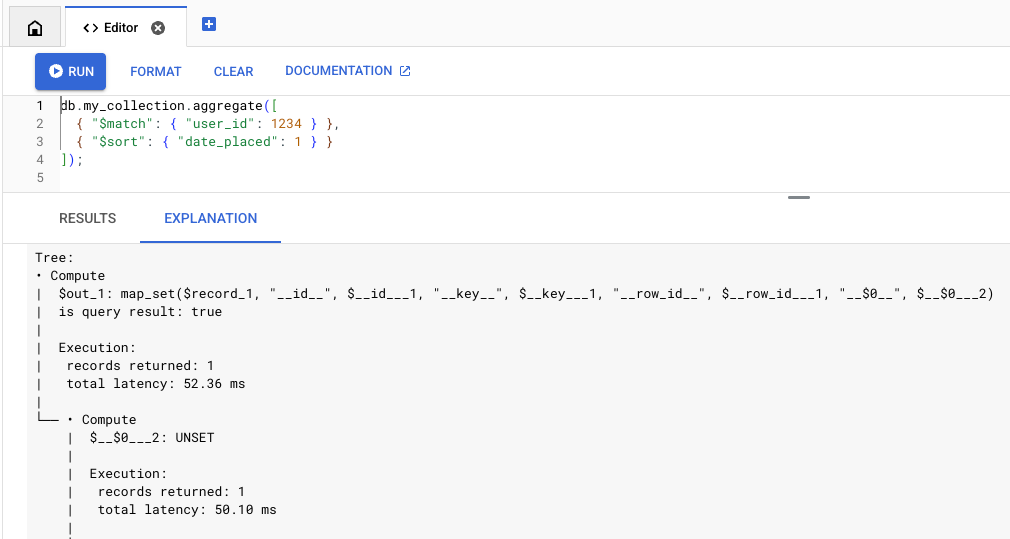
MongoDB API
הסבר השאילתה ב-MongoDB API נתמך באמצעות הפקודה explain, שאפשר להשתמש בה בכלים כמו Mongo Shell ו-Compass.
הפקודה explain נתמכת עם הפקודות aggregate, find, distinct ו-count, לדוגמה:
db.collection.explain('executionStats').find(...)
אפשר גם להשתמש בשיטה explain(), לדוגמה:
db.collection.find({QUERY}).explain('executionStats')מגבלות
חשוב לשים לב למגבלות ולהבדלים הבאים:-
התכונה "הסבר על שאילתות" לא תומכת בפקודות שמחזירות סמן. לדוגמה, אי אפשר להפעיל את explain באמצעות קריאה ישירה לפקודה הבאה:
db.collection.aggregate(..., explain: true)
הסבר השאילתה נתמך רק בפקודות
find,aggregate,count,distinct,update,deleteו-findAndModify.-
הכלי Query Explain תומך במצבי דרגת המלל
executionStats, allPlansExecutionו-queryPlanner.-
queryPlanner: מחזירה רק את תוכנית ההרצה, בלי להריץ את השאילתה. -
executionStatsו-allPlansExecution: מחזירה את תוכנית ההרצה יחד עם נתונים סטטיסטיים של חיוב, זיכרון והרצה.
אם לא צוין מצב מלל, ברירת המחדל של המעטפת היא
queryPlanner. כדי לראות את הנתונים הסטטיסטיים המלאים של הביצוע, צריך לציין את מצב דרגת המללexecutionStatsאוallPlansExecution. -
ניתוח
הפלט של Query Explain מכיל שני רכיבים עיקריים: Summary Statistics ו-Execution Tree. לדוגמה, נניח שזו השאילתה:
db.orders.aggregate(
 [
   { "$match": { "user_id": 1234 } },
   { "$sort": { "date_placed": 1 } }
 ]
)
נתונים סטטיסטיים מסכמים
בחלק העליון של הפלט המוסבר מופיע סיכום של הנתונים הסטטיסטיים של ההרצה. אתם יכולים להשתמש בנתונים הסטטיסטיים האלה כדי לקבוע אם לשאילתה יש זמן אחזור ארוך או עלות גבוהה. הוא גם מכיל נתונים סטטיסטיים על הזיכרון, שמאפשרים לדעת עד כמה השאילתה קרובה למגבלות הזיכרון.
Execution:
 results returned: 35
 query id: 7e7b37ea1a259d79
 request peak memory usage: 45.56 KiB (46,656 B)
 data bytes read: 24.58 KiB (25,175 B)
 entity row scanned: 265

Billing:
 read units: 7
עץ ההפעלה
עץ ההרצה מתאר את הרצת השאילתה כסדרה של צמתים. הצמתים התחתונים (צומתי עלה) מאחזרים נתונים משכבת האחסון, שעוברים במעלה העץ כדי ליצור תשובה לשאילתה.
לפרטים על כל צומת ביצוע, עיינו בחומר העזר בנושא ביצוע.
במאמר אופטימיזציה של הרצת שאילתות מוסבר איך להשתמש במידע הזה כדי לבצע אופטימיזציה של השאילתות.
דוגמה לעץ ביצוע:
Execution:
 results returned: 35
 query id: 7e7b37ea1a259d79
 request peak memory usage: 45.56 KiB (46,656 B)
 data bytes read: 24.58 KiB (25,175 B)
 entity row scanned: 265

Billing:
 read units: 7

Tree:
• Compute
|  $out_1: map_set($record_1, "__id__", $__id___1, "__key__", unset)
|  is query result: true
|
|  Execution:
|   records returned: 35
|   latency: 204.87 ms (local 7.64 ms)
|
└── • Compute
    |  $__id___1: _id($__key___2)
    |
    |  Execution:
    |   records returned: 35
    |   latency: 197.23 ms (local 2.04 ms)
    |
    └── • MajorSort
        |  fields: [$v_5 ASC]
        |  output: [$__key___2, $record_1]
        |
        |  Execution:
        |   records returned: 35
        |   latency: 195.20 ms (local 28.42 ms)
        |   peak memory usage: 45.56 KiB (46,656 B)
        |
        └── • Compute
            |  $v_5: offset($v_4, 0L)
            |
            |  Execution:
            |   records returned: 35
            |   latency: 166.78 ms (local 14.84 ms)
            |
            └── • Compute
                |  $v_4: sortPaths(array($date_placed_1), [date_placed ASC])
                |
                |  Execution:
                |   records returned: 35
                |   latency: 151.94 ms (local 5.43 ms)
                |
                └── • TableScan
                       source: **/orders
                       order: STABLE
                       filter: $eq($user_id_1, 1,234)
                       output bindings: {$__key___2=row().__key__, $date_placed_1=row().date_placed, $record_1=row[* - { __create_time__, __update_time__ }](), $user_id_1=row().user_id}
                       output: [$__key___2, $date_placed_1, $record_1]

                       Execution:
                        records returned: 35
                        latency: 146.50 ms
                        data bytes returned: 3.25 KiB (3,325 B)
                        post-filtered rows: 230
                        records scanned: 265
                        data bytes read: 24.58 KiB (25,175 B)
המאמרים הבאים
- למידע על הצמתים של עץ ההרצה, קראו את חומר העזר בנושא הרצת שאילתות.
- במאמר אופטימיזציה של הרצת שאילתות מוסבר איך לבצע אופטימיזציה של השאילתות.