

इस पेज पर, क्वेरी को लागू करने पर, क्वेरी को लागू करने की जानकारी पाने का तरीका बताया गया है.
क्वेरी एक्सप्लेन का इस्तेमाल करना
क्वेरी एक्सप्लेन का इस्तेमाल करके, यह समझा जा सकता है कि आपकी क्वेरी कैसे लागू की जा रही हैं. इससे आपको ऐसी जानकारी मिलती है जिसका इस्तेमाल करके, अपनी क्वेरी को ऑप्टिमाइज़ किया जा सकता है.
Query Explain का इस्तेमाल, Google Cloud console या explain कमांड के ज़रिए किया जा सकता है.
कंसोल
क्वेरी एडिटर में कोई क्वेरी चलाएं और जानकारी टैब खोलें:
-
Google Cloud console में, डेटाबेस पेज पर जाएं.
- डेटाबेस की सूची में से, कोई Cloud Firestore डेटाबेस चुनें. Google Cloud Console, उस डेटाबेस के लिए Firestore Explorer खोलता है.
- क्वेरी एडिटर में कोई क्वेरी डालें और चलाएं पर क्लिक करें.
-
क्वेरी के विश्लेषण का आउटपुट देखने के लिए, Explanation टैब पर क्लिक करें.
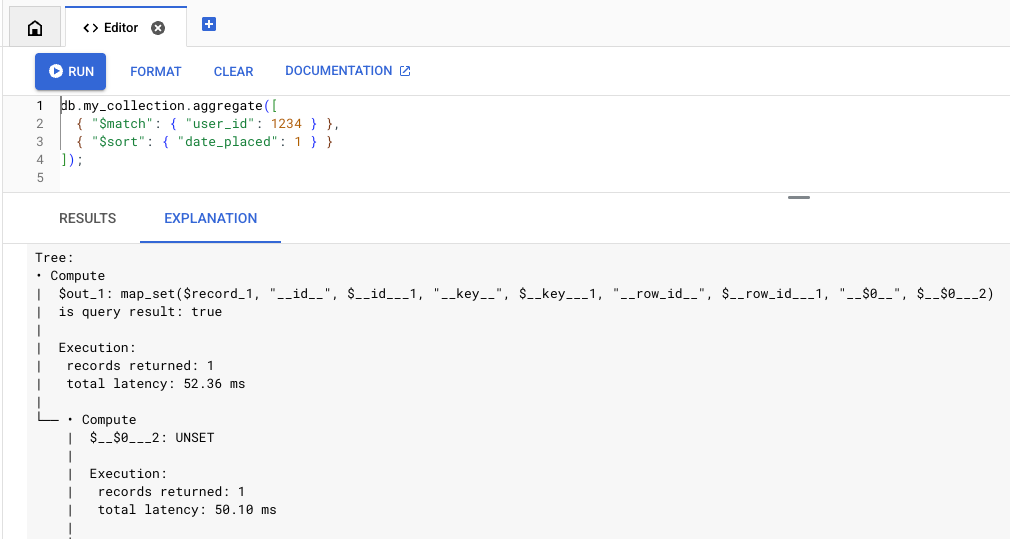
MongoDB API
MongoDB API में Query Explain की सुविधा,
explain
कमांड के ज़रिए काम करती है. इसका इस्तेमाल Mongo Shell और Compass जैसे टूल में किया जा सकता है.
explain कमांड का इस्तेमाल, aggregate, find, distinct, और count कमांड के साथ किया जा सकता है. उदाहरण के लिए:
db.collection.explain('executionStats').find(...)
explain() तरीके का भी इस्तेमाल किया जा सकता है. उदाहरण के लिए:
db.collection.find({QUERY}).explain('executionStats')सीमाएं
इन सीमाओं और अंतरों का ध्यान रखें:-
Query Explain, कर्सर दिखाने वाले कमांड के साथ काम नहीं करता. उदाहरण के लिए, सीधे तौर पर यह कमांड देकर, explain को कॉल नहीं किया जा सकता:
db.collection.aggregate(..., explain: true)
Query Explain का इस्तेमाल सिर्फ़
find,aggregate,count,distinct,update,delete, औरfindAndModifyकमांड के साथ किया जा सकता है.-
Query Explain में, वर्बोसिटी के ये मोड इस्तेमाल किए जा सकते हैं:
executionStats,allPlansExecution, औरqueryPlanner.queryPlanner: क्वेरी को प्रोसेस किए बिना, सिर्फ़ एक्ज़ीक्यूशन प्लान दिखाता है,executionStatsऔरallPlansExecution: यह बिलिंग, मेमोरी, और एक्ज़ीक्यूशन के आंकड़ों के साथ-साथ, एक्ज़ीक्यूशन प्लान दिखाता है.
अगर कितने शब्दों में जानकारी दी जाए, यह मोड तय नहीं किया गया है, तो शेल डिफ़ॉल्ट रूप से
queryPlannerपर सेट हो जाता है. एक्ज़ीक्यूशन के पूरे आंकड़े देखने के लिए, आपकोexecutionStatsयाallPlansExecutionवर्बोसिटी मोड तय करना होगा.
विश्लेषण
Query Explain के आउटपुट में दो मुख्य कॉम्पोनेंट होते हैं- खास जानकारी के आंकड़े और एक्ज़ीक्यूशन ट्री. उदाहरण के लिए, इस क्वेरी को देखें:
db.orders.aggregate(
 [
   { "$match": { "user_id": 1234 } },
   { "$sort": { "date_placed": 1 } }
 ]
)
आंकड़ों की खास जानकारी
आउटपुट के सबसे ऊपर, क्वेरी के लागू होने से जुड़े आंकड़ों की खास जानकारी होती है. इन आंकड़ों का इस्तेमाल करके, यह पता लगाएं कि किसी क्वेरी में इंतज़ार का समय ज़्यादा है या उसकी लागत ज़्यादा है. इसमें मेमोरी के आंकड़े भी शामिल होते हैं. इनसे आपको पता चलता है कि आपकी क्वेरी, मेमोरी की सीमाओं के कितने करीब है.
Execution:
 results returned: 35
 query id: 7e7b37ea1a259d79
 request peak memory usage: 45.56 KiB (46,656 B)
 data bytes read: 24.58 KiB (25,175 B)
 entity row scanned: 265

Billing:
 read units: 7
एक्ज़ीक्यूशन ट्री
एक्ज़ीक्यूशन ट्री, क्वेरी के एक्ज़ीक्यूशन को नोड की सीरीज़ के तौर पर दिखाता है. सबसे नीचे मौजूद नोड (लीफ नोड), स्टोरेज लेयर से डेटा को वापस लाते हैं. यह डेटा, ट्री में ऊपर की ओर जाता है और क्वेरी का जवाब जनरेट करता है.
हर एक्ज़ीक्यूशन नोड के बारे में जानकारी के लिए, एक्ज़ीक्यूशन रेफ़रंस देखें.
क्वेरी को ऑप्टिमाइज़ करने के लिए, इस जानकारी का इस्तेमाल करने के तरीके के बारे में जानने के लिए, क्वेरी को ऑप्टिमाइज़ करना लेख पढ़ें.
यहां एक्ज़ीक्यूशन ट्री का एक उदाहरण दिया गया है:
Execution:
 results returned: 35
 query id: 7e7b37ea1a259d79
 request peak memory usage: 45.56 KiB (46,656 B)
 data bytes read: 24.58 KiB (25,175 B)
 entity row scanned: 265

Billing:
 read units: 7

Tree:
• Compute
|  $out_1: map_set($record_1, "__id__", $__id___1, "__key__", unset)
|  is query result: true
|
|  Execution:
|   records returned: 35
|   latency: 204.87 ms (local 7.64 ms)
|
└── • Compute
    |  $__id___1: _id($__key___2)
    |
    |  Execution:
    |   records returned: 35
    |   latency: 197.23 ms (local 2.04 ms)
    |
    └── • MajorSort
        |  fields: [$v_5 ASC]
        |  output: [$__key___2, $record_1]
        |
        |  Execution:
        |   records returned: 35
        |   latency: 195.20 ms (local 28.42 ms)
        |   peak memory usage: 45.56 KiB (46,656 B)
        |
        └── • Compute
            |  $v_5: offset($v_4, 0L)
            |
            |  Execution:
            |   records returned: 35
            |   latency: 166.78 ms (local 14.84 ms)
            |
            └── • Compute
                |  $v_4: sortPaths(array($date_placed_1), [date_placed ASC])
                |
                |  Execution:
                |   records returned: 35
                |   latency: 151.94 ms (local 5.43 ms)
                |
                └── • TableScan
                       source: **/orders
                       order: STABLE
                       filter: $eq($user_id_1, 1,234)
                       output bindings: {$__key___2=row().__key__, $date_placed_1=row().date_placed, $record_1=row[* - { __create_time__, __update_time__ }](), $user_id_1=row().user_id}
                       output: [$__key___2, $date_placed_1, $record_1]

                       Execution:
                        records returned: 35
                        latency: 146.50 ms
                        data bytes returned: 3.25 KiB (3,325 B)
                        post-filtered rows: 230
                        records scanned: 265
                        data bytes read: 24.58 KiB (25,175 B)
आगे क्या करना है
- एग्ज़ीक्यूशन ट्री नोड के बारे में जानने के लिए, क्वेरी एग्ज़ीक्यूशन रेफ़रंस देखें.
- क्वेरी को ऑप्टिमाइज़ करने का तरीका जानने के लिए, क्वेरी के लागू होने की प्रोसेस को ऑप्टिमाइज़ करना लेख पढ़ें.