

背景
管道作業提供新的查詢介面
Cloud Firestore,支援進階查詢功能和複雜
運算式。這個版本導入了許多新函式,包括 min(...)、max(...)、substring(...)、regex_match(...) 和 array_contains_all(...),以及可執行複雜轉換的階段。
開始使用
如要安裝及初始化用戶端 SDK,請參閱下列指南中的操作說明:
語法
以下各節概述 Pipeline 作業的語法。
概念
與管道作業的一項顯著差異,是導入明確的「階段」順序。因此可以表達更複雜的查詢。不過,這與使用 Core 作業的現有查詢介面有顯著差異,因為後者會隱含階段順序。請參考下列 Pipeline 作業範例:
Web
const pipeline = db.pipeline() // Step 1: Start a query with collection scope .collection("cities") // Step 2: Filter the collection .where(field("population").greaterThan(100000)) // Step 3: Sort the remaining documents .sort(field("name").ascending()) // Step 4: Return the top 10. Note applying the limit earlier in the // pipeline would have unintentional results. .limit(10);
Swift
let pipeline = db.pipeline() // Step 1: Start a query with collection scope .collection("cities") // Step 2: Filter the collection .where(Field("population").greaterThan(100000)) // Step 3: Sort the remaining documents .sort([Field("name").ascending()]) // Step 4: Return the top 10. Note applying the limit earlier in the pipeline would have // unintentional results. .limit(10)
Kotlin
val pipeline = db.pipeline() // Step 1: Start a query with collection scope .collection("cities") // Step 2: Filter the collection .where(field("population").greaterThan(100000)) // Step 3: Sort the remaining documents .sort(field("name").ascending()) // Step 4: Return the top 10. Note applying the limit earlier in the pipeline would have // unintentional results. .limit(10)
Java
Pipeline pipeline = db.pipeline() // Step 1: Start a query with collection scope .collection("cities") // Step 2: Filter the collection .where(field("population").greaterThan(100000)) // Step 3: Sort the remaining documents .sort(field("name").ascending()) // Step 4: Return the top 10. Note applying the limit earlier in the pipeline would have // unintentional results. .limit(10);
Python
from google.cloud.firestore_v1.pipeline_expressions import Field pipeline = ( client.pipeline() .collection("cities") .where(Field.of("population").greater_than(100_000)) .sort(Field.of("name").ascending()) .limit(10) )
Go
pipeline := client.Pipeline(). Collection("cities"). Where(firestore.FieldOf("population").GreaterThan(100000)). Sort(firestore.Orders(firestore.Ascending(firestore.FieldOf("name")))). Limit(10)
初始化
管道作業的語法與現有 Cloud Firestore 查詢非常相似。如要開始使用,請編寫下列內容來初始化查詢:
Web
const { getFirestore } = require("firebase/firestore"); const { execute } = require("firebase/firestore/pipelines"); const database = getFirestore(app, "enterprise"); const pipeline = database.pipeline();
Swift
let firestore = Firestore.firestore(database: "enterprise") let pipeline = firestore.pipeline()
Kotlin
val firestore = Firebase.firestore("enterprise") val pipeline = firestore.pipeline()
Java
FirebaseFirestore firestore = FirebaseFirestore.getInstance("enterprise"); PipelineSource pipeline = firestore.pipeline();
Python
firestore_client = firestore.client(default_app, "your-new-enterprise-database") pipeline = firestore_client.pipeline()
Go
client, err := firestore.NewClientWithDatabase(ctx, projectID, databaseID) if err != nil { fmt.Fprintf(w, "firestore.NewClientWithDatabase failed: %v", err) return err } defer client.Close() pipeline := client.Pipeline().Collection("books")
結構
建立管道作業時,有幾個重要術語需要瞭解:階段、運算式、函式和子查詢包裝函式。
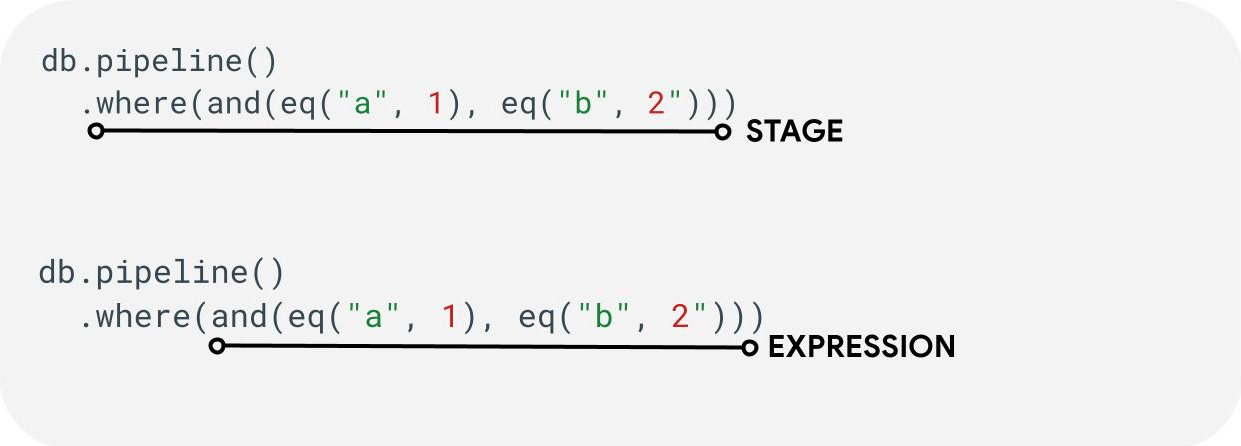
階段:管道可能包含一或多個階段。從邏輯上來說,這些步驟代表執行查詢時採取的步驟 (或階段) 序列。
運算式:階段通常會接受運算式,讓您表達更複雜的查詢。運算式可能很簡單,只包含單一函式,例如 eq("a", 1)。您也可以透過巢狀運算式 (例如 and(eq("a", 1), eq("b", 2)).) 表示更複雜的運算式
子查詢包裝函式:您可以使用 array() 和 scalar() 等函式,在階段中將巢狀管道嵌入為運算式。
欄位 / 常數 / 變數
管道作業支援複雜的運算式。因此,請務必區分值代表的是欄位、常數還是變數。
欄位是指文件中的資料,常數則可讓您將任何值指定為運算式的引數,變數則可讓您定義及使用查詢執行範圍內的暫時值,而非處理中的文件。下文將概述這些概念,如要進一步瞭解如何在查詢執行期間讀取及寫入變數,請參閱「let(...)」階段。
| 欄位 | 常數 | 變數 | |
|---|---|---|---|
| Purpose | 存取欄位或將欄位儲存至文件中 | 指定固定值 | 在管道執行期間使用暫時值 |
| SDK 用法 | field("name") |
constant("val") |
variable("name") |
| 範圍 | 目前文件中的本機 | 全球 | 從全域到管道和子管道 |
| 未定義的參照 | 評估結果為 absent |
不適用 | 產生執行階段錯誤 |
範例:
Web
const pipeline = db.pipeline() .collection("cities") .where(field("name").equal(constant("Toronto")));
Swift
let pipeline = db.pipeline() .collection("cities") .where(Field("name").equal(Constant("Toronto")))
Kotlin
val pipeline = db.pipeline() .collection("cities") .where(field("name").equal(constant("Toronto")))
Java
Pipeline pipeline = db.pipeline() .collection("cities") .where(field("name").equal(constant("Toronto")));
Python
from google.cloud.firestore_v1.pipeline_expressions import Field, Constant pipeline = ( client.pipeline() .collection("cities") .where(Field.of("name").equal(Constant.of("Toronto"))) )
Go
pipeline := client.Pipeline().Collection("cities"). Where(firestore.FieldOf("name").Equal(firestore.ConstantOf("Toronto")))
階段
輸入階段
輸入階段代表查詢的第一個階段。這會定義您要查詢的初始文件集。對於管道作業,這與現有查詢大致相似,大多數查詢都是以 collection(...) 或 collection_group(...) 階段開頭。兩個新的輸入階段為 database() 和 documents(...),其中 database() 可傳回資料庫中的所有文件,而 documents(...) 的作用與批次讀取相同。
Web
let results; // Return all restaurants in San Francisco results = await execute(db.pipeline().collection("cities/sf/restaurants")); // Return all restaurants results = await execute(db.pipeline().collectionGroup("restaurants")); // Return all documents across all collections in the database (the entire database) results = await execute(db.pipeline().database()); // Batch read of 3 documents results = await execute(db.pipeline().documents([ doc(db, "cities", "SF"), doc(db, "cities", "DC"), doc(db, "cities", "NY") ]));
Swift
var results: Pipeline.Snapshot // Return all restaurants in San Francisco results = try await db.pipeline().collection("cities/sf/restaurants").execute() // Return all restaurants results = try await db.pipeline().collectionGroup("restaurants").execute() // Return all documents across all collections in the database (the entire database) results = try await db.pipeline().database().execute() // Batch read of 3 documents results = try await db.pipeline().documents([ db.collection("cities").document("SF"), db.collection("cities").document("DC"), db.collection("cities").document("NY") ]).execute()
Kotlin
var results: Task<Pipeline.Snapshot> // Return all restaurants in San Francisco results = db.pipeline().collection("cities/sf/restaurants").execute() // Return all restaurants results = db.pipeline().collectionGroup("restaurants").execute() // Return all documents across all collections in the database (the entire database) results = db.pipeline().database().execute() // Batch read of 3 documents results = db.pipeline().documents( db.collection("cities").document("SF"), db.collection("cities").document("DC"), db.collection("cities").document("NY") ).execute()
Java
Task<Pipeline.Snapshot> results; // Return all restaurants in San Francisco results = db.pipeline().collection("cities/sf/restaurants").execute(); // Return all restaurants results = db.pipeline().collectionGroup("restaurants").execute(); // Return all documents across all collections in the database (the entire database) results = db.pipeline().database().execute(); // Batch read of 3 documents results = db.pipeline().documents( db.collection("cities").document("SF"), db.collection("cities").document("DC"), db.collection("cities").document("NY") ).execute();
Python
# Return all restaurants in San Francisco results = client.pipeline().collection("cities/sf/restaurants").execute() # Return all restaurants results = client.pipeline().collection_group("restaurants").execute() # Return all documents across all collections in the database (the entire database) results = client.pipeline().database().execute() # Batch read of 3 documents results = ( client.pipeline() .documents( client.collection("cities").document("SF"), client.collection("cities").document("DC"), client.collection("cities").document("NY"), ) .execute() )
Go
// Return all restaurants in San Francisco results1, err := client.Pipeline().Collection("cities/sf/restaurants").Execute(ctx).Results().GetAll() if err != nil { fmt.Fprintf(w, "GetAll failed: %v", err) return err } // Return all restaurants results2, err := client.Pipeline().CollectionGroup("restaurants").Execute(ctx).Results().GetAll() if err != nil { fmt.Fprintf(w, "GetAll failed: %v", err) return err } // Return all documents across all collections in the database (the entire database) results3, err := client.Pipeline().Database().Execute(ctx).Results().GetAll() if err != nil { fmt.Fprintf(w, "GetAll failed: %v", err) return err } // Batch read of 3 documents results4, err := client.Pipeline(). Documents([]*firestore.DocumentRef{ client.Collection("cities").Doc("SF"), client.Collection("cities").Doc("DC"), client.Collection("cities").Doc("NY"), }). Execute(ctx).Results().GetAll() if err != nil { fmt.Fprintf(w, "GetAll failed: %v", err) return err }
與所有其他階段一樣,這些輸入階段的結果順序並不穩定。如果需要特定排序,請務必加入 sort(...) 運算子。
其中
where(...) 階段會對先前階段產生的文件執行標準篩選作業,且大多會反映現有查詢的「where」語法。如果指定運算式評估結果為非 true 值,系統會從傳回的文件中篩除該文件。
多個 where(...) 陳述式可以串連在一起,並做為 and(...) 運算式。舉例來說,下列兩個查詢在邏輯上等效,可以互換使用。
Web
let results; results = await execute(db.pipeline().collection("books") .where(field("rating").equal(5)) .where(field("published").lessThan(1900)) ); results = await execute(db.pipeline().collection("books") .where(and(field("rating").equal(5), field("published").lessThan(1900))) );
Swift
var results: Pipeline.Snapshot results = try await db.pipeline().collection("books") .where(Field("rating").equal(5)) .where(Field("published").lessThan(1900)) .execute() results = try await db.pipeline().collection("books") .where(Field("rating").equal(5) && Field("published").lessThan(1900)) .execute()
Kotlin
var results: Task<Pipeline.Snapshot> results = db.pipeline().collection("books") .where(field("rating").equal(5)) .where(field("published").lessThan(1900)) .execute() results = db.pipeline().collection("books") .where(Expression.and(field("rating").equal(5), field("published").lessThan(1900))) .execute()
Java
Task<Pipeline.Snapshot> results; results = db.pipeline().collection("books") .where(field("rating").equal(5)) .where(field("published").lessThan(1900)) .execute(); results = db.pipeline().collection("books") .where(Expression.and( field("rating").equal(5), field("published").lessThan(1900) )) .execute();
Python
from google.cloud.firestore_v1.pipeline_expressions import And, Field results = ( client.pipeline() .collection("books") .where(Field.of("rating").equal(5)) .where(Field.of("published").less_than(1900)) .execute() ) results = ( client.pipeline() .collection("books") .where(And(Field.of("rating").equal(5), Field.of("published").less_than(1900))) .execute() )
Go
results1, err := client.Pipeline(). Collection("books"). Where(firestore.FieldOf("rating").Equal(5)). Where(firestore.FieldOf("published").LessThan(1900)). Execute(ctx).Results().GetAll() if err != nil { fmt.Fprintf(w, "GetAll failed: %v", err) return err } results2, err := client.Pipeline(). Collection("books"). Where(firestore.And( firestore.FieldOf("rating").Equal(5), firestore.FieldOf("published").LessThan(1900), )). Execute(ctx).Results().GetAll() if err != nil { fmt.Fprintf(w, "GetAll failed: %v", err) return err }
選取 / 新增及移除欄位
select(...)、add_fields(...) 和 remove_fields(...) 都可讓您修改先前階段傳回的欄位。這三種通常稱為投影式舞台。
select(...) 和 add_fields(...) 可讓您將運算式結果指定給使用者提供的欄位名稱。select(...) 只會傳回具有指定欄位名稱的文件,而 add_fields(...) 會擴充前一階段的結構定義 (可能會覆寫具有相同欄位名稱的值)。
remove_fields(...) 可指定要從前一階段移除的一組欄位。指定不存在的欄位名稱是無運算。
請參閱下方的「限制要傳回的欄位」一節,但一般來說,使用這類階段將結果限制為用戶端中需要的欄位,有助於減少大多數查詢的成本和延遲時間。
匯總 / 不重複
您可以在 aggregate(...) 階段對輸入文件執行一系列匯總作業。根據預設,所有文件都會匯總在一起,但您可以提供選用的 grouping 引數,將輸入文件匯總到不同 bucket 中。
Web
const results = await execute(db.pipeline() .collection("books") .aggregate( field("rating").average().as("avg_rating") ) .distinct(field("genre")) );
Swift
let results = try await db.pipeline() .collection("books") .aggregate([ Field("rating").average().as("avg_rating") ], groups: [ Field("genre") ]) .execute()
Kotlin
val results = db.pipeline() .collection("books") .aggregate( AggregateStage .withAccumulators(AggregateFunction.average("rating").alias("avg_rating")) .withGroups(field("genre")) ) .execute()
Java
Task<Pipeline.Snapshot> results = db.pipeline() .collection("books") .aggregate(AggregateStage .withAccumulators( AggregateFunction.average("rating").alias("avg_rating")) .withGroups(field("genre"))) .execute();
Python
from google.cloud.firestore_v1.pipeline_expressions import Field results = ( client.pipeline() .collection("books") .aggregate( Field.of("rating").average().as_("avg_rating"), groups=[Field.of("genre")] ) .execute() )
Go
snapshot := client.Pipeline(). Collection("books"). Aggregate( firestore.Accumulators(firestore.Average("rating").As("avg_rating")), firestore.WithAggregateGroups("genre"), ). Execute(ctx)
如未指定 groupings,這個階段只會產生單一文件;否則,系統會為每個不重複的 groupings 值組合產生文件。
distinct(...) 階段是簡化的彙整運算子,可產生不重複的 groupings,不含任何累加器。在所有其他方面,其行為與 aggregate(...) 相同。以下範例說明:
Web
const results = await execute(db.pipeline() .collection("books") .distinct( field("author").toUpper().as("author"), field("genre") ) );
Swift
let results = try await db.pipeline() .collection("books") .distinct([ Field("author").toUpper().as("author"), Field("genre") ]) .execute()
Kotlin
val results = db.pipeline() .collection("books") .distinct( field("author").toUpper().alias("author"), field("genre") ) .execute()
Java
Task<Pipeline.Snapshot> results = db.pipeline() .collection("books") .distinct( field("author").toUpper().alias("author"), field("genre") ) .execute();
Python
from google.cloud.firestore_v1.pipeline_expressions import Field results = ( client.pipeline() .collection("books") .distinct(Field.of("author").to_upper().as_("author"), "genre") .execute() )
Go
snapshot := client.Pipeline(). Collection("books"). Distinct(firestore.Fields( firestore.ToUpper(firestore.FieldOf("author")).As("author"), firestore.FieldOf("genre"), )). Execute(ctx)
函式
函式是建立運算式和複雜查詢的構成元素。如需函式完整清單和範例,請參閱「函式參考資料」。快速複習一下,一般查詢的結構如下:

許多階段都接受包含一或多個函式的運算式。最常見的函式用法會出現在 where(...) 和 select(...) 階段。您應熟悉兩種主要函式:
Web
let results; // Type 1: Scalar (for use in non-aggregation stages) // Example: Return the min store price for each book. results = await execute(db.pipeline().collection("books") .select(field("current").logicalMinimum(field("updated")).as("price_min")) ); // Type 2: Aggregation (for use in aggregate stages) // Example: Return the min price of all books. results = await execute(db.pipeline().collection("books") .aggregate(field("price").minimum().as("min_price")) );
Swift
var results: Pipeline.Snapshot // Type 1: Scalar (for use in non-aggregation stages) // Example: Return the min store price for each book. results = try await db.pipeline().collection("books") .select([ Field("current").logicalMinimum(["updated"]).as("price_min") ]) .execute() // Type 2: Aggregation (for use in aggregate stages) // Example: Return the min price of all books. results = try await db.pipeline().collection("books") .aggregate([Field("price").minimum().as("min_price")]) .execute()
Kotlin
var results: Task<Pipeline.Snapshot> // Type 1: Scalar (for use in non-aggregation stages) // Example: Return the min store price for each book. results = db.pipeline().collection("books") .select( field("current").logicalMinimum("updated").alias("price_min") ) .execute() // Type 2: Aggregation (for use in aggregate stages) // Example: Return the min price of all books. results = db.pipeline().collection("books") .aggregate(AggregateFunction.minimum("price").alias("min_price")) .execute()
Java
Task<Pipeline.Snapshot> results; // Type 1: Scalar (for use in non-aggregation stages) // Example: Return the min store price for each book. results = db.pipeline().collection("books") .select( field("current").logicalMinimum("updated").alias("price_min") ) .execute(); // Type 2: Aggregation (for use in aggregate stages) // Example: Return the min price of all books. results = db.pipeline().collection("books") .aggregate(AggregateFunction.minimum("price").alias("min_price")) .execute();
Python
from google.cloud.firestore_v1.pipeline_expressions import Field # Type 1: Scalar (for use in non-aggregation stages) # Example: Return the min store price for each book. results = ( client.pipeline() .collection("books") .select( Field.of("current").logical_minimum(Field.of("updated")).as_("price_min") ) .execute() ) # Type 2: Aggregation (for use in aggregate stages) # Example: Return the min price of all books. results = ( client.pipeline() .collection("books") .aggregate(Field.of("price").minimum().as_("min_price")) .execute() )
Go
// Type 1: Scalar (for use in non-aggregation stages) // Example: Return the min store price for each book. results1, err := client.Pipeline(). Collection("books"). Select(firestore.Fields( firestore.LogicalMinimum(firestore.FieldOf("current"), firestore.FieldOf("updated")).As("price_min"), )). Execute(ctx).Results().GetAll() if err != nil { fmt.Fprintf(w, "GetAll failed: %v", err) return err } // Type 2: Aggregation (for use in aggregate stages) // Example: Return the min price of all books. results2, err := client.Pipeline(). Collection("books"). Aggregate(firestore.Accumulators( firestore.Minimum("price").As("min_price"), )). Execute(ctx).Results().GetAll() if err != nil { fmt.Fprintf(w, "GetAll failed: %v", err) return err }
限制
在大多數情況下,Enterprise 版不會對查詢形狀設限。換句話說,您不會受限於 IN 或 OR 查詢中的少量值。不過,您應注意以下兩項主要限制:
- 期限:60 秒 (與 Standard 版相同)。
- 記憶體用量:查詢執行期間具體化的資料量上限為 128 MiB。
錯誤
查詢失敗的原因有很多,請參閱這篇文章,瞭解常見錯誤和相關解決方法:
| 錯誤代碼 | 動作 |
DEADLINE_EXCEEDED
|
您執行的查詢超過 60 秒的期限,因此需要額外最佳化。如需相關提示,請參閱「效能」一節。如果無法找出問題的根本原因,請與團隊聯絡。 |
RESOURCE_EXHAUSTED
|
您執行的查詢超出記憶體限制,需要進行額外最佳化。如需相關提示,請參閱「效能」一節。如果無法找出問題的根本原因,請與團隊聯絡。 |
INTERNAL
|
如需支援,請與團隊聯絡。 |
效能
Enterprise 版資料庫不一定需要索引。
也就是說,與現有查詢相比,查詢可能會出現較高的延遲,而現有查詢會因缺少 FAILED_PRECONDITION 索引錯誤而立即失敗。如要提升管道作業的效能,可以採取下列步驟。
建立索引
使用的索引
查詢說明可協助您判斷查詢是否由索引提供服務,或是否會改用效率較低的作業 (例如資料表掃描)。如果查詢並未完全從索引提供服務,請按照說明建立索引。
建立索引
您可以按照現有的索引管理說明文件建立索引。建立索引前,請先熟悉 Cloud Firestore 中索引的一般最佳做法。為確保查詢能運用索引,請按照最佳做法,依下列順序建立索引:
- 等式篩選器中使用的所有欄位 (順序不限)
- 所有要排序的欄位 (順序相同)
- 將用於範圍或不等於篩選器的欄位,依查詢限制選擇性遞減排序
舉例來說,如果查詢如下:
Web
const results = await execute(db.pipeline() .collection("books") .where(field("published").lessThan(1900)) .where(field("genre").equal("Science Fiction")) .where(field("rating").greaterThan(4.3)) .sort(field("published").descending()) );
Swift
let results = try await db.pipeline() .collection("books") .where(Field("published").lessThan(1900)) .where(Field("genre").equal("Science Fiction")) .where(Field("rating").greaterThan(4.3)) .sort([Field("published").descending()]) .execute()
Kotlin
val results = db.pipeline() .collection("books") .where(field("published").lessThan(1900)) .where(field("genre").equal("Science Fiction")) .where(field("rating").greaterThan(4.3)) .sort(field("published").descending()) .execute()
Java
Task<Pipeline.Snapshot> results = db.pipeline() .collection("books") .where(field("published").lessThan(1900)) .where(field("genre").equal("Science Fiction")) .where(field("rating").greaterThan(4.3)) .sort(field("published").descending()) .execute();
Python
from google.cloud.firestore_v1.pipeline_expressions import Field results = ( client.pipeline() .collection("books") .where(Field.of("published").less_than(1900)) .where(Field.of("genre").equal("Science Fiction")) .where(Field.of("rating").greater_than(4.3)) .sort(Field.of("published").descending()) .execute() )
Go
snapshot := client.Pipeline(). Collection("books"). Where(firestore.FieldOf("published").LessThan(1900)). Where(firestore.FieldOf("genre").Equal("Science Fiction")). Where(firestore.FieldOf("rating").GreaterThan(4.3)). Sort(firestore.Orders(firestore.Descending(firestore.FieldOf("published")))). Execute(ctx)
建議的索引是 (genre [...], published DESC, avg_rating DESC). 的 books 集合範圍索引
索引密度
Cloud Firestore 支援稀疏和非稀疏索引。詳情請參閱「索引密度」。
涵蓋的查詢 + 次要索引
如果傳回的所有欄位都位於次要索引中,Cloud Firestore 可以略過擷取完整文件,只傳回索引中的結果。這通常會大幅改善延遲時間 (和成本)。 使用下列查詢範例:
Web
const results = await execute(db.pipeline() .collection("books") .where(field("category").like("%fantasy%")) .where(field("title").exists()) .where(field("author").exists()) .select(field("title"), field("author")) );
Swift
let results = try await db.pipeline() .collection("books") .where(Field("category").like("%fantasy%")) .where(Field("title").exists()) .where(Field("author").exists()) .select([Field("title"), Field("author")]) .execute()
Kotlin
val results = db.pipeline() .collection("books") .where(field("category").like("%fantasy%")) .where(field("title").exists()) .where(field("author").exists()) .select(field("title"), field("author")) .execute()
Java
Task<Pipeline.Snapshot> results = db.pipeline() .collection("books") .where(field("category").like("%fantasy%")) .where(field("title").exists()) .where(field("author").exists()) .select(field("title"), field("author")) .execute();
Python
from google.cloud.firestore_v1.pipeline_expressions import Field results = ( client.pipeline() .collection("books") .where(Field.of("category").like("%fantasy%")) .where(Field.of("title").exists()) .where(Field.of("author").exists()) .select("title", "author") .execute() )
Go
snapshot := client.Pipeline(). Collection("books"). Where(firestore.FieldOf("category").Like("%fantasy%")). Where(firestore.FieldOf("title").FieldExists()). Where(firestore.FieldOf("author").FieldExists()). Select(firestore.Fields("title", "author")). Execute(ctx)
如果資料庫已在 books 上建立 (category [...], title [...], author [...]) 的集合範圍索引,則可避免從主要文件中擷取任何內容。在這種情況下,索引中的順序並不重要,[...] 用於表示這一點。
限制要傳回的欄位
根據預設,Cloud Firestore 查詢會傳回文件中的所有欄位,類似於關聯式系統中的 SELECT *。不過,如果應用程式只需要部分欄位,則可使用 select(...) 或 restrict(...) 階段,在伺服器端推送這項篩選條件。這會縮減回應大小 (降低網路輸出成本),並縮短延遲時間。
疑難排解工具
查詢說明
查詢說明功能可讓您查看執行指標和所用索引的詳細資料。
指標
管道作業 (如果與現有 Cloud Firestore 指標完全整合)。
已知問題 / 限制
專用索引
管道作業目前不支援現有的 array-contains 和 vector 索引類型。Cloud Firestore 不會直接拒絕這類查詢,而是會嘗試使用其他現有的 ascending 和 descending 索引。因此,這類 array_contains 或 find_nearest 運算式預計會比現有對應項目慢。
即時和離線支援
管道作業不具備即時和離線功能。